


Analytics & Reporting Release Notes February 2026 - Part I
Timeline
When will this be released?
February 4th 2026, 3 PM PST
Is there downtime for this release?
No
Related Release Note Links
- Analytics and Reporting Release Notes December 2025
- Analytics and Reporting Release Notes January 2026
NEOGOV Analytics Dashboards
Benefits Dashboard
We are excited to announce the launch of the Benefits Dashboard, a specialized reporting tool designed to provide HR administrators and managers with a real-time, comprehensive view of healthcare enrollment across the organization. This dashboard streamlines the oversight of employee selections, ensuring that your team can monitor participation levels with precision and ease.
This dashboard is currently accessible to select agencies, with a planned expansion to all users in Q1 2026. Please refer to the attached release notes (Analytics & Reporting Release Notes, December 2025) for more details.
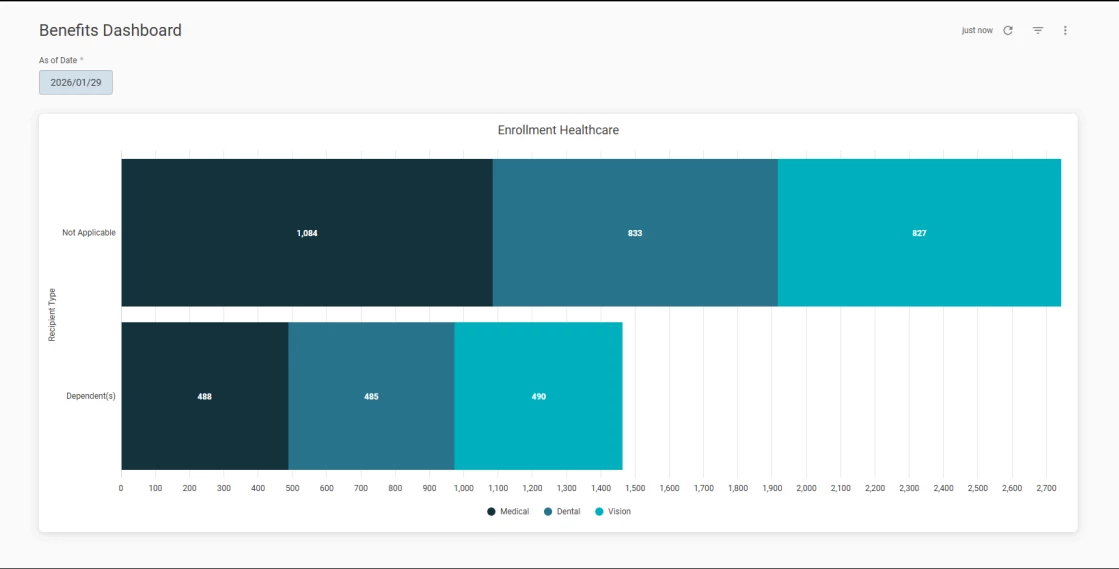
Analytics > Benefits
Key Metrics
The Benefits Dashboard focuses on "Official" enrollment records, filtering out noise to provide a clear picture of active, enrolled participants. Based on the Healthcare Enrollment bar chart, the metrics, visible in the table, are tracked.
| Metric | Description | Customer Value |
| Medical Enrollment Count | Total number of employees and dependents officially enrolled in medical plans. | Helps identify the primary driver of benefit costs and ensures employees have essential health coverage. |
| Dental Enrollment Count | Total number of individuals enrolled in dental care programs. | Allows for easy comparison against medical enrollment to identify gaps in supplemental care adoption. |
| Vision Enrollment Count | Total number of individuals enrolled in vision care programs. | Provides visibility into the utilization of vision benefits, often used to evaluate the competitiveness of the benefits package. |
Note: All metrics are categorized by Recipient Type, allowing users to see exactly who is being covered under the organisation's policies.
Values & Benefits
The Benefits dashboard is more than just a visualization; it is a strategic asset for your daily operations:
- Real-time data accuracy
With the integrated As of Date filter, users can view enrollment snapshots for any specific day. This is vital for month-end reporting and historical auditing.
- Targeted decision making
By isolating "Official" statuses and active enrollments, the dashboard removes administrative clutter, allowing you to focus on actual participants rather than pending or cancelled applications.
- Operational efficiency
The horizontal stacked layout provides a comparative view of medical, dental, and vision counts at a single glance. This reduces the time spent manually aggregating data from different carriers or spreadsheets.
- Strategic planning
Understanding the distribution of enrollments across different recipient types assists in forecasting future premium costs and negotiating better rates with providers based on actual volume.
For further details regarding the additional features on this dashboard, kindly refer to the Analytics & Reporting December 2025 Release Notes.
Enhanced Public Report Management for HR Admins
Building on the two product reports introduced in January, NEOGOV has now launched new capabilities for HR Admins to manage public reports specifically for Learn and eForms. These enhancements provide HR Admins with complete control over public report management, equipping them with the necessary information to stay current and effectively support their employees.
Note: Public Report management capability was previously only available for recruitment reports. We plan to extend this option to all HCM products by the end of the quarter.
Public Report Management Permissions
To gain the ability to edit public reports, users must be assigned the following permissions:
- HR Admin role in Learn - required to manage Learn public reports.
- HR Admin role in eForms - required to manage eForms public reports.
Note: Removing the HR Admin role from a user will also revoke their ability to manage public reports.
Report and Subscription Management for HR Admins
HR Admin now have comprehensive control over public reports and their distribution:
- Public report actions: easily view, edit, and delete existing public reports to ensure they meet your organization's needs.
- Subscription management: take control of how and when report updates are shared. HR Admins can now create, view, edit, and delete subscriptions for public reports, providing greater flexibility in distribution and access configuration.
HR Admins cannot edit or delete standard reports for Learn or eForms.
Value
These enhancements increase transparency and efficiency in report management for HR Admins, empowering them to better support their teams with real-time access to necessary data and report insights.
Audience
Users with the HR Admin role in Learn/eForms
Example
- Maria, an HR User, created the Learn public report. Jake, an HR Admin, was able to edit this report and update the subscription originally set by Maria due to his permissions.
- Even after Maria, an HR User, was terminated, Jake, an HR Admin, could locate and successfully remove the subscriptions associated with Maria's public reports.
Data Catalog Enhancement
NEOGOV has updated the access permissions for Insight users with RB access, enabling them to interact with the Data Catalog even if they have specific Job Posting restrictions. This enhancement allows users to access the data dictionary information and export entities efficiently without being hindered by their role-specific restrictions.
With this enhancement, users who have the following set of permissions can see and use Data Catalog:
- Can View PII set to ON
- Can View Confidential is set to ON
- Exam Plans scope set to ALL
- New Report Builder ON checkbox selected
- All Department access
- All or restricted Job Postings - only this permission has been changed
Key Changes
- Access to Data Catalog
Insight users with RB access who have Job Posting restrictions can now access the Data Catalog, granting them the ability to export data entities while maintaining necessary security protocols.
- Row-Level Security for Job Postings
We've implemented row-level security, ensuring that data related to any restricted Job Posting is excluded when users download data. This means when a user executes a download, the data will omit rows associated with these restricted postings.
- Data Dictionary
The download process for the data dictionary remains unchanged, as this document provides only a list and description of fields without including restricted data.
Value
This update provides enhanced access and flexibility for RB users, enabling efficient data utilization while maintaining strict compliance and security measures for restricted job postings.
Audience
This feature impacts Insight users with RB access to all or restricted Job Postings.
Example:
- Maria, an Insight user with RB access with partial Job Posting restrictions, attempts to download data. The system provides a file that excludes data from restricted job postings, allowing them secure access to necessary information.
- Jake, an Insight user with RB access with restrictions on all job postings, attempts to download entity data. They receive a blank document, preventing access to restricted information.
Bugs Resolved
Functional
| Scenario When Issue Encountered | Issue Resolved |
| The load time for the Standard Custom Dashboard was taking more than 2 minutes. | We've significantly reduced the load time for the Standard Custom Dashboard. This improvement was achieved by adjusting the default filter settings to utilize a smaller time frame. |