



Attract: Fall 2026 Release Notes
Article Links
Timeline
When will this be released?
UAT Preview Window
Not available in UAT.
Production Availability
October 29, 2026, 4 AM PDT.
Is there downtime for this release?
No.
(Early Access) AI Sourcing & Outreach
AI Sourcing & Outreach is an automated feature in Attract that helps recruiters launch personalized, multi-touch email campaigns for active job openings in just a few clicks. By pairing flexible AI content strategies with targeted candidate filters and automatic pipeline tracking, recruiters can connect with top candidates without the manual effort. This feature expands Attract’s campaign toolset and works smoothly across candidate search, talent pools, messaging, and reporting analytics.
We know AI adoption needs to be thoughtful and governed. That’s why this feature is:
- Admins can enable or disable from Attract Admin Settings > Artificial Intelligence (AI).
- This capability for Attract is OFF by default. Admins can opt in when ready.
What’s New
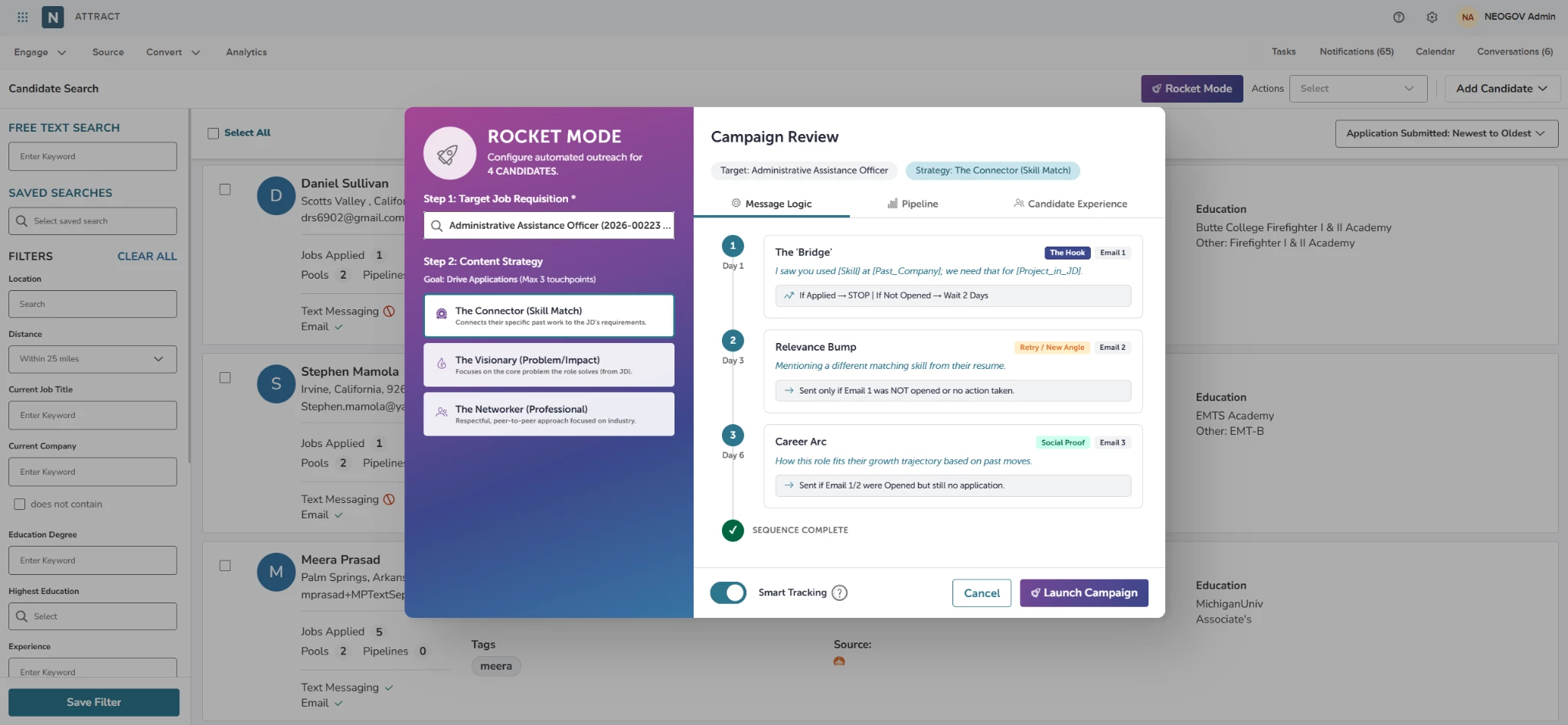
- AI-powered sequence generation: Effortlessly initiate automated outreach for active job openings using custom AI prompts tailored to specific messaging styles.
- Personalized candidate emails: Automatically generate email content using candidate profiles, skills, work history, and education.
- Content strategy options: Select from three tailored strategies.
- Connector (skill match).
- Visionary (problem/impact focus).
- Networker.
- Automated three-touch sequence: Send a hook email on day one, a follow-up email on day three, and a social proof email on day six.
- Smart audience filtering: Automatically filter source candidates by job while excluding candidates who are barred from applying or haven't applied within the last 730 days.
- Smart pipeline tracking: Automatically log sequence progress, candidate replies, and applications within dedicated talent pools.
- Campaign and analytics reporting: View AI Sourcing & Outreach metrics directly in standard Campaign Reports and Attract Effectiveness Reports.
Controls (How to Configure)
- Open the candidate search screen and click the AI Sourcing & Outreach option.
- Choose an active job synced directly from Insight using the drop-down menu (required).
- Select one of three strategies (required).
- Connector: Emphasizes skill alignment.
- Visionary: Highlights problem-solving and impact.
- Networker: Focuses on relationship-building outreach.
- Enable or disable the Smart Pipeline Tracking toggle on the setup popup.
- Review email templates and dynamic sequence logic before launching.
- Recipient preview and controls include the following.
- Preview the top five matched candidates and their current roles.
- Click a candidate’s name to view their full profile.
- Select View All to review the full filtered candidate list on the candidate search page.
- Select Launch Campaign to begin outreach, or Cancel to exit setup.
How it Works (Per Run)
- Candidate selection: Filters candidates automatically based on job alignment.
- Applies rules ensuring candidates are eligible to work (Yes/Unknown), not barred from applying (No/Unknown), and have applied within 730 days.
- Sequence timing logic:
- Day 1: Sends Email 1 (Hook angle).
- Day 3: Sends Email 2 (Retry / alternate angle) if no application is submitted.
- Day 6: Sends Email 3 (Social proof) if no action is taken.
- Automatic sequence completion: If a candidate applies at any point during the sequence, outreach immediately halts, and the candidate moves to Applied / Sequence Complete.
- Smart pipeline pool creation: When pipeline automation is enabled, a custom talent pool is created with five tracking stages.
- Sequence Email 1 Sent: Candidates who received the first email.
- Sequence Email 2 Sent: Candidates moved here after receiving the second email.
- Sequence Email 3 Sent: Candidates moved here after receiving the third email.
- Action Required: Candidates who reply with a question or query.
- Applied: Candidates who submit a job application during the sequence.
Notifications, Activity, and Audit
- Message tracking tab: Provides detailed visibility into sent, delivered, opened, clicked, replied, and failed messages for each candidate.
- Candidate email history: Expand individual candidate rows under the Message tab to inspect the exact personalized emails sent.
- Reply monitoring: Logs candidate responses and automatically moves candidates requiring attention to the Action Required stage.
- Campaign logs: Records the campaign owner, trigger source (AI Sourcing & Outreach), content strategy used, job title, launch date, and overall email statistics.
- Pool activity navigation: Select any pool or stage to view the filtered list of candidates currently in that status.
Getting Started
- Open the Candidate Search page in Attract and select AI Sourcing & Outreach.
- Choose an active Insight job from the drop-down list.
- Select a Content Strategy (Connector, Visionary, or Networker) and choose whether to turn on Smart Pipeline Tracking.
- Review the sequence timing, email previews, and recipient list.
- Select Launch Campaign to start the automated sequence.
- Track your campaign under the Campaigns tab using the AI Sourcing & Outreach filter, or review candidate stages directly in Pools.
Value
- Saves recruiter time: Replaces manual outreach by generating personalized, multi-touch email sequences for you.
- Keeps pipelines organized: Automatically organizes candidate progress, replies, and applications into talent pool stages without manual updates.
- Improves engagement insights: Brings performance data together in Campaign and Effectiveness reports for a clear look at candidate outreach.
Audience
Recruiters, Pool Owners, and Hiring Managers who create and manage candidate engagement campaigns.
Prerequisites
Active job postings synced from Insight, and standard campaign permissions in Attract.
Examples
Scenario 1: Re-engaging Engineering Candidates (Connector Strategy)
| Goal | Setup | Outcome |
|---|---|---|
| Reach out to qualified software candidates for an active engineering role. | A recruiter selects the engineering position, chooses the Connector strategy, enables Smart Pipeline Tracking, and launches the campaign. | Candidates receive personalized emails on day one, highlighting how their skills align with the role. On day three, anyone who hasn't applied gets a friendly follow-up email. As soon as a candidate applies, they move directly to the Applied stage, and further outreach stops. |
Scenario 2: Highlighting Organizational Impact (Visionary Strategy)
| Goal | Setup | Outcome |
|---|---|---|
| Connect with prospective leadership candidates by emphasizing strategic impact and key team initiatives. | A recruiter selects an open executive role, chooses the Visionary strategy, and launches outreach. | Candidates receive tailored messages focused on leadership and strategic goals. If a candidate replies with a question, the feature places them in the Action Required stage so a recruiter can respond directly. |
Appendix: Bugs Resolved
No additional bug fixes outside of the maintenance releases.
Related Resources
- Article: Attract: Sourcing Candidates
- Article: Attract: Auto Search for Pools and Pipelines