



Attract: Summer 2026 Release Notes
Article Links
Timeline
When will this be released?
- UAT Preview Window: NA
- Production Availability: July 30, 2026, 4 AM PDT
Is there downtime for this release?
No.
(Beta) AI Candidate Summary - Experience and Application History
We’re excited to introduce an early access beta of our new AI Candidate Search Summary, a powerful step toward smarter, faster, and more clinical hiring workflows in Attract. Attract admins can now enable AI capabilities at the agency level and unlock an intelligent data strategist designed to help improve the quality of candidate triage with ease.
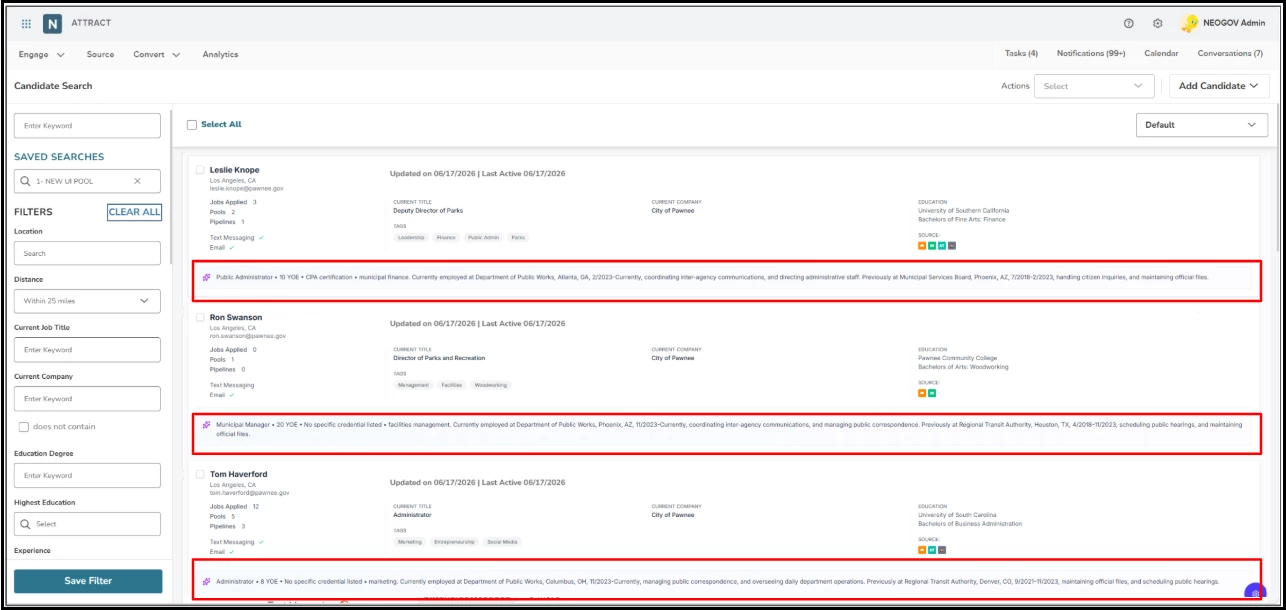
We know AI adoption needs to be thoughtful and governed. That’s why this feature is:
- Admin-controlled: Enable or disable via:
- Attract Admin Settings > Agency Preferences > Artificial Intelligence (AI).
- This capability for Attract Candidate Search is OFF by default. Admins can opt in when ready.
How It Works
- Admin enables the AI Summary in Agency Preferences.
- Recruiters see the clinical, 3-sentence AI profile summary on the page when viewing candidate lists after active filters are applied.
- Use AI to instantly identify core functional utility (experience, credentials) and run an automated audit for previous application history at a glance.
Simplified Candidate Search
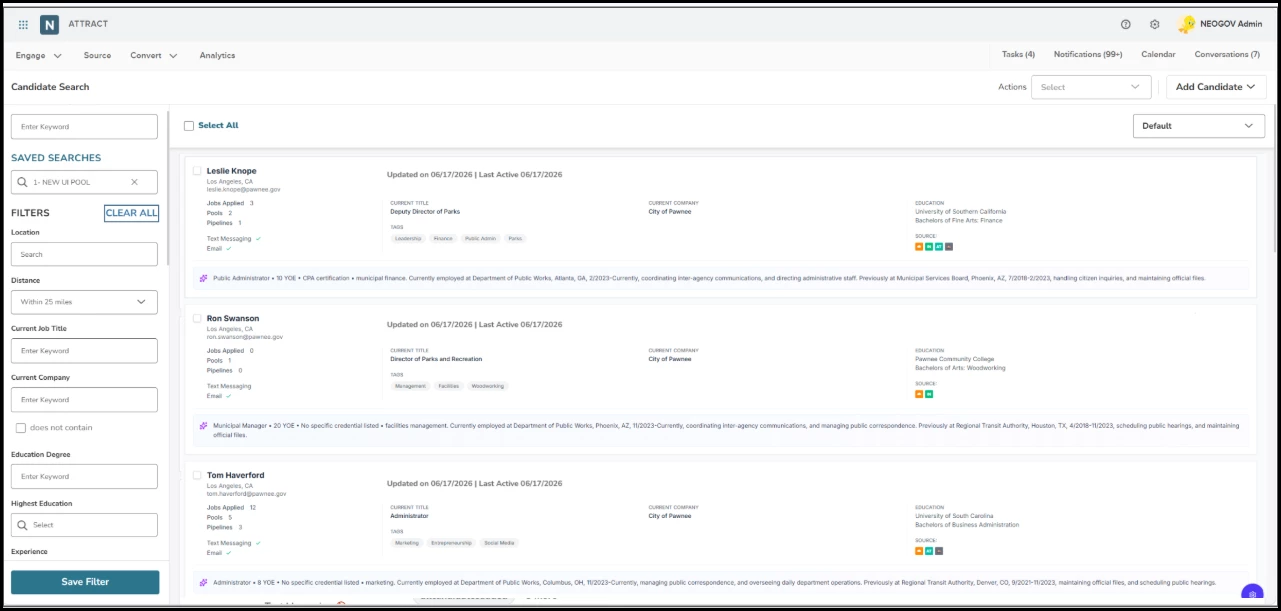
In this release, we’ve modernized the candidate search experience to help recruiters to get from search to action with less friction. This update improves how search loads, how filters are organized and applied, how saved views work, and how candidates are reviewed in the results list. Across the entire candidate search, the outcome is more scannable and you have a more consistent search workspace, with stronger workflows and cleaner candidate intake.
What’s New
- Smarter default filtering: Preconfigured filters are applied by default to keep searches focused on viable candidates, including legal-to-work, barred-from-applying, recency, and non-hired stage criteria.
- Clearer filter experience: The left sidebar is reorganized into saved views, always-available filters, preconfigured filters, and advanced filters so it’s easier to scan and refine results.
- Faster filter refinement: Keyword, job title, company, education, experience, location, job, application status, pool, and advanced filters are easier to use and update the results as values change.
- Favorite filters: Frequently used filters can be starred and pinned to a Favorite Filters area for quicker access across sessions.
- Saved view flexibility: Saved views capture the full filter state, and can be shared privately, by team, or globally.
- Stronger candidate actions: Recruiters can select candidates and take action with email, SMS, add to pool, tag, share, export, and assign departments.
- Improved candidate browsing: Candidate tiles make results easier to scan, with key details and status indicators visible at a glance.
- Continuous loading: Infinite scroll brings in additional candidates in small batches so browsing feels smoother without repeated paging.
- Security honored: Department-based visibility remains enforced across search, profile access, and exports.
How It Works
- Default load behavior: Opening Candidate Search loads your default saved view if one is set. If not, or if no results match, the page shows a guided empty state instead of a blank list.
- Preconfigured filters: Default filters stay on to help narrow results to appropriate candidates, while still allowing users to work within a structured search baseline.
- Live updates: Results refresh as filter values change, reducing the need for extra clicks to see updated matches.
- Bulk selection: Users can select visible candidates or expand to select all matching search results across the broader result set.
- Candidate loading: Candidate tiles load in batches of 10 as you scroll. If loading fails, you will see a retry option.
Value
- Less manual work: Recruiters can find a qualified list faster and take action without jumping between multiple screens.
- More consistent search behavior: Saved views, preconfigured filters, and favorites create a more repeatable workflow.
Audience
Recruiters, pool owners, and admins who manage candidate search workflows in Attract should use these updates. Teams that rely on shared saved views, department-based visibility, or candidate actions will see the most immediate benefit.
Examples
Finding healthcare candidates faster: A recruiter opens Engage > Candidate and starts with the preconfigured filters already applied, then narrows the list further with Current Job Title, Location, Experience, and Highest Education. As results update, the recruiter scans the candidate tiles to quickly compare title, company, location, education, tags, and communication status before selecting the strongest matches for outreach.
Working through a large result set: A recruiter searches for candidates in a specific city, and sets a distance radius, then adds keyword and education filters to narrow the list. As more candidates load through infinite scroll, they keep reviewing the tile layout instead of opening every profile individually. With key details visible on each tile, the recruiter can move through a large search result much faster and decide who’s worth a closer look.
Using candidate tiles to act sooner: An admin or recruiter runs a filtered search for candidates who meet baseline requirements, but haven’t been organized for follow-up. From the tile view, they can quickly spot relevant profile details, review source badges and status indicators, then select the right group for the next steps. The result is less time spent opening records one-by-one, and more time acting on qualified candidates.
Appendix: Bugs Resolved
| Scenario When Issue Encountered | Issue Resolved |
| Refreshing the candidate details page loses the edited log activity value. | No Activity data that is manually edited is lost. |
| Attract Form Candidate and Manual Paper Candidate are not auto merged when profiles have the same email address. | Attract form candidates and a manual paper candidates profiles are auto merged nightly if the same email address exists. |
| The candidate is removed when sourced from GJOBS. | The candidate is not removed from your search after being sourced from GJOBS. |
| Attract Forms report encountering issue with downloading the report. | Form Report along with individual responses can be downloaded. |
| Access Error when Downloading the Exported candidate File via E-mail Link. | Able to download the candidate list via email link without encountering the issue. |
| Insight Master Profile Customer Form Field when deleted in Insight are still visible in Attract. | Deleted Customer Form Fields from Insight are no longer visible in Attract. |
Related Resources