


Article Links
Timeline
When will this be released?
Release Date: 02/19/2026 from 00:00 – 00:00 pm PDT, PST.
Attract does not support a separate User Acceptance Testing (UAT) environment.
Is there downtime for this release?
No.
Auto Search Candidates
This release introduces auto search for talent pipelines. This allows teams to link saved queries to pipelines, and enables automated actions. This means new matching candidates are added automatically, and downstream automated actions are triggered.
Auto Populate Pipelines from Saved Query (Phase 2)
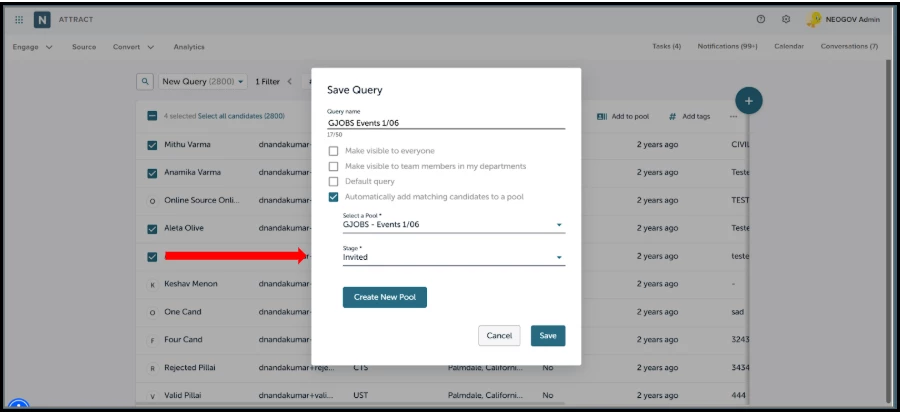
We’ve introduced a centralized auto search configuration for talent pipelines, giving recruiters precise control over how pipelines are populated from saved queries. The configuration streamlines setup, provides clear run controls, and maintains department-level access boundaries so teams can scale sourcing without sacrificing oversight.
Auto Search Controls
- Enable Auto Search (Checkbox): Turn automation on/off at the pipeline level.
- Link a Saved Query (Required): Select any saved query from candidate search. The linked query defines who is eligible to be auto-added to the pipeline.
- Run Cadence: Evaluates the linked query daily, and adds new matches since the last successful run.
- Pipeline Stage Progression: Candidates are not automatically moved backward to an earlier stage. For example, a candidate in Stage 2 will not be automatically added back into Stage 1.
- Safe Deduplication: Candidates already in the pipeline are skipped to prevent duplicates.
- Access Control Alignment: Auto search respects linking the user’s visibility and data-access scopes.
- Initial link/backfill: When you link a saved query, current matches are immediately evaluated and added.
- Daily schedule: Reviews the query once every 24 hours (overnight window). New matches since the last run are added.
Notifications/Candidate Profile Activity
- Heads-up when automation adds candidates: Recruiters receive an in-app notification (and email, if enabled) once per run when new candidates are added to an eligible pool.
- Traceable adds: When a candidate is added to a pool using auto‑population (initial or daily runs), a system activity entry is recorded in Candidate Profile > Activity. There will be no duplicate log if the candidate is already in the pool.
- Clear context: Entry shows the pool name, via auto‑population, a linked saved query, and a timestamp.
- Department permissions: Visibility honors existing access controls (department visibility) and filters.
User Interface Update
Value
Delivers automated, reliable pool growth from saved queries. This reduces manual upkeep, accelerates sourcing velocity, and preserves governance through permissions‑aware execution, safe deduplication, and transparent run history.
Audience
Recruiters and administrators.
Example
A recruiter links the IT – Recent Applicants (Last 30 Days) saved query to the IT pipeline. Existing matches are added immediately, and new IT applicants are automatically added during the daily run. As candidates enter the pipeline, automated actions are triggered, such as sending a welcome or screening email to the candidate and creating follow-up tasks for recruiters. This ensures timely outreach and consistent pipeline execution without manual intervention.
Two-Way Texting (Single Messaging Only)
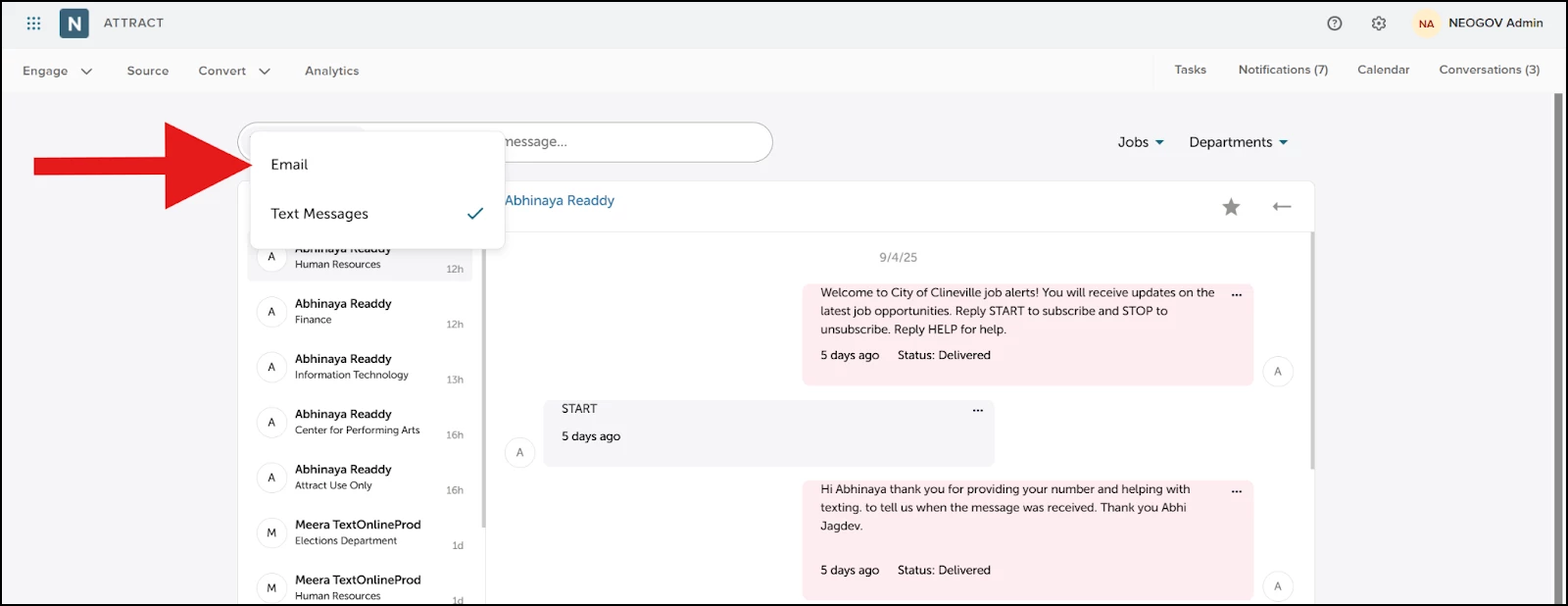
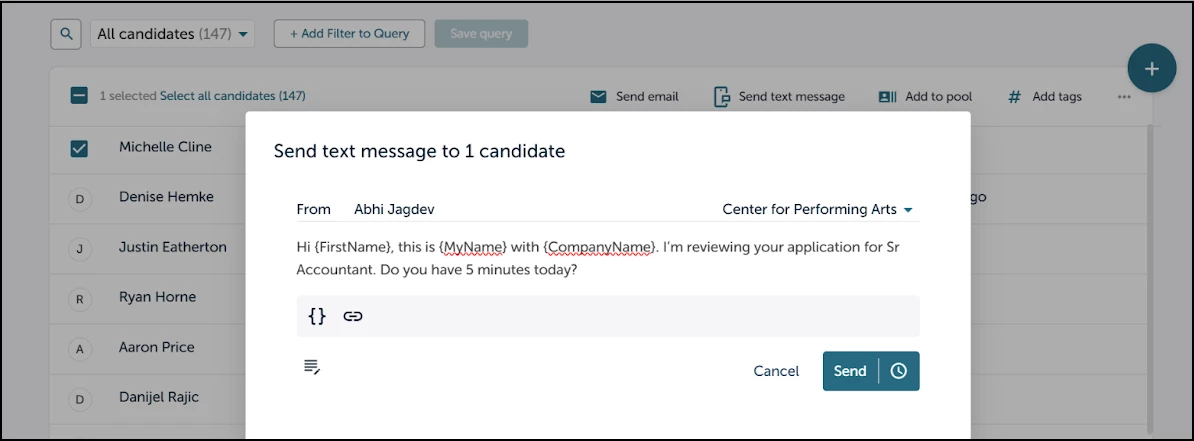
This release introduces two‑way texting in Attract, enabling recruiters to send and receive SMS directly with candidates in a single, threaded view. Expect faster response times, smoother handoffs, and communication you can easily track within the candidate record.
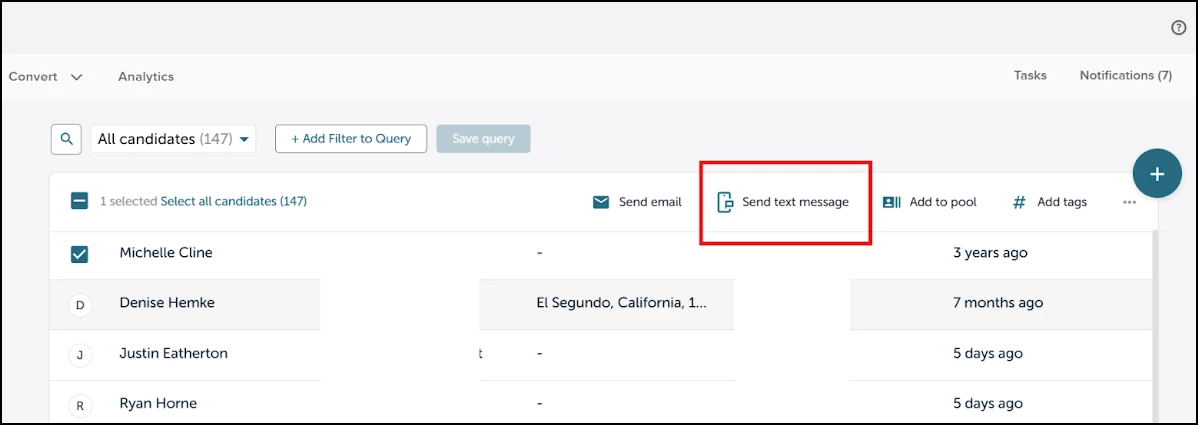
Send Text Messages to Individual Candidates
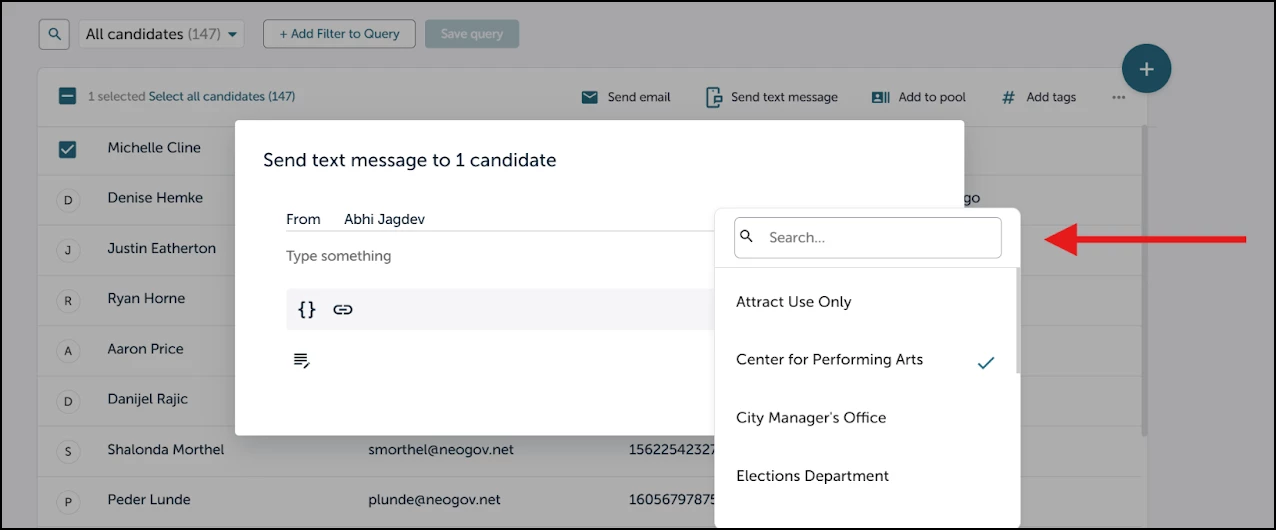
We’ve centralized SMS configuration in Attract so admins can control numbers, consent defaults, templates, and who can text. Setup is streamlined with tenant‑level enablement, and role‑based permissions, with clear on/off controls. Department‑level access boundaries are maintained, letting teams scale texting while preserving oversight. Keyword handling and opt‑out enforcement run automatically and are fully logged.
Messaging Controls
- Start a Conversation: Message from the candidate list, or candidate profile.
- Threaded Replies: Candidate responses appear in the conversation for quick reply as well as in the candidate profile.
- Templates & Personalization: Use message templates with smart fields such as candidate name, and job title. You can draft and preview before sending.
- Consent & Keywords: Respects opt‑in/opt‑out; standard keywords (STOP, HELP) are auto‑handled and logged. Sending is blocked if a candidate is opted out.
- Access Alignment: Threads respect the user’s job/candidate visibility and data‑access scopes.
- Logging & Retention: Every sent/received message is recorded in Candidate Profile > Activity with timestamp and parties; messages follow your organization’s retention policy.
User Interface Updates
Value
Accelerates candidate communication and boosts response rates by bringing SMS into the candidate and job views. Recruiters can reach candidates instantly, coordinate interviews faster, and keep every message in one easy to track thread, cutting time‑to‑first‑response and reducing no‑shows.
Audience
This feature is for HR recruiters, hiring managers, and recruiting coordinators who need fast, trackable communication with applicants, especially high‑volume teams and roles with time‑sensitive scheduling.
Example
A recruiter opens a candidate profile for an accountant role and selects Text to confirm tomorrow’s phone screen. The candidate replies within minutes; the full exchange is logged, and the recruiter gets an in‑app alert along with an email notification.
Appendix: Bugs Resolved
Functional
| Scenario When Issue Encountered | Issue Resolved |
| Visitor Conversion Reports classify applicants as Campaign when they arrive via personal email links (Gmail or Yahoo), even though no Attract campaigns exist. | Will now classify these visitors as Referral to avoid inflating campaign data when no Attract campaigns have been run. |
508(C) Compliance
| Screen(s) | Count of Bugs Resolved |
| Attract Career Pages (JobSeeker facing). | 4 |
Related Resources