



Enable the AI Writing Assistant in Insight: Write Faster Postings, Stay in Control
The AI Writing Assistant is now available in Insight, but it is off by default. An Insight administrator must enable it before your team can use it. Once enabled, recruiters and administrators can refine job postings, candidate comments, and e-Reference templates directly in Insight.
The Problem It Solves
Creating clear, consistent, and professional job postings takes time. Your team spends hours refining language, ensuring consistency across departments, and reviewing drafts for tone and clarity. The AI Writing Assistant reduces that manual effort, freeing your recruiters to focus on what matters: evaluating candidates and moving offers forward.
What You Control
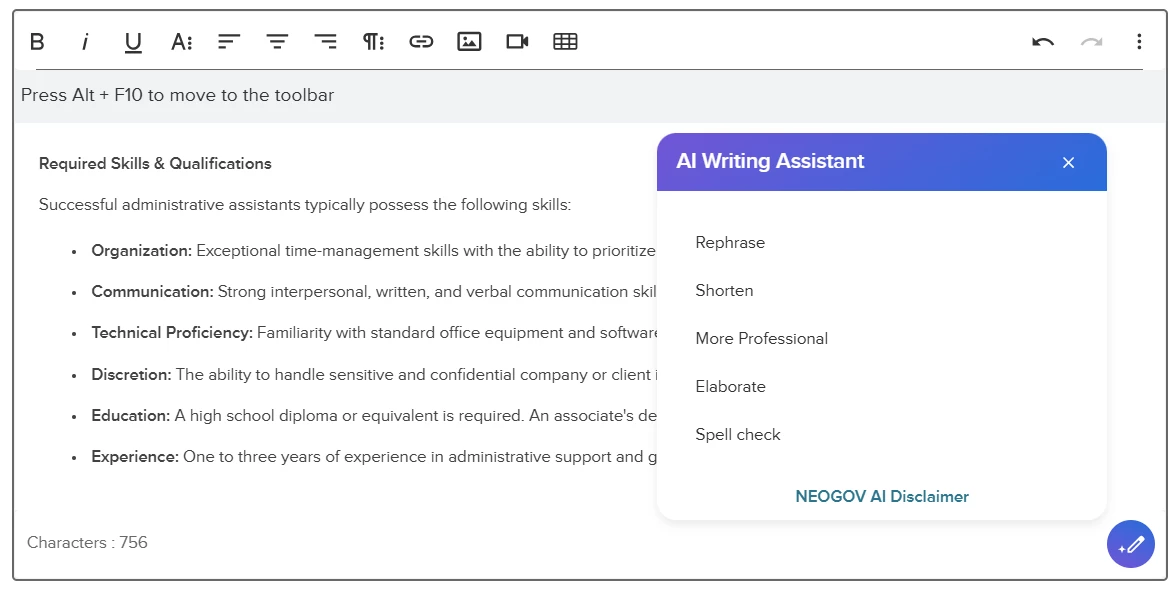
The AI Writing Assistant is designed around a simple principle: your team makes every decision. It offers five refinement options: Rephrase, Shorten, More Professional, Elaborate, and Spell Check. It can refine selected text or the full content, but it does not automatically save or replace your original text. Users review each suggestion and decide whether to use, edit, or discard it. You stay in control of the final message.
The Writing Assistant processes only the text a user chooses to refine in a supported Insight field. Because supported workflows include candidate disposition and rating comments, users should follow their organization’s policies and avoid including unnecessary sensitive or personal information.
The feature is a writing aid and not a screening or decision-making tool. Users should review every suggestion for accuracy, appropriateness, and alignment with organizational policies before saving it.
Security, Privacy, and Responsible Use
We know security matters in public sector hiring. Here's what you should know:
- The feature is OFF by default. Admins decide when to enable it for your organization.
- Data handling is transparent. We've published detailed FAQs on AI usage and security at trust.neogov.com/faq#ai-usage. Review these with your IT and compliance teams if needed.
- Agency data is not used to train public AI models. NEOGOV does not use applicant, employee, or workforce data to train public or global AI systems.
How to Enable It
If you're ready to move forward:
- Go to Insight Admin Settings → Agency Preferences → Artificial Intelligence (AI) → AI Writing Assistant in Insight
- Turn the feature ON
- Once enabled, the Writing Assistant becomes available to users across supported Insight workflows.
Save time where it matters. Enable the AI Writing Assistant today!