



February 2026 GovernmentJobs Release Notes
Timeline
When will this be released?
Production Availability: February 17, 2026, 3 - 4 PM PDT
Is there downtime for this release?
No
Ability to Save and Favorite Jobs
We’re excited to introduce Saved Jobs, a new feature designed to help job seekers stay engaged with opportunities on GovernmentJobs.com and help you capture more applications from motivated candidates.
Job searching isn’t always a one-visit experience. Candidates often need time to research, compare roles, or prepare their applications. With Saved Jobs, they can now bookmark positions and return when they’re ready to apply, keeping your opportunities top of mind instead of losing them to other job boards.
This enhancement is part of our continued investment in modernizing GovernmentJobs.com to drive stronger engagement, better candidate experiences, and improved results for the agencies.
Please note: This feature is available on the GovernmentJobs.com job board only and does not impact agency career pages or SchoolJobs. We will plan to enable this feature within Career Pages and SchoolJobs as well in the near future; Stay Tuned!
How Saved Jobs Works
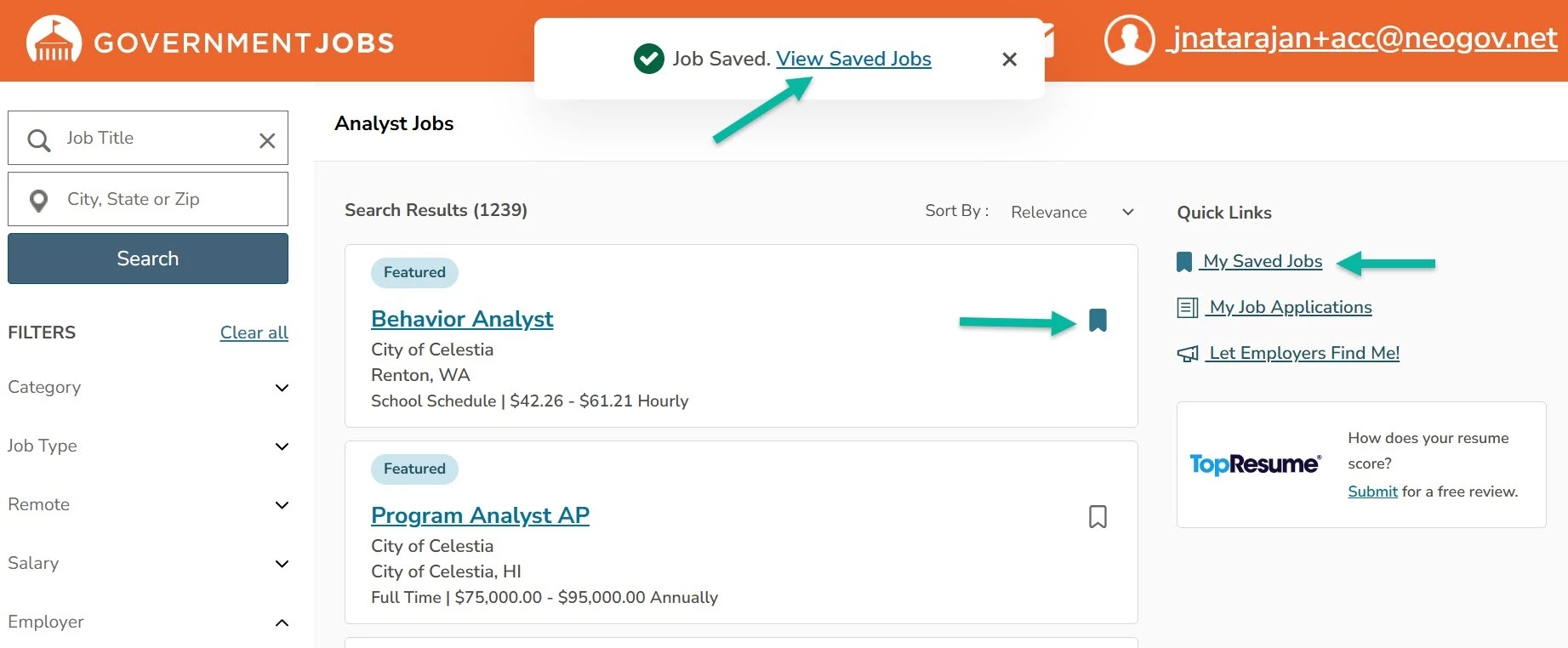
Job seekers can click the bookmark icon, log in, and save jobs directly from:
- Job Search Results
- Job Details pages
- Similar Jobs Section on Job Details Page
Saved roles are stored in a dedicated Saved Jobs page in their account, accessible from:
- Quick Links on desktop search results
- The top-right navigation menu (desktop and mobile)
Jobs are displayed in order of most recently saved. If a job closes or expires, it remains visible in the candidate’s list so they can track opportunities they were interested in.
What this means for Agencies
Saved Jobs is designed to increase follow-through and strengthen the value of your postings.
More applications over time
Candidates can return to saved roles when they’re fully ready to apply, capturing applicants who might otherwise have dropped off.
Higher-intent candidates
Saving a job signals meaningful interest. When those candidates return, they’re more prepared and motivated to complete the application.
Stronger ROI on your postings
Instead of relying on a single visit, your job postings benefit from sustained visibility and repeat engagement, helping you maximize exposure and applicant flow.
A Better Experience for Job Seekers
- Easily bookmark jobs of interest
- Apply on their own timeline
- Stay organized during their search
By making it easier for candidates to stay connected to opportunities, we’re helping ensure your roles remain accessible, competitive, and top-of-mind.