



Insight Spring 2026 Release Notes
Article Links
Timeline
When will this be released?
UAT Preview Window: April 2, 2026, 4 AM PDT
Production Availability: April 30, 2026, 4 AM PDT
Is there downtime for this release?
No.
AI Job Posting Writing Assistant (Beta)
We’re excited to introduce an early access beta of our new AI Job Posting Writing Assistant, a powerful step toward smarter, faster, and more effective hiring workflows in Insight. Insight admins can now enable AI capabilities at the agency level and unlock an intelligent writing assistant designed to help improve job posting quality with ease.
We know AI adoption needs to be thoughtful and governed. That’s why this feature is:
- Admin-controlled: Enable or disable via:
- Insight Admin Settings → Agency Preferences → Artificial Intelligence (AI)
- This capability on the job posting is OFF by default. Admins can opt in when ready.
- Safely rolled out:
Available to:- Select beta customers only for early access in production with the Spring release
- UAT access is not yet available as we are still in the process of enabling AI capabilities in the UAT environment.
- Once UAT is ready, we will announce availability so that interested agencies can begin testing.
How It Works
- Admin enables “AI Job Posting Writing Assistant” in Agency Preferences
- Recruiters see the AI assistant while adding/editing job postings
- Use AI to refine and enhance job descriptions instantly
Beta Experience
This is an early beta release, and we’re actively learning from customer feedback.
- Expect ongoing improvements and the functionality may evolve
- Your input will help shape the future of AI in Insight
This is just the beginning. We’re investing in AI-powered enhancements across Insight and OHC to improve usability, efficiency and support better and smarter hiring outcomes. More exciting AI capabilities are on the way. Stay tuned!
Auto-Advancing Candidates
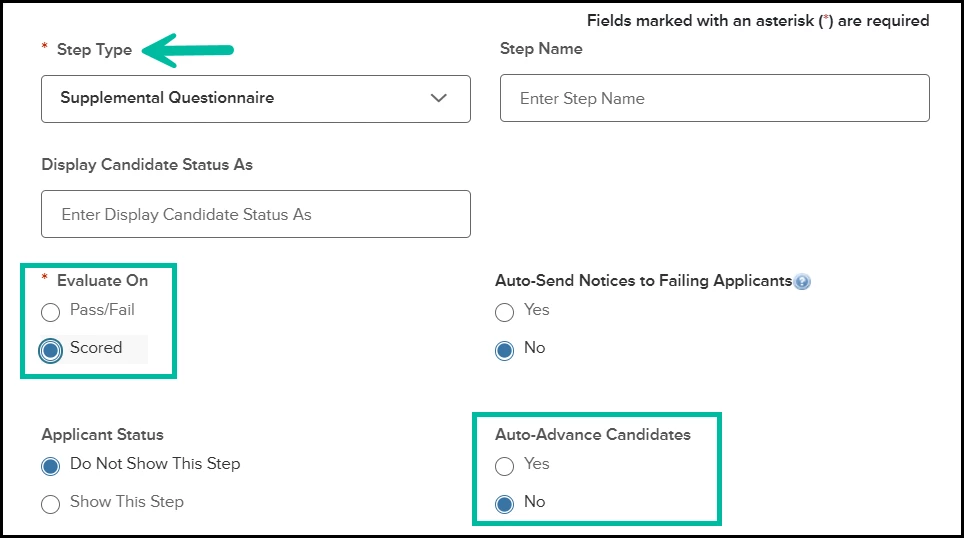
Recruiters can now save time and reduce manual work with Auto-Advancing Candidates from the supplemental questionnaire step in Insight. Applicants who pass the scored supplemental questionnaire step with or without auto screening setup can now move automatically to the next evaluation step or directly to the eligible list. This helps recruiters move qualified candidates forward faster and reduces the need for manual intervention.
Audience
Insight Users
How it works
Create a job posting with a supplemental questionnaire step. Enable Auto-Advance Candidates on scored Supplemental Questionnaire steps. Auto-Advance triggers when candidates pass the supplemental questionnaire step and will be auto-advanced to the next evaluation step, if one exists, or directly to the eligible list.
Value
This is a major efficiency gain for agencies that use the scored Supplemental Questionnaire auto screening step to verify minimum qualifications. Instead of recruiters manually advancing qualified candidates, Insight can now take care of that action automatically. For teams managing high application volumes and for agencies with a small HR team, this means a faster, more streamlined workflow with less administrative effort.
Multiple Recruiting Hire Workflow Templates
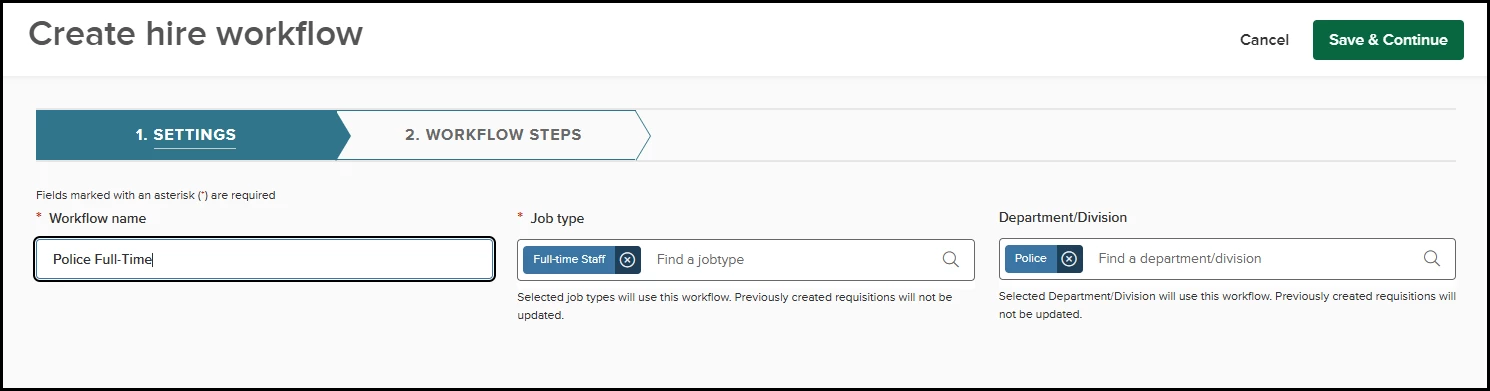
HR Liaisons can now create multiple hire workflow templates to customize evaluation processes for different departments, divisions, and job types, similar to the approval workflow templates. These templates automatically apply when a candidate referral matches the requisition settings and can be updated at the recruitment level.
For Example, Colleges and Universities often have unique recruitment processes for different position types, like Faculty and Staff. Similarly, Towns, Cities, Counties, and States often have different recruitment processes for safety-related positions. You will now be able to configure hire workflow templates for these job types, and they will be applied automatically whenever a candidate is referred to the requisitions under those job types.
Audience
HR Liaisons
Value
Set up common hire workflow templates to automatically populate upon candidate referral, saving HR Liaisons and Hiring Managers from the need to manually alter the default.
Auto-Assigning Hiring Team Members
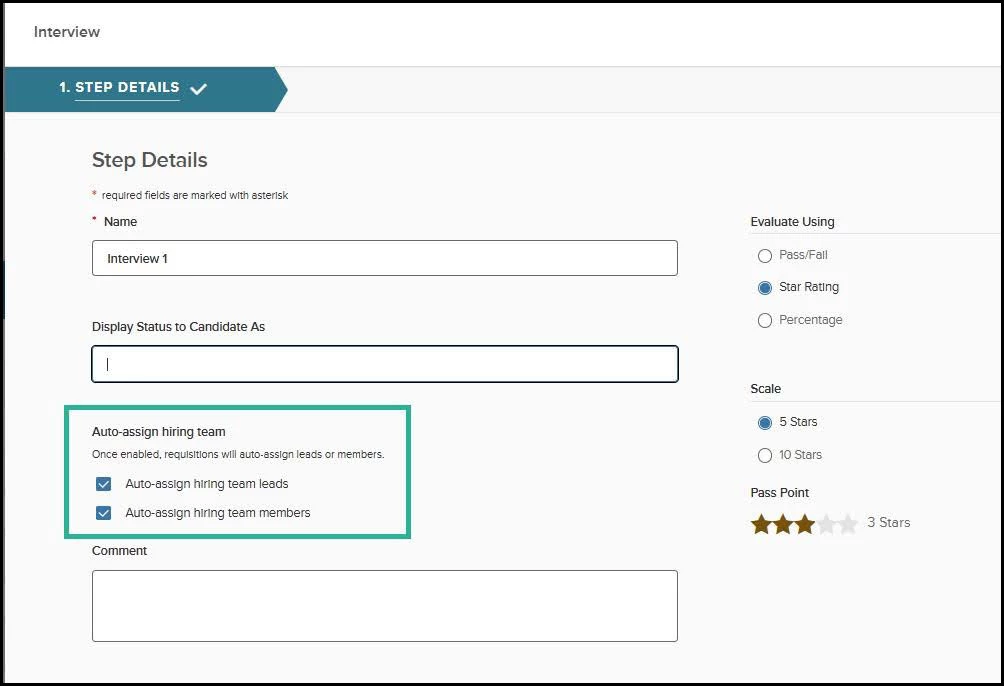
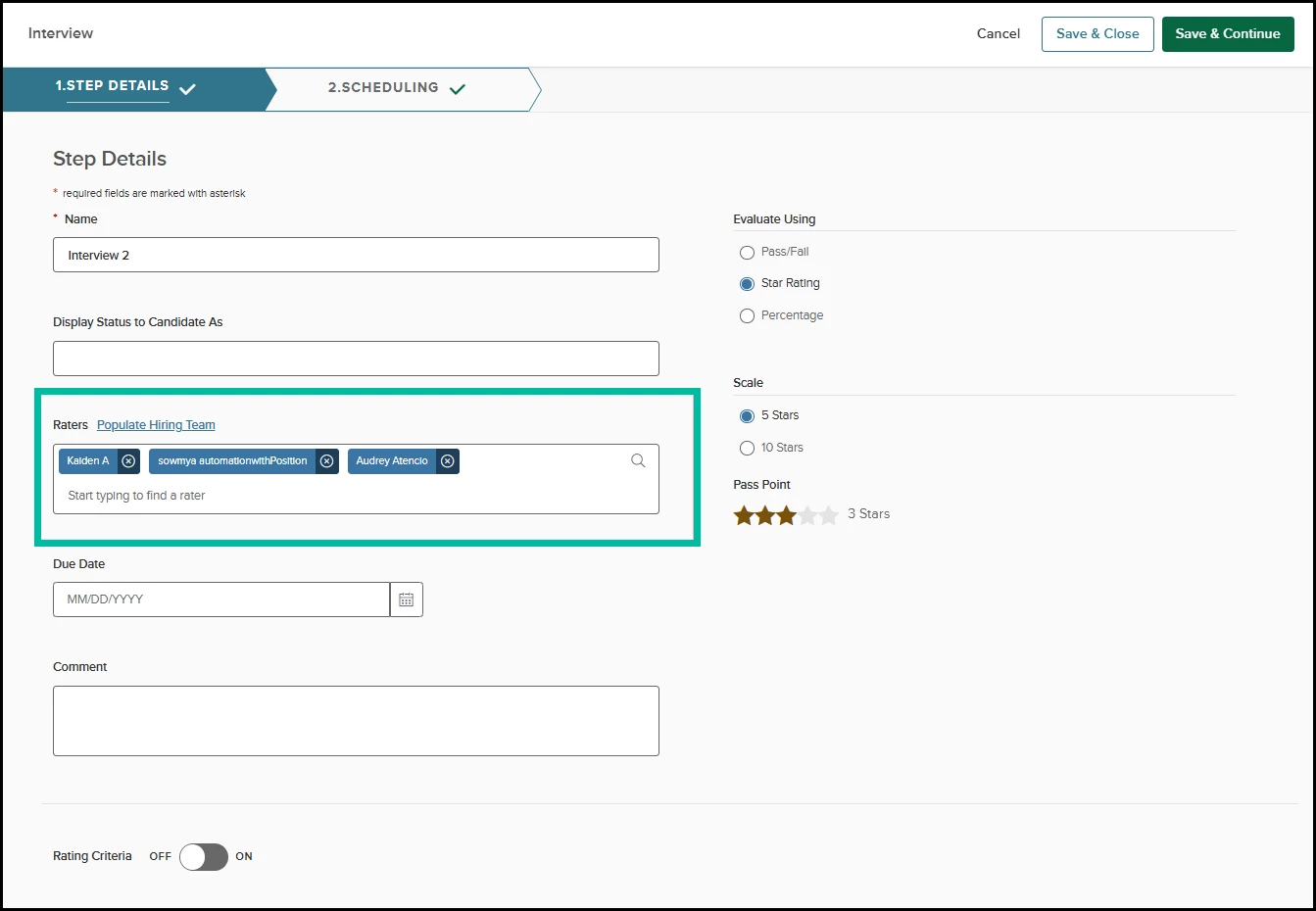
Are you using the hiring teams functionality in your recruitment? We have a usability improvement for you! In each Hire Workflow Template within OHC/Unified Recruiting, for Exam, Review, and Interview steps, HR Liaisons can now enable Auto-assign Hiring Team Leads and/or Auto-assign Hiring Team Members in the Raters section. If the auto-assign setting is enabled on the hire workflow template, the raters listed on the requisitions as hiring team members and leads will automatically show up as raters in the referred list hire workflow steps of individual recruitments without manual intervention.
Audience
HR Liaisons, Hiring Managers
Value
Save time for hiring managers by reducing manual setup in the individual referred list by automatically assigning hiring team leads and members to key workflow steps (review, interview, and exams) when you select them during requisition creation.
Support For Remote/Online Test Locations
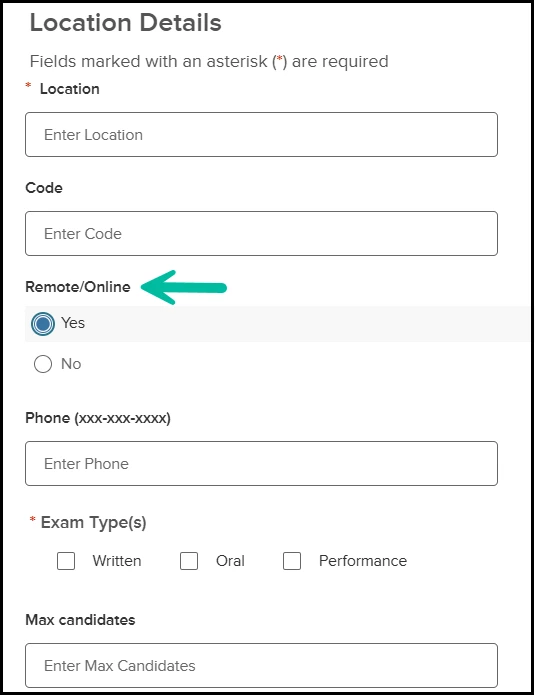
For agencies that conduct virtual or online testing, this enhancement provides a dedicated way to designate a test/exam location as Remote/Online. Previously, Insight and OHC required a physical address for all locations, often forcing recruiters to enter placeholder zip code values like "00000" which could sometimes confuse candidates. When setting up or editing a location, users can now select Remote/Online = Yes. Once enabled, all physical address fields, including country, street, city, state, and zip, are hidden and no longer required.
Audience
Insight Users, HR Liaisons, Hiring Managers
Value
This update eliminates the need for dummy address data on the exam location settings, ensuring a professional and clear communication to applicants for virtual interviews and exams.
Default Filter on Eligible Candidates Grid
This enhancement optimizes the performance of the Eligible Candidates grid by updating the default view to show active candidates only. Previously, the eligible candidates grid loaded both active and inactive candidates by default, which led to slower loading times for agencies managing high-volume eligible lists.
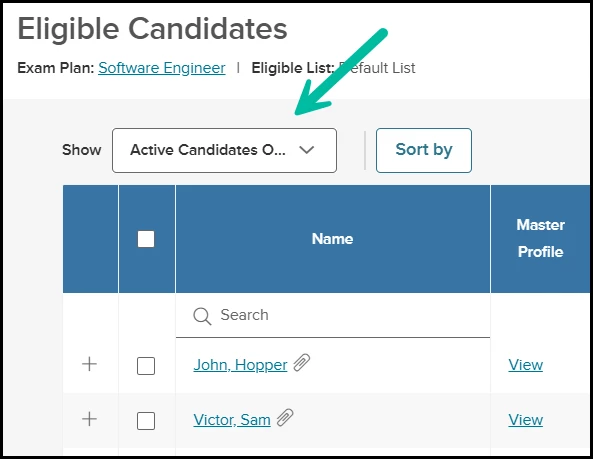
Now, when an Insight user accesses an eligible list, the system automatically filters the view to Active Candidates Only to ensure faster page response times. Recruiters who need to see the full list can still do so by manually updating the "Show" filter to include all candidates.
Audience
Insight users
Select the Right Hiring Manager with Email Visibility
When assigning a Hiring Manager during requisition creation, users can now view the manager’s email address alongside their name. This makes it easier to distinguish between individuals with the same name and select the correct person.
Audience
Insight users, Hiring Managers, Originators
Value
This improvement reduces the risk of assigning the wrong Hiring Manager, especially in larger organizations with duplicate names. It helps streamline requisition setup and ensures the right stakeholders are involved from the start.
Flexible Additional Points Labels to Match your Agency Needs
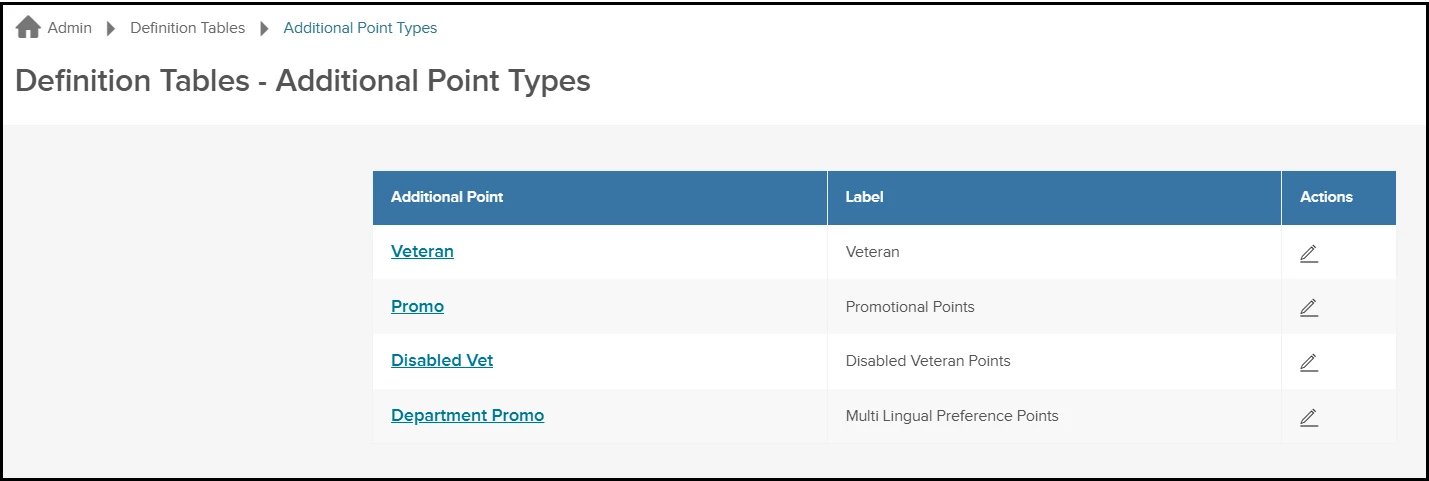
Insight Admins can now manage and customize Additional Point labels through a new “Additional Point Types” page under Definition Tables. This allows you to rename standard point categories (e.g., Veteran, Promotional) to better reflect your agency’s unique hiring policies, and updates will automatically appear when additional points are applied on the eligible list.
Audience
Insight Administrators
Value
Public sector hiring often involves diverse and evolving preference criteria such as multilingual skills, specialized certifications, or state/local policy-driven priorities. This update gives your agency the flexibility to align the system with those needs, ensuring your evaluation process accurately reflects your standards without requiring system workarounds.
Internal Automated Emails Navigates Directly To Unified Recruiting Tasks
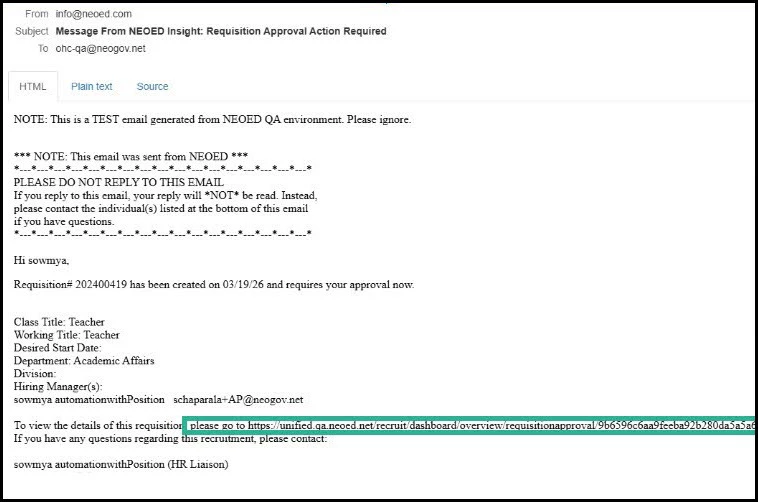
When hiring department users receive internal automated emails for requisition, interview, offer, and hire actions, the action links in the email now navigate the users to the relevant Unified Suite page, streamlining your workflow. Supported actions include: Requisition Created, Updated, Put on Hold, Requisition Approval (Action Required/Status Update), SME Review, Referral Sent, Hire Action Taken, Hire Approval Status Update, Scheduled Interviews/Exams/Reviews, Calendar Integration, eOffers, Canvass.
Audience
Raters, Approvers, Hiring Managers, SME Reviewers
Value
Reduces confusion and saves time by ensuring all recruiting actions start and finish in Unified.
Example:
When you receive a “Requisition Approval Required” email, selecting the link takes you straight to the approval task in Unified.
OHC Settings Overlay in Unified Recruiting Dashboard
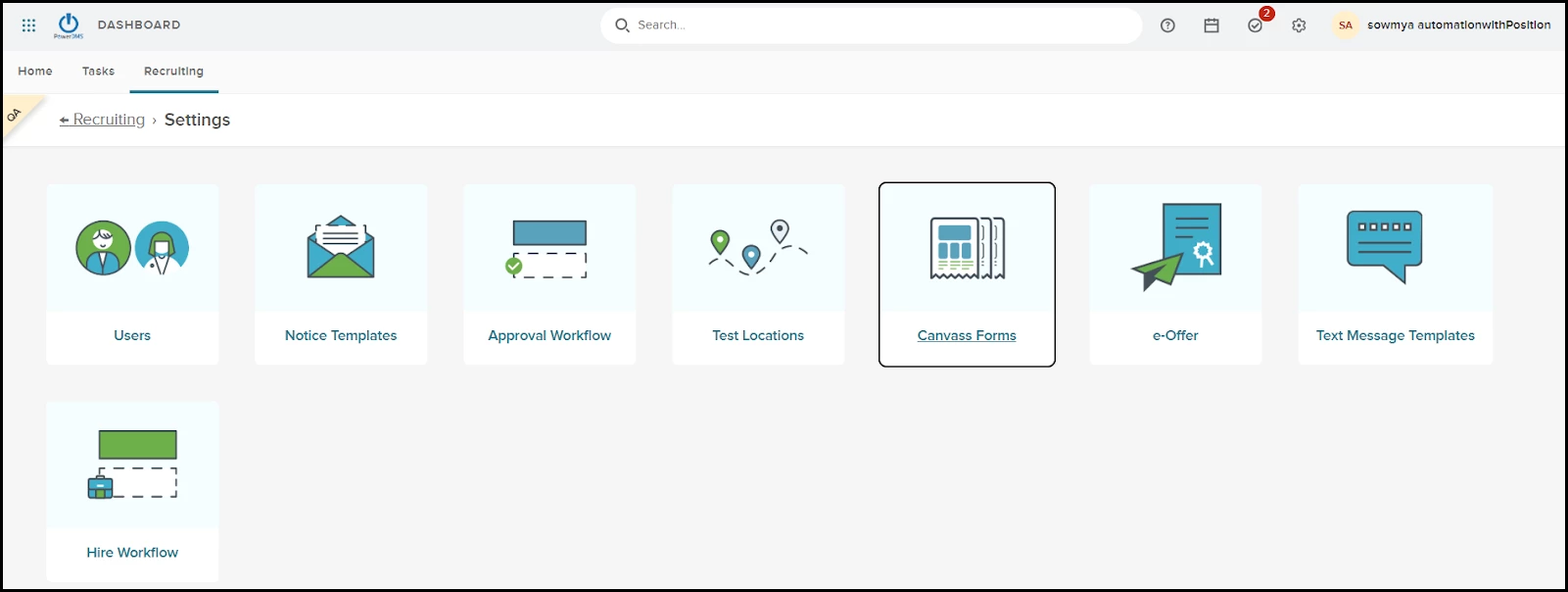
Hiring department users can now access OHC settings directly within Unified Recruiting, no more switching platforms between OHC and Unified. View settings in the recruiting dashboard now opens a tile-based overlay within Unified, showing only the settings users have permission to use, with seamless navigation and accessibility. Settings visibility and functionality remain unchanged and continue to depend on your agency’s existing OHC security permissions.
Audience
HR Liaisons, Hiring Managers
Value
Centralizes recruiting configuration in Unified and reduces context switching.
Appendix: Bugs Resolved
Functional
| Scenario When Issue Encountered | Issue Resolved |
| When OHC Advertising was disabled, the “My Job Postings” tab disappeared from Unified Recruiting, preventing users with the correct permissions from viewing job postings. Access to job postings was incorrectly tied to the advertising setting instead of user permissions. Users without the necessary permissions could still see the “My Job Postings” tab, and the “Open Job Postings” widget behavior was inconsistent. | The “My Job Postings” tab now always appears in Unified Recruiting for users with the right permissions, regardless of the OHC Advertising setting. Job postings are displayed based solely on user security permissions. The “My Job Postings” tab is now hidden for users without the required permissions, and the widget behavior remains unchanged—displaying only when OHC Advertising is enabled. Access to job postings in OHC is unaffected. |
No additional bug fixes outside of the maintenance releases. Please refer to the maintenance release notes for details.