



Learn Winter 2026 Release Notes
Article Links
Timeline
When will this be released?
UAT: Monday, January 20, 2026, 7 AM EDT
Production: Thursday, February 19, 2026, 7 AM EDT
Is there downtime for this release?
No
Learn Winter Enhancements Overview
The Winter 2026 release focuses on clarity, accessibility, and smarter insights across Learn.
These enhancements are designed to:
- Reduce administrative friction.
- Enhance visibility into training data.
- Enable organizations to make faster, more informed decisions.
These updates:
- Strengthen usability.
- Streamline administration.
- Elevate how training data is accessed and understood across your organization.
Custom Label Sync from Insight to Learn
Ensure consistent terminology across your platform by reflecting custom labels configured in Insight (IN) within the Learn experience. If you’ve customized terms like Department or Division in IN, these now appear throughout Learn — aligning with how they’re already supported in other Talent Management Suite products, such as Onboard and Perform.
This enhances clarity for administrators and learners, particularly in higher education environments where specialized terminology is prevalent.
Value
Improves usability and alignment for institutions using custom taxonomy across HR and learning systems.
How it Works
Configure custom labels for core entities (for example, Department, Division, Class Spec) in Insight.
In the image below, Division and Department were switched from Learn’s default labels.
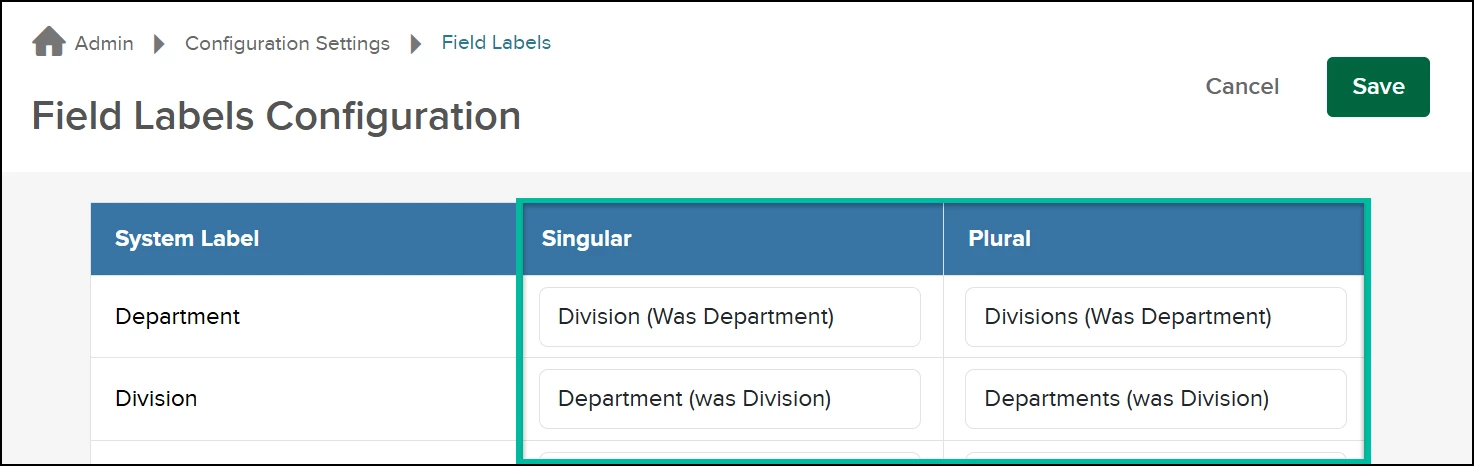
These labels appear automatically in Learn wherever those entities are referenced, including:
- Administrative menu submenus
- Grid lists and labels
- Learners and External Learners lists
- Register and Enroll Learners
- Bulk action screens
- Associations pages
- Email templates, PDFs, and CSVs
- All Learn reports (for example, Training Activity, Certification/License, Survey Filters, Custom Online Question Reports, RB Reports)
- Training Request Create/Edit flyouts
Note: If no custom label is set in Insight, default terms are used.
The following images provide a few examples comparing the previous and updated behavior in the Learn application, where the default labels for Division and Department have been swapped.
| Visibility in Catalog Field 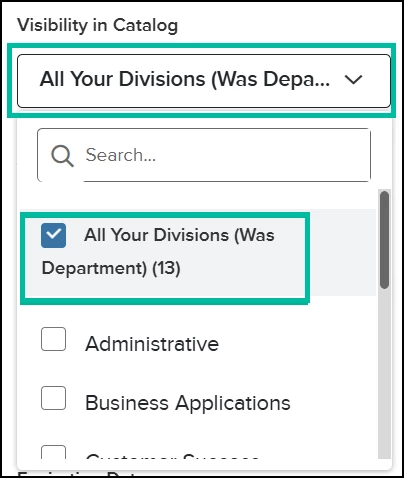
| Administrative Menu 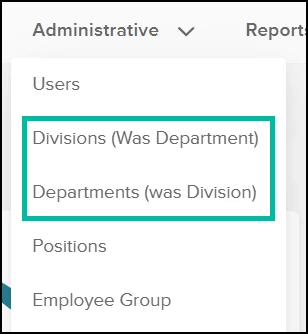
|
Audience
Administrators
Examples
If your organization uses Division instead of Department, and swaps the two labels in Insight, Learn now mirrors that configuration across all screens and reports.
Default NEOGOV/NEOED Course Catalog Access for HR Admins
HR Admins now get immediate access to the NEOGOV or NEOED course catalog — no setup required.
In the Spring 2025 release, HR Admins and HR Users could access the catalog directly from within the app, removing the need for a separate link. Based on customer feedback, HR Admins requested tighter controls on who can import and manage courses.
This update ensures only HR Admins receive catalog access by default, reducing risk and simplifying governance. Access for HR Users now requires explicit permission and can be enabled by Customer Support upon request.
Value
Improves control over course imports while reducing setup time for key admin roles. HR Admins are automatically granted catalog access when their account is created or their role is updated to HR Admin. HR Users, Managers, and Employees do not receive access by default.
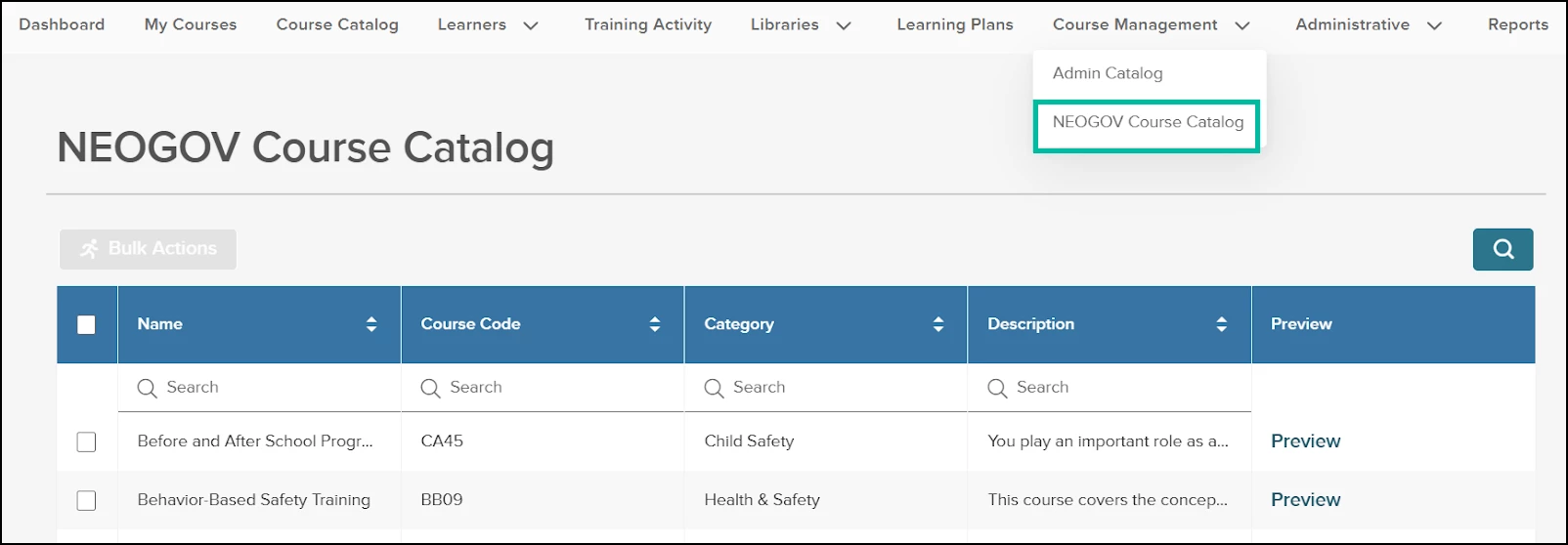
NEOED Course Catalog (if Higher Ed)
Audience
Administrators
Examples
When a new HR Admin is added, they can instantly browse and assign courses without any extra permissions setup.
Reporting Enhancements: Faster Load Times for Training Activity Report
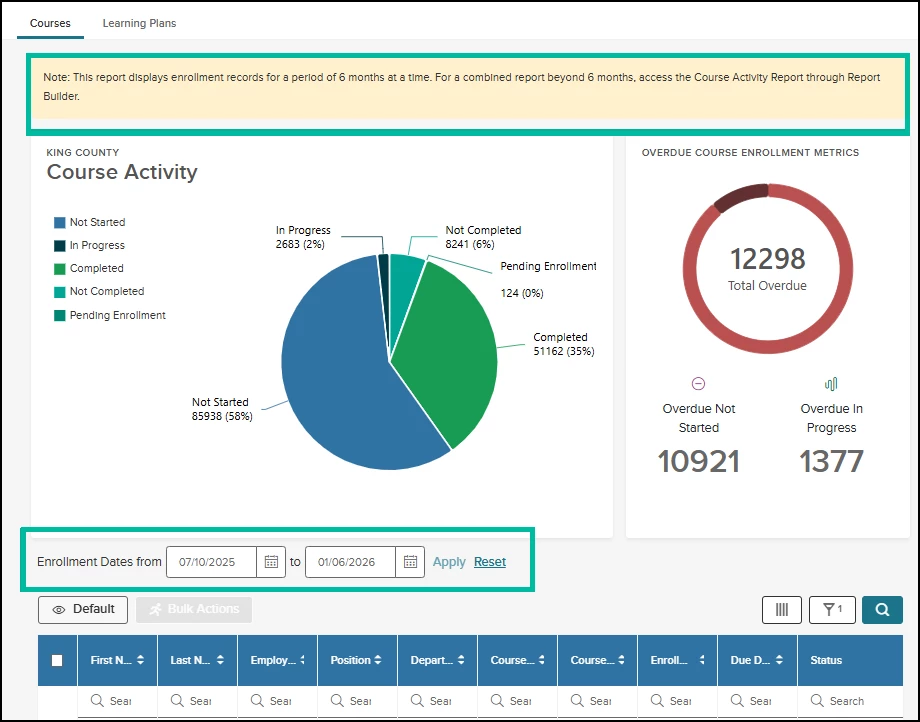
Training Activity now loads faster and more reliably for organizations with large data sets. To reduce delays and system errors in production, the report defaults to showing enrollment data only for organizations with more than 200,000 enrollment records, in 6-month periods.
For all other organizations, the current behavior remains unchanged. Manager and Employee views are not impacted.
Value
Improves performance and stability for large reports, reducing errors and wait times for training data.
How it works
- This update only applies to organizations with over 200,000 enrollment records.
- For these organizations, HR Admins and HR Users will see enrollment data limited to 6 months at a time in the Training Activity Report.
- A new Enrollment Date filter allows users to adjust the report within a rolling 6-month window.
When first accessing the Training Activity Report, the From date defaults to the current date. If a user selects a To (end) date beyond the 6-month limit, Learn will automatically adjust the From date to keep the selected range within 6 months.
For example, if the From date is set to August 1, 2025, and the user attempts to extend the To date to April 1, 2026, Learn will automatically adjust the From date to October 1, 2025, to maintain a 6-month reporting window. Enrollment data will then be displayed from October 1, 2025, through April 1, 2026 (not counting the start date).
- Users cannot filter or sort across multiple 6-month periods to combine all enrollment records into a single report. For reporting beyond a 6-month window, use Analytics and Reporting.
- The update applies to the Courses tab only. Learning Plans are not affected.
Reporting Enhancements: Access to Full Reporting
For organizations with more than 200,000 enrollment records, HR Admins and HR Users must access the Course Activity Report via Report Builder in the Analytics and Reporting product to view combined data beyond a 6-month period.
Note: HR Admins have access to Analytics and Reporting by default; HR Users must be granted access to use Report Builder.
If the user has Report Builder access, Learn will display the following message:
- This report displays enrollment records for 6-month periods. For a combined report beyond 6 months, access the Course Activity Report through Report Builder.
If the user does not have Report Builder access, Learn will display the following message:
- This report includes enrollment data for a 6-month period. If you need information covering a longer timeframe, reach out to your administrator for help retrieving a full report.
Audience
Administrators, HR Users
Examples
An HR Admin with more than 200,000 enrollment records can view the Training Activity report by default to see enrollments from the last 6 months with faster loading and no system timeouts.
Reporting Enhancements: Learning Dashboards in Analytics & Reporting
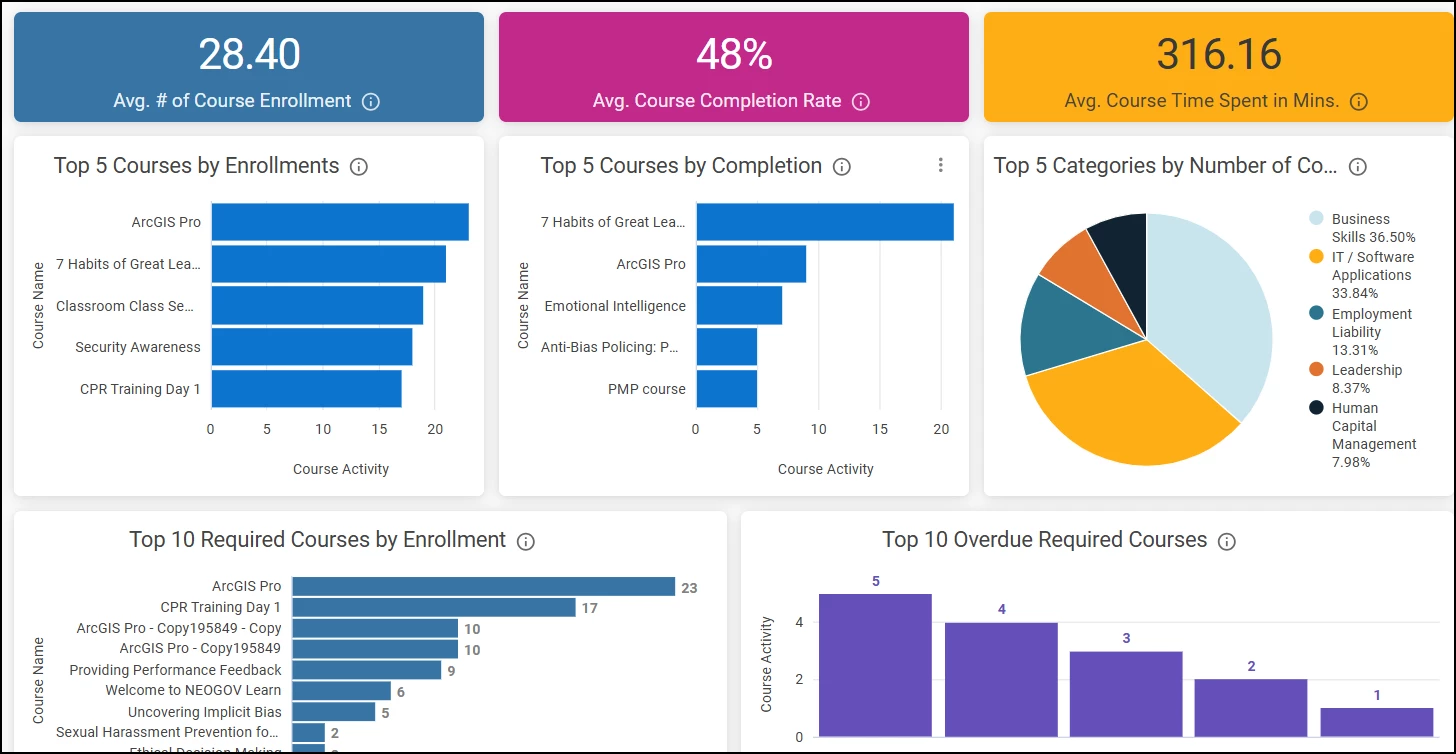
Our new Course Performance Insights Dashboards give Administrators clear, actionable visibility into compliance, completions, and engagement across your organization. They make it easy to spot trends, drill down by department or role, and share polished visuals with leadership.
These dashboards turn raw data into decisions—without the heavy lifting.
Key Insights
| Average Number of Enrollments | Understand how often courses are being assigned and accessed. |
| Average Completion Rate | Measure learner engagement and track progress toward training goals. |
| Required Overdue Courses | Quickly pinpoint overdue mandatory training to address compliance risks. |
How it Works
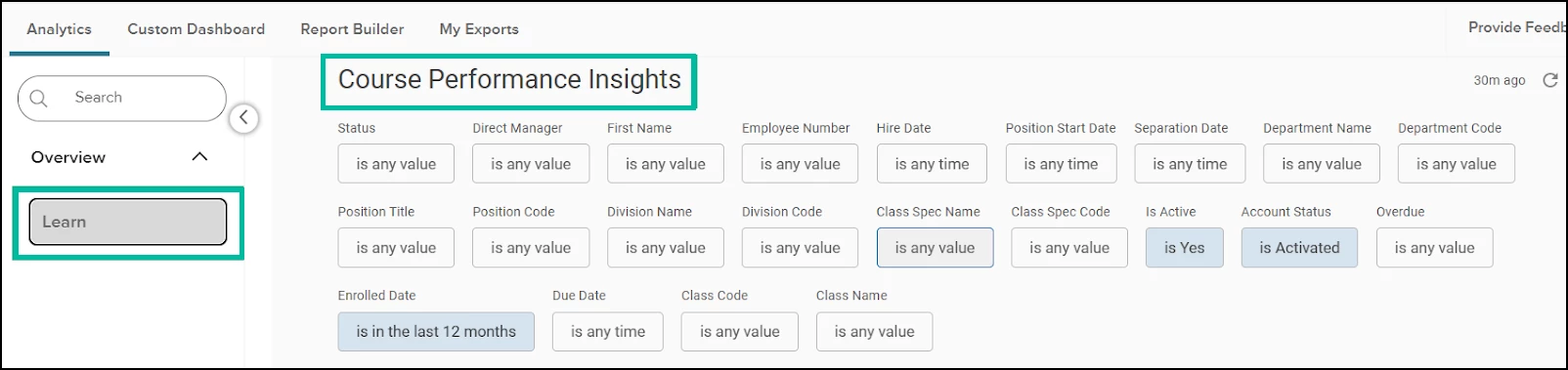
- Log in to Learn as an HR Admin or HR User and then select the product switcher in the navigation and select Analytics & Reporting.
- Data available will be filtered based on the user’s department access.
- The new Learn dashboards will be accessible under Overview.
- Filter your data utilizing the filters available at the top of the dashboard.
- View key reporting metrics and drill down into detailed results by selecting each metric.
Value
Being able to see key insights, such as the average number of course enrollments, overall completion rates, and overdue required courses, makes it easy to understand training activity, measure learner engagement, and proactively address compliance risks across your organization.
Audience
HR staff with access to Analytics and Reporting
Examples
- Training adoption monitoring - An HR Admin reviews the Average Number of Enrollments to understand how frequently courses are being assigned and accessed across departments, helping identify underutilized or high-demand training.
- Measuring learner engagement - A Training Manager checks the Average Completion Rate to see whether employees are progressing through assigned courses and to determine if course length, format, or content may be impacting engagement.
- Compliance risk management - A Compliance Officer uses the Required Overdue Courses insight to quickly identify mandatory training that has not been completed, allowing them to follow up before audits or regulatory deadlines.
- Department-level performance reviews - A Manager filters dashboard data by department to compare enrollment and completion trends, ensuring their team is keeping pace with required and recommended training.
Note: These dashboards are available today in early access for select agencies, with plans to roll them out to all users in mid-January and then all agencies in Q1 2026. We’ll share a follow-up announcement when the Learn Dashboards in Analytics and Reporting become available to everyone.
Content Updates & Announcements
The Learn Content Team is excited to announce our Winter Course Release, available in your UAT environments on January 20, 2026, and in all Production environments on February 19, 2026. This release will include 145 new course titles.
Some important highlights to share from this list:
- 12 new Cybersecurity courses, including a Boost microlearning series, as well as a 30-minute “Using AI Responsibly“ course.
- 41 new Spanish language courses, including many important Health & Safety and Employment Liability titles, including Harassment Prevention.
- Over 70 new and engaging Health & Safety courses.
- Other great Driver Safety, Healthcare, Business Skills, and DEI content.
A full list of courses being added is now available for download on the Learn: Course Catalog page in the Community.
Note: This list will only be available during the customer enablement period. After this time, the updated Course Catalog will be available.
Appendix: Bugs Resolved
No additional bug fixes outside of the maintenance releases. Please refer to the maintenance release notes for details.
Related Resources
- Article: Learn: Custom Label Sync from Insight to Learn
- Article: Learn: Analytics Dashboards
- Article: Learn: Course Catalog
- Article: Learn: Navigating the Course Catalog as an Employee