



July 22, 2026 PowerAction Release Notes 54.0
Table of Contents
Timeline
When will this be released?
Jul 22, 2026 6:30 PM PDT
Is there downtime for this release?
No
General Changes
-
The Indoor or outdoor drop-down menu in the Event section now includes the option for Both, allowing you to more accurately track a situation that moves into different locations.
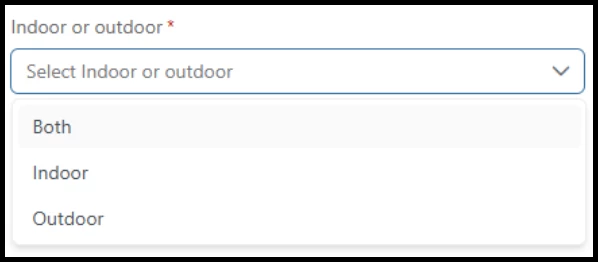
-
To use this new value on a PowerAction Report, you must first update the configuration on the report’s template or create a brand new template.
-
To update an existing template
-
Go to the Settings gear icon, then select Admin, and Reports.
-
Open the report template you want to update.
-
Find the Event section. Make note of how this section is configured.
-
Remove the Event section and add it back to the template.
-
Update the configuration of the Event section and click Save.
-
All new reports using this template will use this updated configuration.
-
-
We will update the analytics dashboard in a future release to better display the new value.
Appendix: Bugs Resolved
-
Resolved an issue that caused users opening Admin > My Agency to see a 403 access denied message before the right page opened.
-
Fixed a bug that caused the Hire Date and Employee DOB to save incorrectly, displaying the wrong date.
-
Resolved an issue that caused the User Profile to display an error message instead of agency Assignments and Years of Experience fields.