



May 27, 2026 PowerAction Release Notes 49.0
Table of Contents
Timeline
When will this be released?
May 27, 2026 6:30 PM PDT
Is there downtime for this release?
No
General Changes
-
Created a No Contact checkbox which allows you to add a Location section to the Interaction section of the Use of Force template.
-
This checkbox disables the Location (body part) drop-down menu and allows users to complete an action report when they’ve made no contact in a Use of Force event.
-
By default, this checkbox is disabled on all templates. To add the drop-down menu, navigate to the form you would like to add it to, scroll down to the Interaction section, and click the box next to No Contact to enable the feature.
-

-
The maximum file size for uploads in PowerAction is now 5 GB anywhere you can attach documents.
-
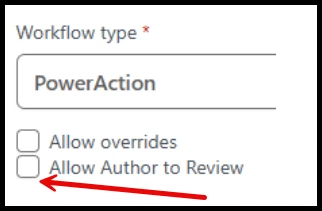
You can now configure Action Reports to allow the Author to review and approve a report.
-
To activate this option, open your workflow under Settings then click the checkbox next to Allow Author to Review.
-
The Author must also have necessary permissions to Review and Approve the report, otherwise won’t be able to complete the action.
-
Appendix: Bugs Resolved
-
Resolved an issue that caused Division, Group, or Team values to show as NULL under Analytics when someone assigned a value to a User.
-
NULL still correctly displays when a value is not assigned.
-
-
Resolved an issue that caused the first field on Action Report templates to sometimes not display when a user tried creating an Action Report.
-
Corrected an issue that prevented some agencies from having all CAD data imported correctly into an Action Report.