



September 30, 2026 PowerAction Release Notes 59.0
Table of Contents
Timeline
When will this be released?
Sep 30, 2026 6:30 PM PDT
Is there downtime for this release?
No
General Changes
- Admins can now delete some PowerAction report templates from the reports screen under admin settings: https://pss.powerdms.com/action-reporting/configure/reports
- To delete a template, open the template from the list
- Click the gear icon to the right of the title and choose Delete report template.
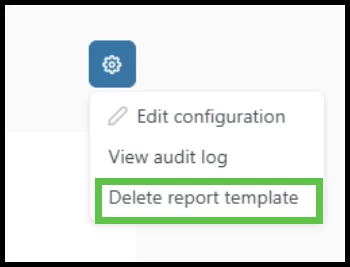
- Confirm the deletion. The system audit log will track the action.
- You cannot delete templates created by NEOGOV, but you can disable them.
- If you created an action report using a template, you also cannot not delete the report.
- If you used the reports only for testing or implementation, you can delete those reports from the PowerAction dashboard first; then you can delete the template from settings.
Appendix: Bugs Resolved
- The Bulk User import process now supports at least 4500 users in one import file.
- Resolved an issue that prevented some fields from being reordered on an Action Report template.
- Removed the Archive Reports permission from the list of Role permissions.