



May 27, 2026 PowerEngage Release Notes 26.8.2
Table of Contents
Timeline
When will this be released?
May 27, 2026 2:30 PM PDT
Is there downtime for this release?
No
General Changes
- Added a new filter to Activity > Surveys to let you see only surveys Marked for Review.
- To access the filter, navigate to Menu, then Activity and choose Surveys at the top of the page. Click the Filter button to view the three available filters: Responded, Has Task, and Marked for Review.
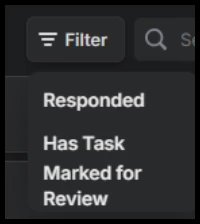
- When choosing the new filter, it will only display surveys when the Mark for Review button selected.

- You can manually select this button when opening a survey or you can set it to automatically select it using the Survey Criteria configuration.
Note: Mark for Review is an alternative to using tasks. Using this setting will not send a notification or allow for assignment, but can still signal when a survey response requires review or investigation.