December 4, 2025 PowerReady Release Notes 26.0
Table of Contents
Timeline
When will this be released?
Dec 4, 2025 1:00am PST
Is there downtime for this release?
No
New Feature/Enhancements
Storage Limit Increased
- Increased the default storage limit from 5 GB to 100 GB for all customers.
Audience
Site Administrators
Workflow Updates
- Require users to select the next person in the workflow
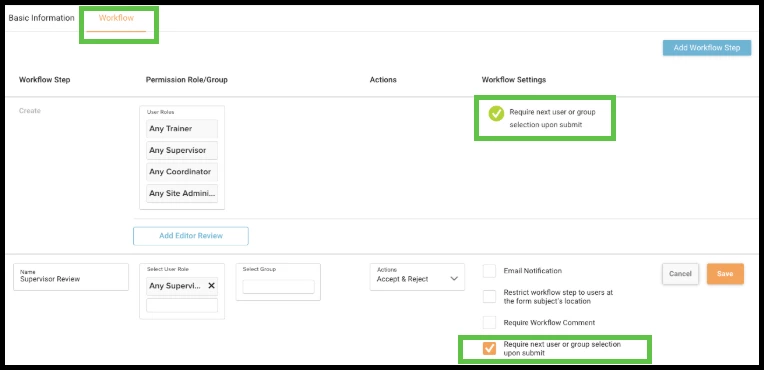
When enabled, clicking the Accept or Submit buttons will not send a report to everyone included in the workflow. Instead, PowerReady will behave as if users clicked the caret (^), requiring them to select an individual before the form advances to the person they select.
While everyone at the next workflow step will be able to approve the form, only the person(s) selected will receive a notification.
Value
This will reduce the number of notifications sent, and require users submitting or approving forms to select specific individual(s) to review the form next.
Audience
Site Administrators, Training Coordinators
Examples
You can chose to allow this setting for a workflow by navigating to Program Settings -> Forms, selecting the form you are working with, clicking the Workflow tab, then checking the box next to Require user or Group selection upon submit.
- Require Workflow Comments
You can now require workflow comments on individual steps.
Value
By requiring form reviewers to enter a workflow comment before approving or rejecting a form at certain workflow steps, you can ensure clarity and accountability throughout the form's approval process.
Audience
Site Administrators, Training Coordinators
Examples
You can set your workflow to allow this by navigating to Program Settings> Forms, selecting the appropriate form, clicking the Workflow tab then checking the box next to Require Workflow Comment.

- Workflow Comments Changes
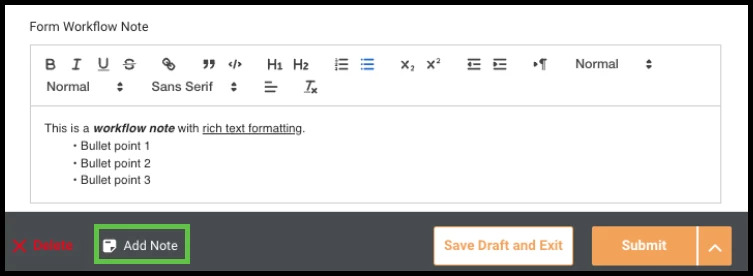
Improved the field for entering workflow comments on forms:
- Moved the comment field to the Summary.
- The Add Note button in the footer still works and now jumps to the new comment field location.
- Enlarged the comment area for easier long-form notes.
- Now supports Rich text formatting.
Value
Strealined the workflow comments User Interface (UI) to improve usability and accessibility, and allow for more functionality such as rich text formatting.
Audience
All users
Examples
The new workflow note field is found on forms’ Summary tab. You can click on the Add Note button in the footer to go directly to the Workflow Note field.