



February 24, 2026 PowerReady Release Notes 28.0
Table of Contents
Timeline
When will this be released?
Feb 24, 2026 11:00am PST
Is there downtime for this release?
No
New Feature/Enhancements
PowerRecall Insights Dashboard Icon
- PowerRecall Insights on the Trainee & Employee Dashboard
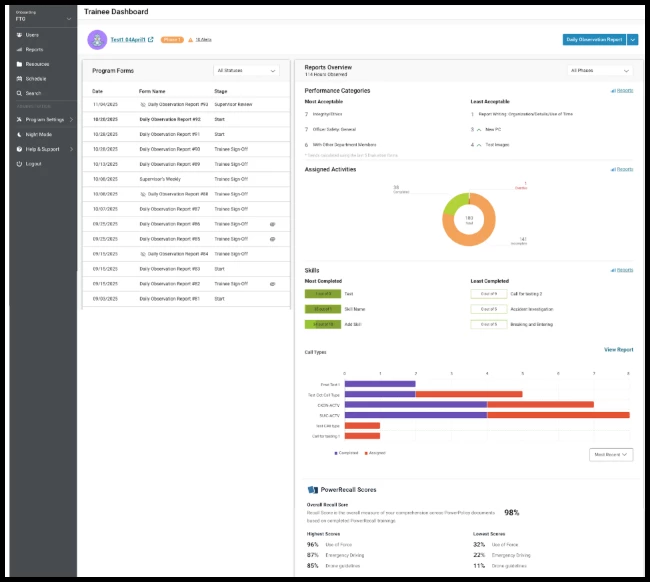
A new PowerRecall Insights icon is now available on trainee and employee dashboards. The icon provides immediate visibility into an individual’s Recall performance directly within PowerReady.
The widget displays:
- Overall PowerRecall score
- Accuracy percentages for the top 3 strongest documents
- Accuracy percentages for the top 3 weakest documents
This feature is available for platform customers with PowerRecall, and is enabled for onboarding, performance, and probationary programs.
Trainees & employees can only see their own scores since they only have access to their own dashboards. Trainers, supervisors, coordinators, and site administrators can see the scores of any user they have access to.
Value
Gives trainees and employees real-time visibility into training comprehension and document retention, reducing guesswork and increasing accountability.
Audience
All users
Examples
The dashboard displays an overall recall score, with three strongest and three weakest policy documents listed alongside their respective accuracy percentages.
- Program-Level Control for PowerRecall Insights
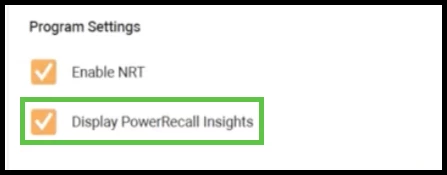
A new program-level setting allows Site Administrators to control whether the PowerRecall Insights widget appears in specific programs. To add the widget, navigate to Site Settings> Programs> Program Settings then check the box next to Display PowerRecall Insights.
Behavior:
- Defaults to enabled and set to True for platform customers with PowerRecall
- Disabled and set to False for non-platform customers
- Disabled and set to False for platform customers without PowerRecall
- Applies to onboarding, performance, and probationary programs
- Controls visibility on trainee and employee dashboards
Provides flexibility for agencies that may not want recall performance visible in certain program types.
Value
Gives agencies control over training visibility while maintaining flexibility across program types.
Audience
Site Administrators
Examples
An agency may enable PowerRecall Insights for probationary programs but disable it for performance improvement programs where recall metrics are not part of evaluation criteria.
Appendix: Bugs Resolved
| Feature Issue | New Behavior |
| FTO-14292 On mobile browsers, selecting a specific next reviewer during a workflow approval would close the selection menu without actually assigning the selected user. | Mobile workflow approval now properly selects and assigns the chosen next reviewer when using the drop-down menu next to Accept. Resolved the issue across iOS and Android devices and all supported mobile browsers. Reviewer assignment now behaves consistently between desktop and mobile environments. |