July 13, 2026 PowerReady Release Notes 34.0
Table of Contents
Timeline
When will this be released?
July 13, 2026 1:00 AM PST
Is there downtime for this release?
No
Enhancements
- Updated the user table in Site Settings > User Management.
- Migrated the Position text field to a Job Title list
User Management Table
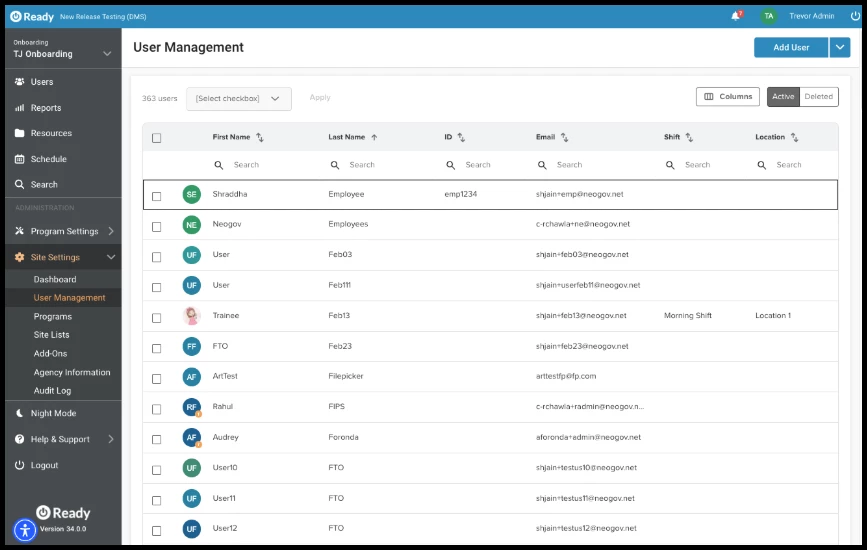
Updated the user list table located under Site Settings> User Management to align with the User Lists and other NEOGOV applications. This update introduces a more flexible, responsive, and customizable grid interface for managing user accounts.
Key enhancements include:
-
Column Sorting: Sort user records effortlessly by clicking on column headers.
-
Multi-Select Bulk Actions: Easily select multiple user rows using checkboxes to perform bulk administrative operations.
-
Column Search: Search for specific values directly within individual column headers for precise user filtering (replacing standard column filters).
-
Customizable View (Hide/Show Columns): Personalize the table view by toggling visible columns on or off to focus on the information that matters most.
-
Expanded Default View: Increased default page density to display 100 items per page, reducing the need for constant pagination.
Value
This table update provides a faster, more modern, and consistent user interface experience. By increasing default row visibility to 100 users and introducing column-level searching and bulk actions, Site Administrators can locate specific user groups and perform multi-user management tasks with significantly fewer clicks.
Audience
-
Site Administrators
Examples
-
Batch User Management: A Site Administrator needs to update permissions or export records for an entire department. They can use the Column Search on the Department column to quickly pinpoint those users, use the Multi-select header box to select all 100 visible rows at once, and apply a bulk action immediately.
-
Customized Workspace: An Administrator working on a smaller screen can open the Hide/Show Columns menu to temporarily hide less frequently used fields (such as creation dates or secondary IDs), creating a clean, focused view of just employee names, emails, and active statuses.
Items Removed from User Management
Removed the general search field in favor of the column search fields.
Migrated the Position text field to a Job Title list
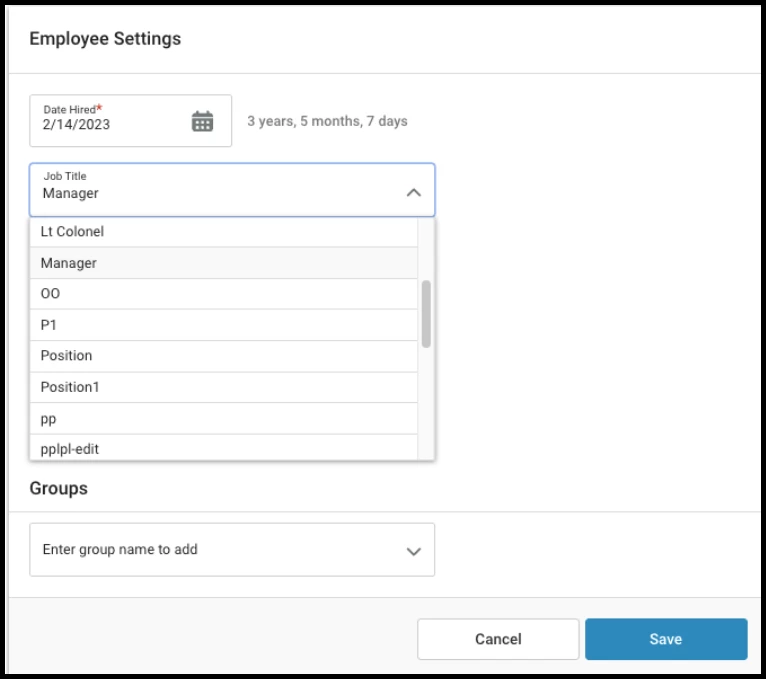
The free-form Position text field has been updated to a structured Job Title drop-down menu managed directly within Site Settings.
-
Site Settings Update: Administrators now have access to a dedicated Job Titles site list under Site Settings> Site Lists> Job Titles to centralize and manage available job titles across the organization.
-
User Profile Update: On the user profile page, renamed the label Position to Job Title. Replaced the text box with a select drop-down menu populated from the new Job Titles list (displaying only the clean title name without internal codes or abbreviations).
-
Data Migration: All existing position entries written as free-form text automatically converted into linked items in the new Job Titles list, ensuring zero data loss and maintaining existing user records
Value
Transitioning from a free-text field to a standardized drop-down menu eliminates inconsistent naming conventions, typos, and duplicate job title entries (e.g., Field Trainer, FTO, Field Training Officer). This standardizes user data, streamlines user profile management, and improves accuracy for system reporting and administrative filtering.
Audience
-
Administrators: Responsible for creating, editing, and managing the centralized Job Titles list in Site Settings.
-
Employees / Users: Select their designated Job Title from the standardized drop-down menu within their User Profile Settings.
Examples
-
Standardizing Agency Roles: An administrator sets up official agency titles in Site Settings (e.g., Patrol Officer, Sergeant, Dispatcher). When onboarding new staff, users simply select their title from the list rather than manually typing variations, ensuring uniform administrative records.
-
Reporting & Filtering Accuracy: A Training Coordinator running reports across departments can filter user records by an exact Job Title without missing employees due to minor spelling differences or inconsistent position titles.