



February 12, 2026 PowerTime Release Notes
Table of Contents
Timeline
When will this be released?
Feb 12, 2026
Is there downtime for this release?
No
Features & Enhancements
Save Historical Platoon Assignment
When looking at historical data on the Platoon View, Calendar View, and Calendar Schedule, employee names now display under the platoon they belong to as of the date being viewed.
Note: PowerTime started logging platoon data in 2023, so no history exists for platoon data prior to this. When viewing dates before 2023, users will appear under their current assignment.
Value
All users can see more clearly historical platoon assignments.
Audience
All users can view this historical data.
Examples
Calendar View and Calendar Schedule
On these two views, you can see employee platoons as of the last date of the time period you’re viewing.
For example, if you’re viewing a month, then the employee will show under the same platoon for the entire month.
Note: We have another enhancement coming shortly to Calendar View and Calendar Schedule which will allow you to see platoon changes as of specific dates.
Platoon View
Platoon view now shows employee platoons as of the last date of the time period you’re viewing.
For example, if you’re viewing a month, then the employee will show under the same platoon for the entire month.
To avoid confusion or missed shifts, we have employee schedules listed in only one place on this screen.
Time Off Approval Screen Filtered to Department
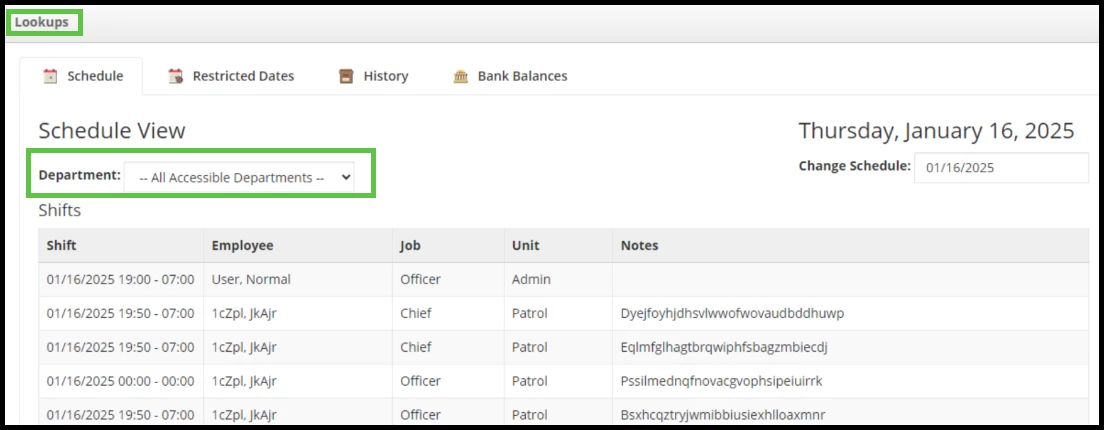
When a PowerTime site has Departments enabled, approvers can now filter the schedule on the Time Off Approval screen by Department.
Value
Filters out employees the viewer is not eligible to see, maintaining employee schedule privacy across your PowerTime site.
Audience
If your agency has Department Support enabled, all users who have access to approve Time Off Requests can now see this Department filter.
Examples
When accessing the Time Off Approval screen, the Lookups section allows users to filter by Department (when Departments are enabled in the PowerTime site).
Appendix: Bugs Resolved
| Feature Issue | New Behavior |
| On the Calendar Editor, changing Device Settings did not Save or work as expected. | Device Settings now updates the schedule view as expected. |