



February 19, 2025 PowerVitals Release Notes 20.0
When will this be released?
Release Date - Weds, 02/19/25 10:00am EST
Is there downtime for this release?
No
Adding Files to Check-Ins
Value
Customers can now save files including CSV’s and PDF’s to their check-ins. This new feature can help record important documents to associated alerts and check-ins.
Audience
Supervisors & Administrators
To add files to check-ins, click the upload button and select the file(s) you’d like to upload, with a maximum of 10 files. Each uploaded has a max size of 20mb.
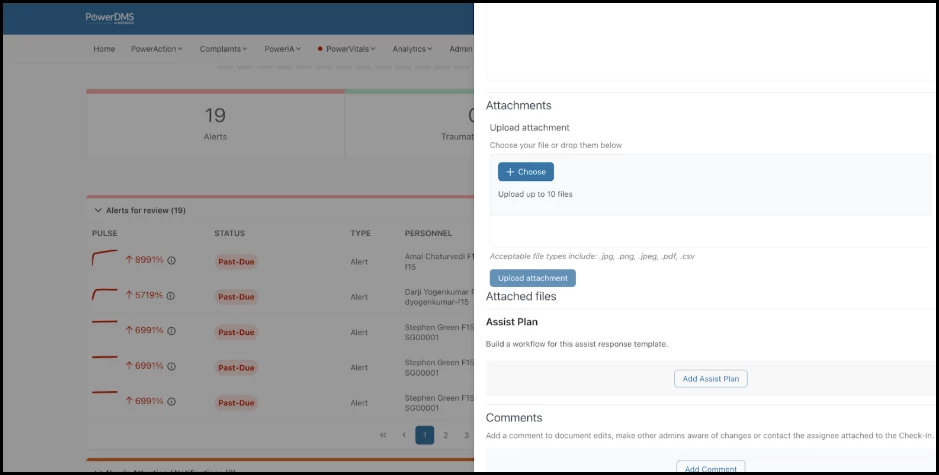
Note: You can’t attach files to drafts. For files to properly attached to check-ins, files need to be associated with an assigned or closed out check-in.
Example
A supervisor wants to attach a recent record from a dispatched event and attaches the file to the check-in after documenting the conversation they’ve had with the officer.
Appendix: Bugs and Requests Resolved
| Feature | Scenario | Issue |
| Multi-Indicator Monitor | Combined Total Limit is now visible for multi-indicator monitors. | The description for Combined Total Limit was not visible on screen unless user worked the scroll bar. |
| Alerts and Manual Indicators | One alert generates per each indicator when adding an indicator manually for an officer. | Two Alerts were generating per indicator when adding an indicator manually for an officer. |