


Table of Contents
Timeline
When will this be released?
February 4, 2026
Is there downtime for this release?
No
New Feature/Enhancements
In this release users will see improvements to workflow processes, a bug fix to enable CAD event ingest for call takers, and an email notification improvement.
Workflow Improvement - “Choose From”
Updated the Workflow Template Assigned To to mirror the Action (AR) workflow configuration for any workflow steps after the first step. Assigned To now has the same selectable options and patterns as Action workflows.
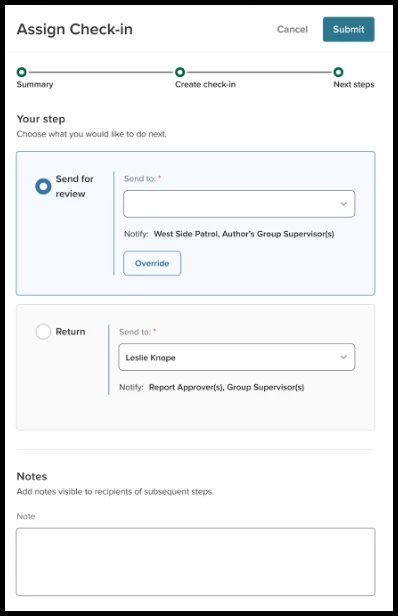
To use an Assigned To workflow, configure recipients from the Choose From options of All Users or List.
Note: You can only enable this for the steps AFTER step one.
To ensure users are selectable for any step outside Assign Assist Plan, you must ensure the users meet at least one of the following conditions:
-
Their direct supervisor
-
The division/group supervisor for that user
-
View all admin permission activated
-
Workflow admin permission activated
Value
This enhancement creates consistency across workflows, reduces admin learning curve, and provides greater flexibility in how alerts and check-ins are routed—without compromising required workflow structure.
Audience
Administrators and Supervisors
Examples
-
An admin configures a PowerVitals workflow to have the first step always assigned to a specific supervisor, but later steps allow the submitting user to select anyone in the agency to continue the workflow.
-
A user sets up an approval workflow so step two allows users to choose from a predefined list of assignee types, ensuring flexibility while maintaining role-based control.
-
A standard approval workflow routes alerts automatically to predefined assignee types, preventing users from choosing individuals who aren’t supposed to take part in the workflow.
CAD Event Ingest - Call Taker
This enhancement introduces call taker support to the CAD event ingest process using Connect ID. The call taker ingest acts as a single persona and follows the same core validation model as existing ingest flows, with additional constraints specific to call takers.
Value
This enhancement enables accurate and secure ingestion of CAD events for call takers, ensuring events only process when the system can fully validate identity and ingest criteria. Now agencies with dispatchers can benefit from tracking major events from their CAD and converting them into indicators.
Audience
Administrators and supervisors
Examples
- A CAD event is created with an assigned call taker whose Connect ID matches the persona; the event passes ingest rules and is successfully ingested as an indicator for the call taker.
- A CAD event includes both a responder and a call taker; both users receive the event because their Connect IDs match and ingest rules are satisfied.
Sent for Review (Step type 1) - Email
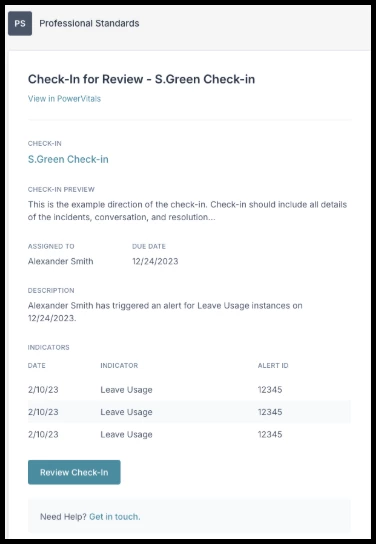
This enhancement introduces email notifications and task sync support when a user sends a Check-In for review as part of a workflow step 1.
When a Check-In reaches the Sent for Review step (Step Type 1), the assigned user receives an email notification, ensuring timely visibility and action.
Value
This enhancement ensures reviewers and approvers are promptly notified through email, reducing delays and improving workflow completion rates.
Audience
Administrators and Supervisors
Examples
A check-in is submitted and routed to a reviewer; the reviewer receives an email titled “New Check-In for Review” with key details and a direct link to open the check-in.