



Unified Web Release Notes Summer 2026
Article Links
Timeline
When will this be released?
July 30, 202
Is there downtime for this release?
No.
Legal Name Display Updates
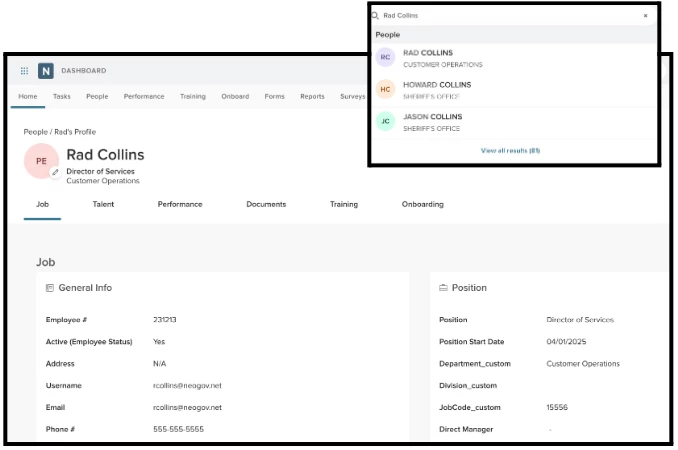
Unified Suite now supports a dedicated Legal Name field, replacing the previous "Preferred Name" label in ADC and Administration. This update ensures clear separation between an employee's preferred first name and their legal name, improving accuracy for compliance and record-keeping. "First Name" now serves as the preferred name, while "Legal Name" is used wherever a legal identifier is required. Legal name appears in all views where legal identification is necessary, with minimal disruption to existing HCM workflows.
Dedicated legal name field
Legal name is now distinctly captured and displayed separate from the preferred/first name. This new feature replaces an employee’s first (legal) name as the display name throughout Unified, employee profiles, notifications, and search. Legal name is preserved for forms, integrations, and compliance contexts.
Value
Separating legal name from preferred name ensures official documents (personnel forms, background checks, payroll, EEO reporting) always use the correct legal identity, reducing data integrity risks. Employees who go by a preferred name (e.g., a nickname, middle name, or culturally preferred name) see their chosen name throughout the system, while legal name is preserved where required.
Audience
Employees, Admins
Examples
An employee enters First Name: "Thomas", Preferred Name: "Tom", Last Name: "Jones". Throughout Unified Suite, their name displays as Tom Jones. On personnel forms and background checks, the system uses Thomas Jones (the legal name).
Customized Dashboard - Admin Settings
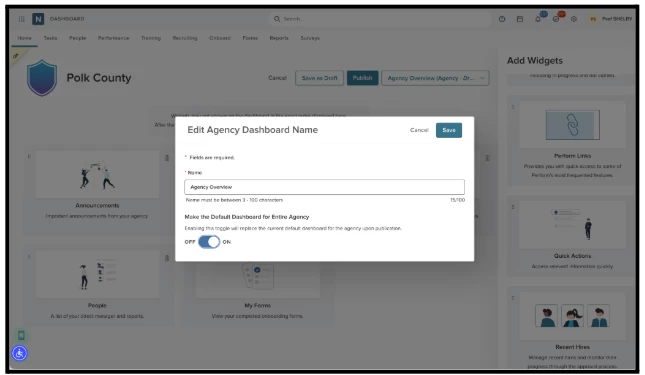
Agency Administrators now have the ability to create, publish, edit, and delete an Agency Dashboard that can be shared across the entire agency. This feature empowers admins to curate a centralized dashboard experience and set it as the default view for all users, while maintaining widget visibility based on individual user permissions. This also enables organization-wide visual analytics through a unified, admin-controlled dashboard.
Create & Publish Agency Dashboard
Agency Admins (HR Admin of All) can now create a new Agency Dashboard via a "Create New Agency Dashboard" option in the Dashboard dropdown. The creation flow includes naming the dashboard (3–100 characters), adding widgets in a draft state (visible only to admins), and publishing when ready. Upon publishing, a success message confirms the dashboard is live. Admins can also toggle the dashboard as the default view for all agency users, replacing each user's current default.
Value
Gives administrators centralized control over the dashboard experience for their agency, enabling them to push curated analytics views to all employees without requiring individual setup. This improves transparency and data-driven decision-making across the organization.
Audience
- Agency Administrators (HR Admin of All): Full access to create, edit, publish, and delete Agency Dashboards.
- All Unified Users (Employees): Receive and view published Agency Dashboards; notified upon first publication.
Examples
- An Agency Admin creates a new Agency Dashboard named "FY26 Workforce Overview," adds relevant widgets (people, tasks, announcements), saves as draft, reviews it, then publishes it as the default for all agency users.
- A second Agency Admin wants to update the published dashboard. Upon clicking Edit, they receive a warning that the dashboard was created by another admin and that changes will affect the entire agency. They confirm and proceed to add a new widget.
- An admin adds widgets that reference modules some employees don't have access to (e.g., Benefits). Employees without permission to those modules simply don't see those widgets — no placeholder or error is shown.
- An Agency Admin decides the Agency Dashboard is no longer needed, selects "Delete Dashboard" from the dropdown, confirms the action, and all users revert to the system default dashboard.
Items Removed from Customized Dashboard – Admin Settings
- 10-widget hard limit removed: The original dashboard design enforced a maximum of 10 widgets. This hard cap has been removed since it was a UX recommendation rather than a technical constraint. The system now provides a soft recommendation for an optimal widget count instead.