



Vetted Release July 9, 2026
Article Links
Timeline
When will this be released?
July 9, 2026 at 5pm PST
Is there downtime for this release?
No.
AI-Powered PHS Comparison Report
Detecting discrepancies across historical Personal History Statements (PHS) is one of the most critical—yet time-consuming—stages of a background investigation. To accelerate this process, Vetted now leverages advanced hybrid technology to cross-reference two submissions instantly.
The system utilizes deterministic logic to align standard, out-of-the-box questions alongside sophisticated Large Language Models (LLMs) to analyze custom agency questions. This combination successfully resolves semantic discrepancies (e.g., an applicant describing a past incident using different phrasing) and automatically filters out minor typographical variations.
How it Works
The comparison experience features an intuitive, easy-to-use toggle:
- AI Control Center Toggle "ON": Limits the volume to a highly focused, deep-dive comparison of 2 PHS reports utilizing full LLM semantic analysis.
- AI Control Center Toggle "OFF": Disengages the LLM engine and seamlessly maintains the existing behavior, allowing you to compare up to 4 PHS reports side-by-side using standard structural matching.
Value
- Frictionless Discrepancy Detection: Automatically flags shifting timelines, altered job titles, or omissions between an applicant's past and present submissions.
- Semantic Understanding: The LLM bypasses phrasing differences or typos, connecting the dots on custom questions even if the applicant words their answers differently across separate PHS forms.
- Enhanced Visibility: Drastically reduces the hours investigators spend manually reading lines side-by-side, surfacing critical background discrepancies in seconds.
- Flexible Analysis Modes: Easily switch between a broad, structural look across up to four historical files and a pinpointed, AI-synthesized deep dive between two files.
Audience
- Admins: (Can configure and manage the AI Control Center Toggles.)
- Investigators
Example
- Spotting Semantic Omissions: An applicant submitted a PHS to your agency two years ago listing a past employer as "ABC Security Services." On their brand-new PHS, they list the same timeframe but refer to it as "Self-Employed Asset Protection." With the AI toggle turned ON, Vetted recognizes the semantic connection, compares the underlying details, and alerts the Investigator to the naming discrepancy.
Items Removed because of this enhancement: None
AI-Powered PHS Module Summarization
With this new release, investigators have the option to leverage generative AI directly within any PHS module to instantly compile a clear, comprehensive summary of the applicant's responses. The AI synthesizes structured data and open-ended text fields seamlessly, highlighting key disclosures and timeline points so you can get right to the core of your investigation without losing hours to initial reading.
How it Works
The PHS Module Summarization feature provides a seamless, on-demand way to digest applicant data without manual tracking:
- Navigate to a PHS Module: From the Applicant File, open any completed PHS module (e.g., Employment History, Financial History, or Legal Disclosures).
- Trigger the AI Engine: Click the new Generate AI Summary button located at the top right of the module viewing panel.
- Review the Compiled Summary: Vetted automatically processes all Yes/No responses, single/multi-select dropdowns, and free-text fields using a unified contextual prompt. Within seconds, a structured, bulleted summary pane appears, surfacing exceptions, timelines, and key disclosures.
- Dismiss or Refresh: The summary remains anchored to the module for quick reference during your review and can be refreshed if the applicant updates their information.
Value
- Frictionless Synthesizing: Transforms pages of dense, multi-format responses into short, structured summaries with a single click.
- Time Savings: Eliminates hours spent reading through routine or repetitive text blocks, allowing you to focus your attention on verifying complex background details and determining applicant eligibility.
- Enhanced Visibility: Surfaces critical free-text disclosures and exceptions immediately, ensuring high-risk details are never buried in long explanations.
- Improved Case Management: Helps investigators quickly map out their interview and verification strategy right at the start of a case file review.
Audience
- Admins (Can configure and manage the AI Control Center Toggles.)
- Investigators
Example
- Triage Free-Text Disclosures: An applicant fills out the Financial History module with a 500-word free-text block explaining past credit issues. Instead of parsing the paragraph line-by-line during his first scan, the Investigator clicks Generate AI Summary. Within seconds, Vetted provides a bulleted list pinpointing the exact dates, companies, and statuses of the credit events.
Items Removed because of this enhancement: None
AI Control Center: Independent Feature Controls
To support your agency’s specific policy and compliance requirements, we are introducing two additional Admin-level controls to enable or disable our newest AI capabilities: PHS Module Summary and the PHS Comparison Report. This enhancement ensures that AI functionality remains completely opt-in, transparent, and perfectly aligned with each agency’s unique operational standards while still allowing Vetted to safely expand AI-powered capabilities over time.
How it Works
The two new configuration settings have been added directly to your existing AI dashboard framework:
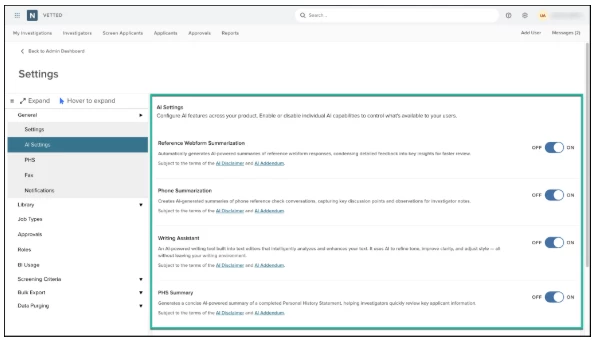
- Navigate to Settings > General > AI Settings (the dedicated subpage within General settings).
- You will find two new independent feature toggles positioned alongside your existing settings:
- PHS Module Summary Toggle: Turn "On" to allow background investigators to generate dynamic AI summaries of long-form applicant sections, or "Off" to completely hide the prompt.
- Comparison Report Toggle: Turn "On" to activate advanced Large Language Model semantic reconciliation for custom questions during historical PHS reviews, or "Off" to maintain standard structural matching.
- Each toggle operates with zero interdependencies. Activating or deactivating the PHS Module Summary or Comparison Report changes their states exclusively and will never alter or interfere with the configuration of your existing features (such as Reference Webform Summarization, Phone Summarization, or the AI Writing Assistant).
Value
- Operational Autonomy: Admins have complete control over the rollout of automated features, enabling them to introduce efficiencies at a pace that matches internal agency readiness.
- Risk Mitigation & Compliance: Easily map platform behavior directly to local municipal regulations, data sovereignty frameworks, or union agreements regarding the use of machine intelligence in public safety hiring.
- Granular Governance: Because every feature-specific toggle is fully isolated, agencies can confidently disable single tools undergoing policy evaluation without losing out on other authorized, time-saving automation rules.
Audience
- Admins
Example
- Strict Regulatory Review: A state police agency has strict data compliance guidelines undergoing administrative review regarding generative AI data parsing. The Admin navigates to the AI Control Center page and turns the toggles for both PHS Module Summary and Comparison Report to "Off." The rest of the investigative team continues their background tracking seamlessly, completely unaffected by the temporary restriction.
Items Removed because of this enhancement: None
Final Report Modernization
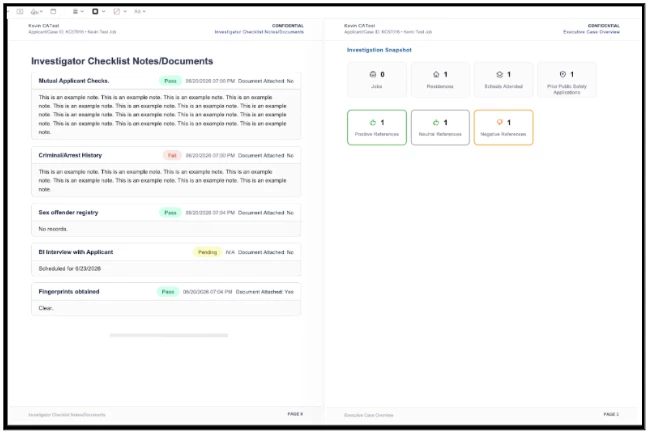
The Final Report is the ultimate culmination of an investigator's exhaustive work and a critical asset for agency decision-making. To transform this vital document into a cleaner, more intuitive, and visually engaging package, we have redesigned it from the ground up. This update introduces a standardized layout, behind-the-scenes data cleanup, and easy to digests visualization components—ensuring your deliverables are highly professional, easily scannable, and robustly accurate.
Value
- Polished Presentation: Instantly elevates the visual quality of your agency's background deliverables, providing a highly professional document for hiring panels, legal counsel, or command staff.
- Enhanced Risk Visibility: Striking color-coded badges draw immediate focal attention to verified milestones, active concerns, or completed investigative steps.
- Accelerated Reading: A refined reading hierarchy enables reviewers to digest dense background histories and multi-page investigations in a fraction of the time.
- Layout Integrity: Normalizes irregular user text entries and spacing anomalies, guaranteeing that the Final Report layout never suffers from overlapping text blocks or broken columns.
Audience
- Admin
- Investigator
- Reviewer
Example
- Submission Confidence: An Investigator completes a thorough, weeks-long file and launches the approval sequence. When the system generates the new Final Report layout, every section perfectly aligns behind the new style guidelines, allowing them to submit the packet immediately without wasting a single second on manual formatting tweaks.
Items Removed because of this enhancement: None
Automated Reference Reminders (released June 16)
Admins can now configure Vetted to automatically send an email reminder to references a set number of days before their correspondence webform response is due. Instead of investigators spending valuable time manually tracking down missing references or sending follow-up emails, Vetted does the heavy lifting for you behind the scenes.
How it Works
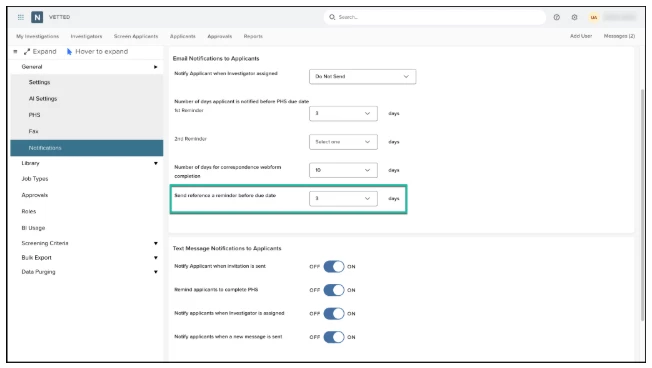
- Navigate to Settings > Notifications.
- Locate the setting labeled: "Number of days reference is notified before correspondence webform due date".
- Use the new "Send reference a reminder before due date" dropdown to select the appropriate value. The available options in this list will be one less day than the ‘Number of days for correspondence webform completion’ field selection.
- Click ‘Save’
Note: The default setting is N/A (no automatic reminder sent).
The Automated Reminder Email:
"Heads up! You’ve got just [number of days] days left to complete and submit your reference response for [applicant name] with the [agency name]! Your timely submission is vital to [applicant name] application process! Log in now: [reference login link]"
Value
- Accelerated Time-to-Hire: Speeds up the collection of critical reference data by nudge-reminding references automatically, keeping the applicant's file moving forward.
- Friction Reduction for Investigators: Eliminates the manual burden of tracking reference deadlines, leaving investigators free to focus on deep-dive background checks.
- Improved Reference Response Rates: Friendly, timed countdown notifications prompt faster action from personal and professional references before their links expire.
Audience
- Admins: Can configure and manage the notification dropdown settings on the backend.
- Investigators: Benefit directly from automated follow-ups and faster background completion times.
Examples
- Scenario 1: Standard Agency Configuration
An Admin at the Lee Village Police Department wants to ensure references submit their paperwork on time. They log into Vetted, navigate to Settings > Notifications, and set the Send reference a reminder before due date dropdown to 3 days. John Doe is an applicant, and his reference has a webform due on Friday. On Tuesday, Vetted automatically emails the reference:
"Heads up! You’ve got just 3 days left to complete and submit your reference response for John Doe with the Dallas Police Department! Your timely submission is vital to John Doe’s application process! Log in now: [Link]" - Scenario 2: Keeping it Manual (Default)
A small agency prefers to manage reference outreach personally. The Admin leaves the dropdown at its default N/A setting. No automated emails are sent, preserving their existing manual process.
Items Removed because of this enhancement: None
Bulk Update Applicant Status (released June 16)
Managing a high volume of applicants just got a little easier! With this release, we are introducing the ability to Bulk Update Investigation Statuses. Instead of clicking into each applicant file individually to manually change their status, department users can now update statuses—and add an optional comment—across multiple applicant records simultaneously.
How it Works
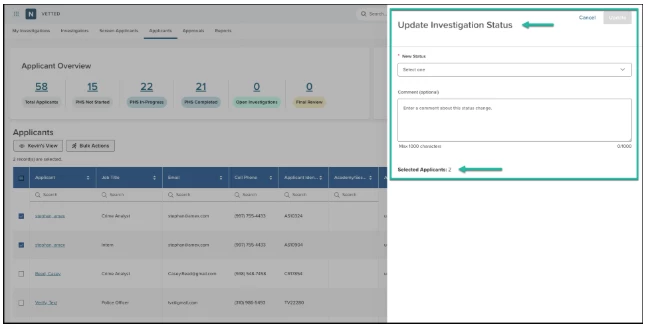
- Navigate to the Applicants or My Investigations tab.
- Select the applicants you want to update using the row-level checkboxes (or use the "Select All" header checkbox). You can select up to 200 applicants at a time across multiple pages.
- Click the Bulk Actions button and select the new Update Investigation Status option from the flyout menu.
- In the status form that appears within the flyout, configure the following:
- New Status (Required): Select from a dropdown of eligible statuses that do not require a multi-step approval workflow.
- Comment (Optional): Enter a free-text comment. If provided, this exact comment will automatically append to the history log of every selected applicant.
- Click Update. The grid will automatically refresh to display the new statuses instantly without requiring a manual page reload.
Eligible Statuses: To preserve your agency's compliance safeguards, this bulk action is intentionally restricted to statuses that do not trigger an approval workflow.
- Included Statuses: Did Not Complete PHS, Hired, Not Selected, PHS Rejected, Waitlisted and any of your agency's Custom Statuses (e.g., Polygraph, Medical/Physical).
- Excluded Statuses: Statuses that can be configured with an approval workflow process (Disqualified, Withdrawn, Admin Review, Conditional Offer) must still be managed through their designated workflow paths.
Value
- Time Savings: Update up to 200 applicant statuses in a single, fluid motion rather than performing hundreds of individual page navigations.
- Consistent Documentation: Applying an optional comment in bulk ensures that cohort-wide notes (such as class cancellations, no shows, or physical agility testing failures) are identically documented across all relevant files.
- Granular Audit Trails: Despite being executed in bulk, the system creates a discrete event log entry for each applicant file, capturing who made the change, the previous status, the new status, the timestamp, and any comments.
Audience
- Admins
- Investigators
- Custom Roles
Examples
- Scenario 1: Marking an Automated PHS Batch
Following a firm deadline, an Investigator reviews the Applicants grid and notices 15 applicants who failed to submit their paperwork on time. The Investigator selects all 15 applicants, hits Bulk Actions > Update Investigation Status, selects Did Not Complete PHS, and types: "Failed to submit PHS by the deadline." Vetted instantly updates all 15 files locally, updates their event logs, and pushes those individual status updates right to NEOGOV Insight. - Scenario 2: Moving Applicants to a Custom Phase
An Admin wants to move a group of 45 applicants who just cleared their background triage into the medical review phase. They select the entire group across two pages, open the flyout, choose their agency's custom status Medical/Physical, and click Update. The grid refreshes immediately, reflecting the new stage of the hiring journey for the entire group.
Items Removed because of this enhancement: None
Alphabetized Investigation Status
Finding and updating applicant statuses is now smoother in Vetted. For agencies managing complex background processes with numerous tracking stages, all Investigation Statuses are now automatically sorted alphabetically (A–Z). We have also introduced Type-to-Search (type-ahead) functionality, allowing you to instantly filter the dropdown list by typing a few characters.
How it Works
The enhanced dropdown list operates with intuitive, consistent guardrails:
- Strict A–Z Sorting: All system-standard and custom-configured statuses are dynamically alphabetized regardless of how many unique statuses your agency utilizes.
- Case-Insensitive Type-Ahead: Typing uppercase or lowercase characters will seamlessly filter the list in real time.
- Historical Preservation: This is a purely visual navigation enhancement. Any existing applicant records with previously assigned statuses remain completely unaffected.
Value
- Accelerated Navigation: Drastically reduces the time spent scrolling and hunting for specific milestones, especially for agencies with extensive, multi-step background procedures.
- Frictionless Status Updates: Type-to-search allows investigators to jump straight to the exact tracking label they need with just a few keystrokes.
Audience
- Admins
- Investigators
- Any Custom Role provisioned with status modification rights
Example
- Rapid Milestone Tracking: An Investigator finishes reviewing an applicant's polygraph results. Instead of scrolling through dozens of local custom statuses to find the right entry, they click the Investigation Status dropdown, type "poly", and the list instantly isolates "Polygraph Completed" for a single-click update.
Items Removed because of this enhancement: None
General Changes
Investigator Notetaking Updates
Investigators frequently document critical observations and verification milestones directly within their investigation checklists. Previously, when an Investigator entered a significant amount of detailed text, the platform would display the entire block inline within the grid. This caused checklist rows to expand excessively, breaking the scannability of the dashboard when users simply wanted to skim the grid to see which background items were complete.
To resolve this visual clutter and restore grid scanability, we have modernized the checklist notes interface. Notes that exceed a character threshold are now truncated with an ellipsis inline. To view, read, or edit the full text, a side-panel flyout can be triggered seamlessly, keeping your main workspace structured and perfectly aligned.
CA POST – Restrict Checklist Items
For California agencies, we have restricted the ability to edit the checklists in preparation for our new CA POST–Insert Supporting Documents Between Checklist Items.
With an upcoming release, Vetted will dynamically insert supporting documents directly after their corresponding checklist item or designated regulatory "Tab". For example, when auditing a CA POST checklist, documents uploaded for TAB D - DMV Records - 11 CCR §1953(g)(1) will print immediately following that specific checklist criteria row rather than at the back of the packet.
This structural improvement keeps evidence contextually tied to verification steps, completely satisfying compliance standards.
Appendix: Bugs Resolved
Functional
| Scenario: When an issue is encountered | Issue Resolved |
| Applicant Profile - Avatar Initials not centered where no applicant profile picture is uploaded. | Avatar initials are now centered. |
508(C) Compliance
| Screen(s) | Count of Bugs Resolved |
| Admin Settings - Bulk Export | 1 |
| Admin Settings - PHS Forms | 1 |
| Admin Settings - Roles | 3 |
| Admin Settings - Job Types | 1 |
| Investigator - Investigator Checklist | 1 |
| Investigator - Applicants Grid | 1 |
| Applicant - Profile | 1 |
| Reports - Report Catalog | 1 |
| Applicant Details - Assign Investigator | 1 |
| Applicant - Mobile | 1 |
| PHS - Personal References | 1 |