



Vetted Release June 16, 2026
Article Links
Timeline
When will this be released?
June 16, 2026, at 5 pm PST
Is there downtime for this release?
No.
PHS Module Note-Taking and Report Automation
(Released on May 26, 2026)
Background investigators frequently handle immense volumes of clarifying information, out-of-state verification logs, and follow-up details for each section or module of a Personal History Statement (PHS). Previously, investigators had to document these findings outside the system or dump all cross-references into a single, global summary section.
To eliminate this fragmented process, we’ve introduced module-specific notes. This updates the case file layout by embedding a dedicated, rich-text note-taking workspace directly within each PHS module, while introducing a dynamic backend token system that automatically pulls these local notes into your investigative summary.
How it Works
This feature integrates right into your existing investigation workspace and consists of two components:
1. Dynamic Template Token Integration (Reporting Information)
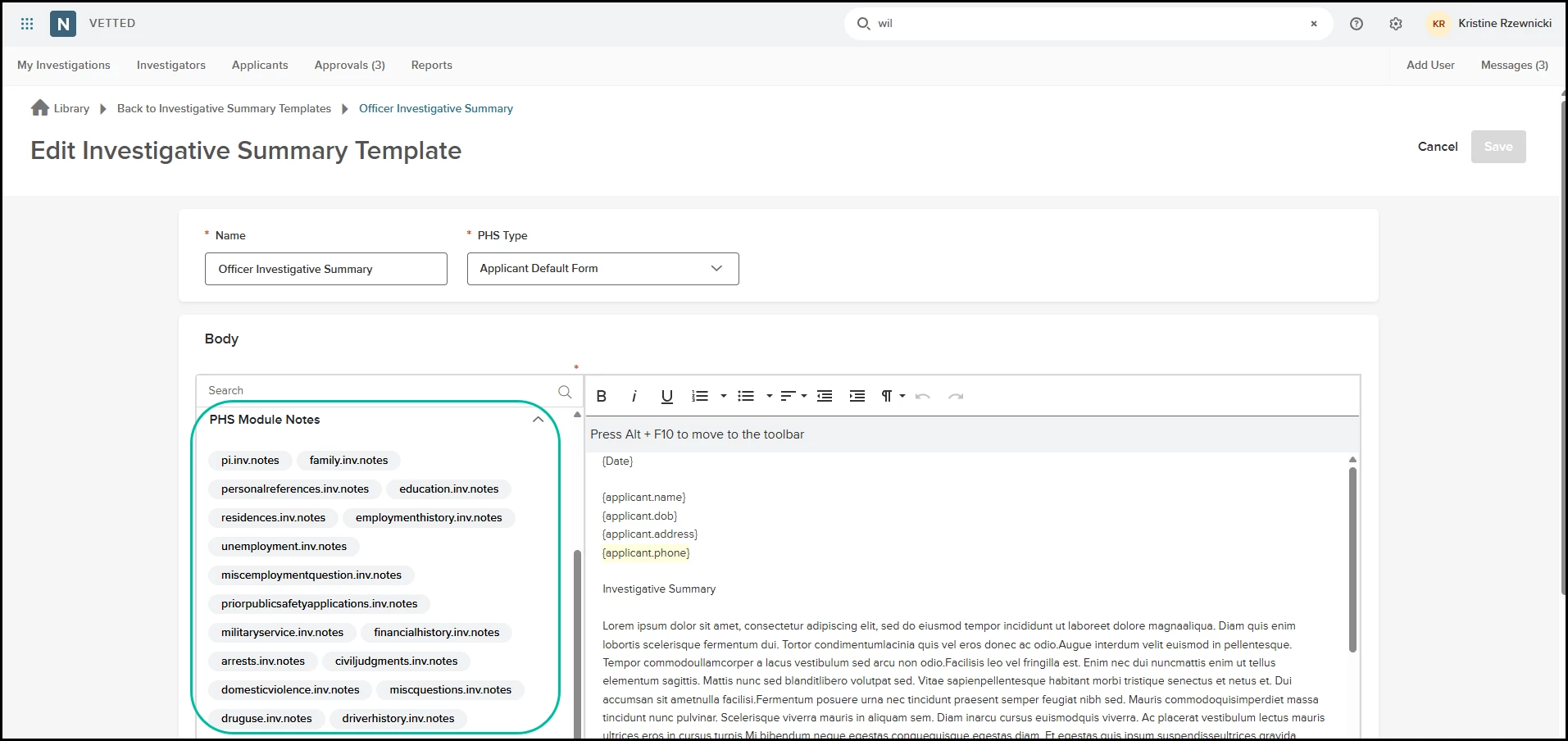
- Where to Find It: For Administrators, navigate to Settings > Investigator Summary Templates.
- The Token Hub: Every single active PHS module now generates its own unique, localized reporting token (for example: {InvestigatorNotes_EmploymentHistory} or {InvestigatorNotes_References}). These tokens populate the left panel of the template builder. When an Admin selects a specific PHS type from the template dropdown, the token panel automatically refreshes to display the matching modules.
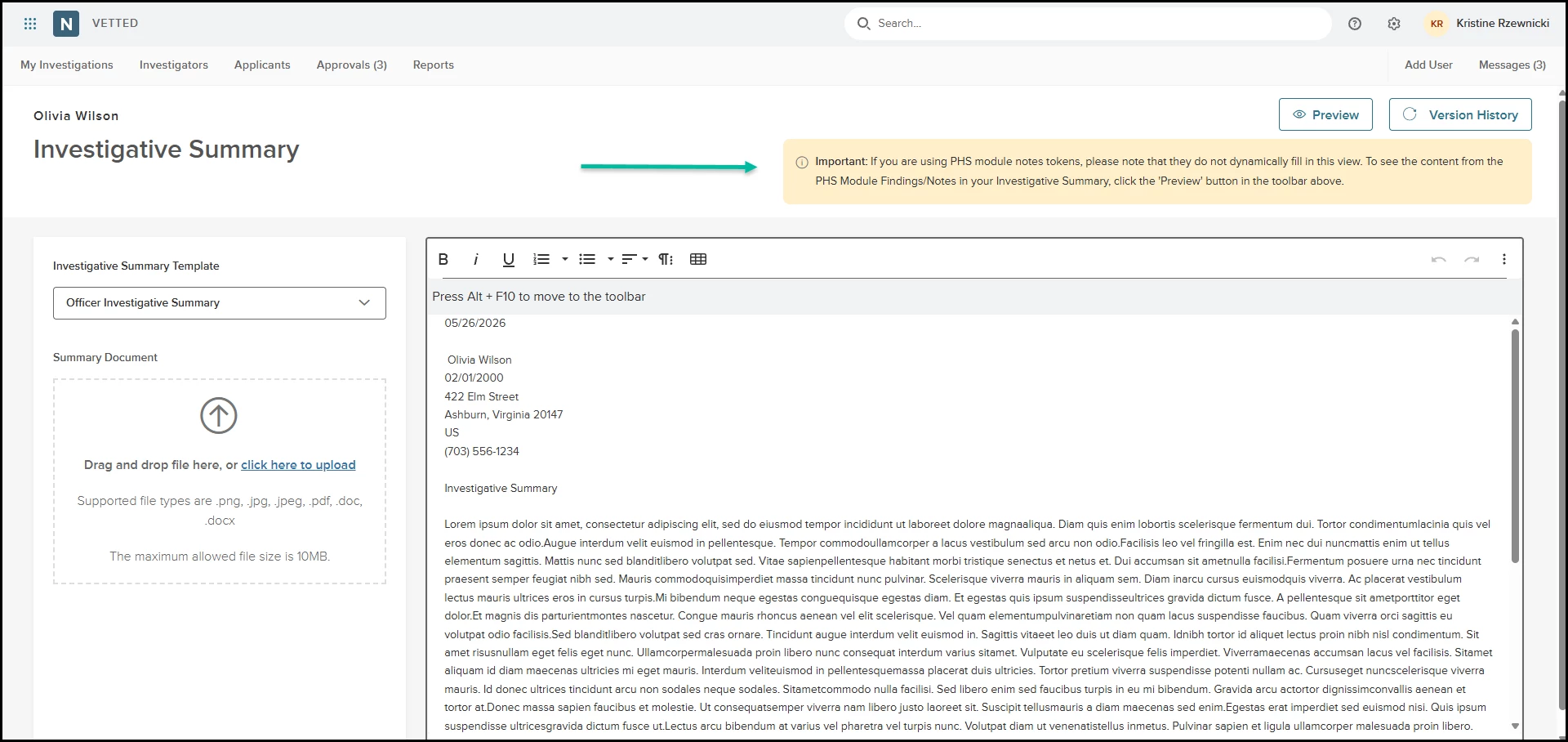
- Automated Extraction: When building or editing your agency’s Investigator Summary Template, simply select and position these tokens where desired. When an investigator finishes an investigation and generates the final summary report in an applicant's profile, Vetted automatically extracts the latest, real-time notes saved inside those individual modules and renders them cleanly in place of the tokens. Investigators are notified via a new banner that PHS Module Findings/Notes content can be viewed by selecting the Preview button when using PHS module notes.
Note: If a module has no notes recorded, the token resolves to an empty string.
2. The Module Notes Flyout Panel (Capturing Information)
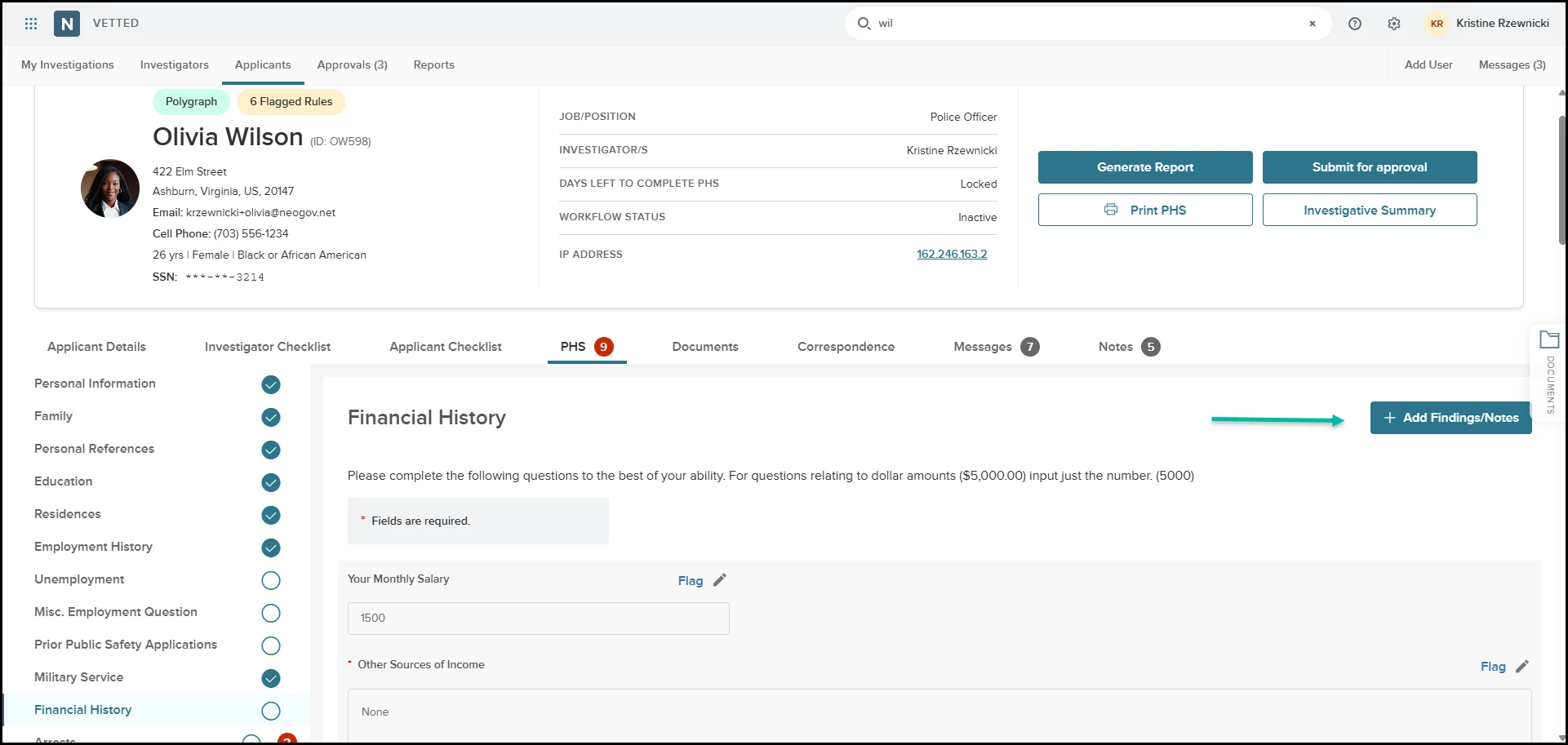
- Where to Find It: Open any applicant profile, navigate to the PHS tab, and click into any module or section (for example: Employment History, Financial, or References). Look for the brand-new Add Findings/Notes button positioned at the top of the workspace.
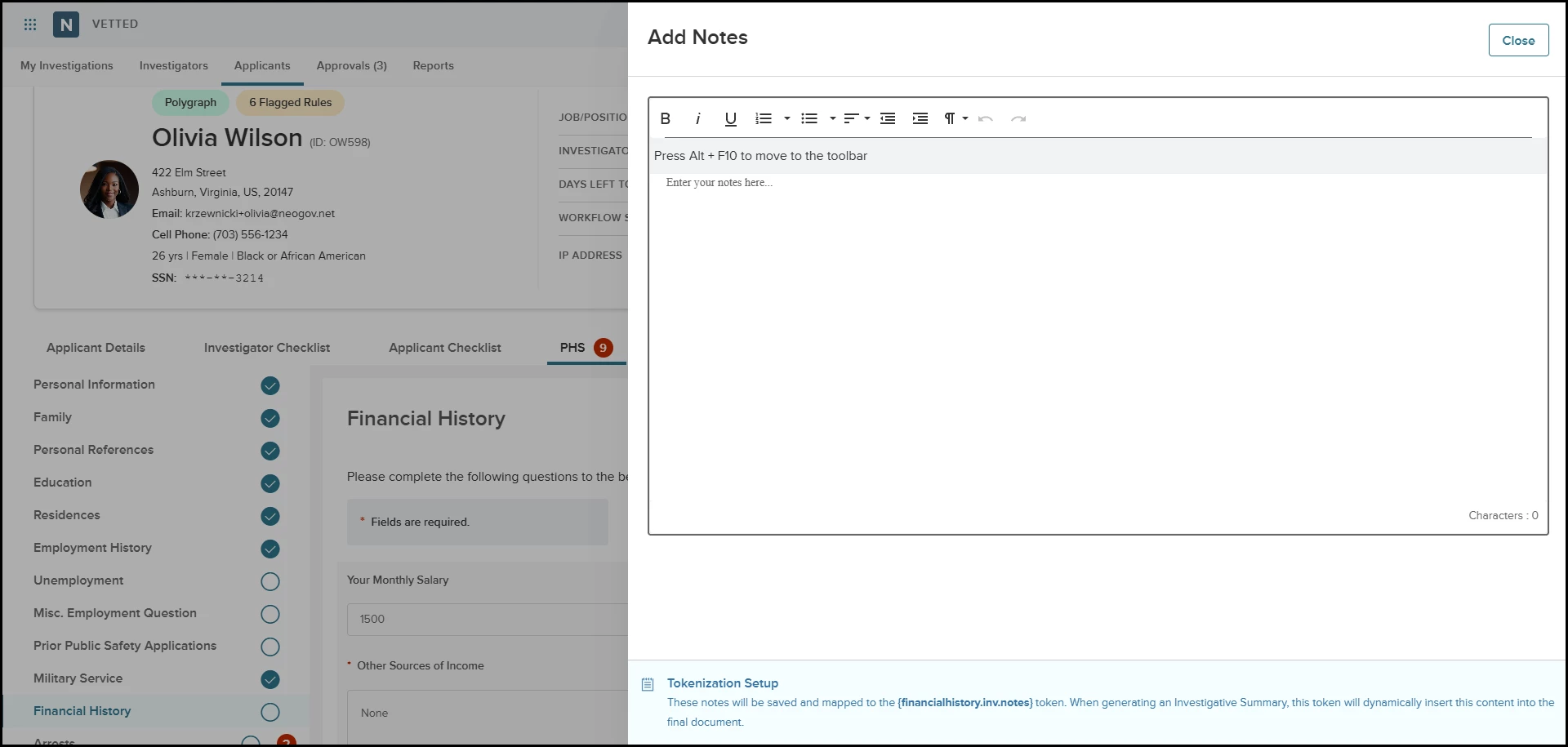
- The Interface: Clicking this button slides out a responsive flyout panel anchored to the right side of the screen. Inside this panel, you have a full visual editor for formatting text, with standard styling tools (bold, italics, bulleted lists, and active hyperlinks).
- Automated Data Protection: As you type your investigative findings, Vetted auto-saves your entries in real time. There is no character limit, spell check is active by default, and your text securely persists across sessions.
- Strict Privacy Guardrails: These notes are stored in the backend model, explicitly linked to that applicant file and module. They are purely investigator-facing and are strictly hidden from applicant dashboards and excluded from applicant-facing exports.
Value
- Centralizes Investigative Findings: Keeps section-specific notes, witness-tracking logs, and verification details organized alongside the matching applicant data, eliminating paper notes and external files.
- Erases Double Data Entry: By utilizing module-specific tokens, investigators never have to copy and paste their field notes into a final report. Writing the note inside the module automatically structures the final summary document.
- Custom Security Customization: Leverages your agency's Custom Roles framework to protect data integrity. Admins can grant precise permissions (View and Modify, View Only, or No Access) at the page level, ensuring sensitive evaluations remain restricted to authorized background personnel.
- Safe, Predictive Builder Layout: The template config page features a quick Preview option so Admins can test token transformations before deployment, and includes a validation warning if an Admin attempts to change PHS types mid-edit, protecting templates from accidental overrides.
Audience
- Admins - Configure the Investigative Summary Template w/ Module Notes tokens, if desired.
- Investigators: Place some or all investigative findings and notes within each specific PHS Module.
Examples
- Investigator Workflow w/Token Use: While auditing an applicant’s Employment module, an investigator calls the candidate's former employer to confirm employment dates. Instead of recording information on a notepad, they click Add Findings/Notes, open the right-hand panel, and type out the full verification history. The text auto-saves instantly. Later, when they export the Investigative Summary, the findings/module notes automatically render in the employment report block without a single extra keystroke.
- Findings/Module notes w/out Token Use: While reviewing an applicant’s Residences module, an investigator enters notes regarding the applicant’s response (for example: "Lists landlord as 'friend' but address matches his uncle’s name. Clarify relationship.") When completing the Investigative Summary, the investigator controls whether those notes appear in the final summary. The investigator can refine their notes utilizing the Writing Assistance and copy and paste them into the summary, or simply use them as a reference when writing their summary. Alternatively, these notes can be kept solely within the applicant's background file and omitted from the summary altogether.
Items Removed because of this enhancement: None
Appendix: Bugs Resolved
Functional
| Scenario: When an issue is encountered | Issue Resolved |
| An error message stating that “middle name must be null/empty” was returned when requesting credit and social media reports via the Vetted/First Choice integration. | The issue with the middle name was resolved. |
508(C) Compliance
| Screen(s) | Count of Bugs Resolved |
| N/A | N/A |