



Vetted Release Notes August 17, 2026
Article Links
Timeline
When will this be released?
August 17, 2026 at 4pm PST
Is there downtime for this release?
No.
Automatic PHS Chronological Sorting & Gap Analysis
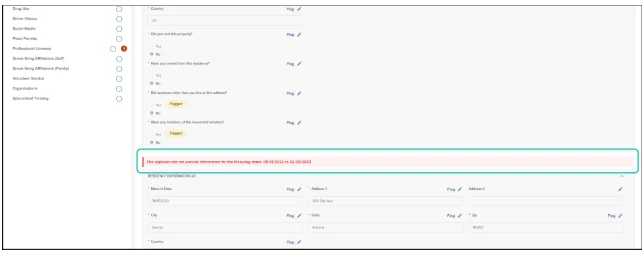
Reviewing an applicant’s Personal History Statement (PHS) just got a major boost. We have eliminated the tedious manual work of aligning out-of-order dates and hunting down timeline gaps across multi-record PHS modules. Upon submission of an applicant’s completed PHS, Vetted now automatically orders historical entries from most recent to least recent and immediately flags timeline gaps, keeping your background reviews fast, thorough, and precise.
How it Works
Once an applicant submits their Personal History Statement, Vetted’s automated timeline engine goes to work across date-sensitive modules (such as Employment History, Residences, and Education):
- Automatic Reverse-Chronological Ordering: No matter what order an applicant enters their past jobs or residences, Vetted automatically sorts and renders all records from most recent to least recent upon submission.
- Automated Gap Detection: The system continuously scans the end date of each record against the start date of the next historical record based on specific category thresholds:
- Prior Employment (>3 days): If a gap between two jobs exceeds 3 days, the system automatically triggers a gap alert.
- Residences (>1 day): If a gap between two residential stays exceeds 1 day, the system flags the missing period.
- Education (>1 month): If the gap between two High School, College, or Trade School records exceeds 1 month, a gap alert is displayed.
- Visual Gap Alerts: If a gap is detected between entries, Vetted automatically inserts a red inline message showing the missing date range directly between those entries in the PHS workspace.
Value
- Saves Hours of Manual Auditing: Investigators no longer need to manually map dates on scratchpads or calculate month-by-month overlaps to reconstruct an applicant's history.
- Eliminates Overlooked Gaps: Automated detection ensures that unaccounted-for periods of time—which can hide undisclosed terminations or personal issues—are instantly brought to light.
- Standardizes File Audits: Creates a uniform, scannable baseline layout for every PHS submitted by applicants.
Audience
- Admins
- Investigators
- Custom Roles (with permission)
Example
- An applicant enters four previous jobs out of order—listing their 2018 retail job first, followed by their current 2025 security role, and then a 2021 office position. Upon PHS submission, Vetted instantly reorganizes the employment card stack into perfect reverse-chronological order (2025 → 2021 → 2018) without altering any underlying applicant data.
Items Removed because of this enhancement: None
Centralized “My References” Workspace
Currently, investigators must navigate into individual applicant profiles to monitor reference responses and take required actions. To streamline this process, we've introduced the “My References” workspace.
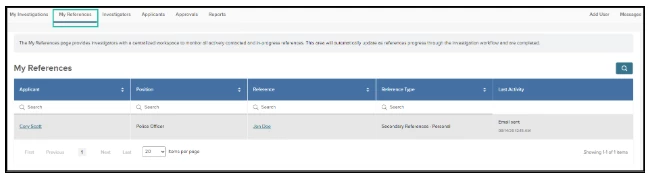
Located right next to the "My Investigations" tab, this dedicated page brings together all active, in-progress reference checks in one place. By bringing reference activity and correspondence tracking into a centralized workspace, users can quickly identify pending references and take action without navigating into individual applicant profiles.
Once a reference is marked complete, it is automatically removed from the My References workspace, ensuring the list remains focused on references that still require attention.
How it Works
- Send correspondence to an applicant's reference.
- Navigate to the My References tab to view your centralized list of all active reference checks across your assigned applicants.
- Review the columns to quickly identify the Applicant, Position, and Reference Type (e.g., academic, employment/professional, or personal).
- Check the Status column to view the most recent update, such as an email being sent, along with the associated date and time. Hover over the Status to view a tooltip containing the full chronological history of prior updates.
- Click the hyperlinked Reference name or organization (e.g., Jane Doe or Austin Peay State University) to open the reference directly. This opens the same reference view available in the Correspondence Hub. Alternatively, click the Applicant hyperlink to route directly back to their main profile.
Value
- Enhanced Visibility: This centralized view provides enhanced visibility into references that have not yet responded to investigation inquiries.
- Time Savings: Investigators can quickly scan the status of all active references in one place, saving time and reducing the need to navigate through individual applicant profiles.
- Streamlined Tracking: The chronological status history provides clear insight into prior activity, helping ensure important updates are not overlooked while keeping the review process organized and efficient.
Audience
- Admins
- Investigators
- Custom Roles with View or Modify access to My References.
Example
- Daily Queue Management: An Investigator starts their shift and opens the "My References" tab. They immediately see that an employment reference for applicant John Doe has submitted a reference packet. Instead of navigating into John's profile, the investigator opens the reference directly from the grid, marks it as "Complete–Positive," and watches it instantly clear from the queue.
Items Removed because of this enhancement: None
PHS Corrections Review Tracking
Keeping track of applicant updates just got easier. Agency users can now mark individual Personal History Statement (PHS) corrections as reviewed directly from the Corrections tab. This gives investigators a clear way to track which applicant-made changes they've already evaluated.
How it Works
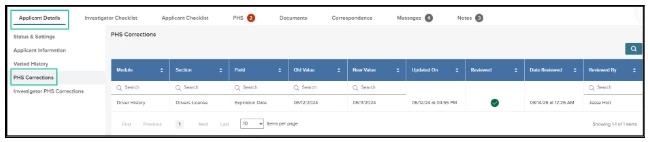
- When an applicant updates their PHS responses, the Corrections tab displays the changes in a grid showing the original and updated values.
- Each correction now includes a "Reviewed" column with a checkbox that can be marked by the agency user.
- Once marked as reviewed, the system records the review status along with the date and time of review.
Value
- Review Status Visibility: This feature provides investigators with a clear way to track which applicant corrections have already been reviewed.
- Eliminates Manual Tracking: Recording statuses directly in the Corrections grid allows investigators to easily see which items are pending or complete without manual documentation.
- Prevents Review Gaps: By maintaining a single source of truth for review statuses, this feature ensures the process remains organized and that all applicant corrections are thoroughly evaluated.
Audience
- Admins
- Investigators
- Custom Roles with View access to PHS Corrections.
Example
- An Investigator is reviewing a lengthy list of employment history changes submitted by an applicant. They evaluate five items, check them off in the "Reviewed" column, and step away to conduct an interview. When they return, they can instantly see exactly where they left off based on the recorded review statuses and the date and time of each review.
Items Removed because of this enhancement: None
Final Report Generation–Expanded Selections
We’ve expanded the items available in the Generate Final Report flyout panel to give you complete control over building comprehensive background investigation files. Users can now include essential communications, audit records, and pre-set rule evaluations directly within the exported report package.
How it Works
When launching the Generate Final Report flyout panel, users will now see additional selectable profile items to incorporate into the final compiled document:
- Messages: Include recorded communications and messaging history exchanged during the investigation process.
- PHS Corrections Grid: Embed the complete audit log of changes, adjustments, and updates made by the applicant to their Personal History Statement (PHS) prior to submission.
- PHS Flagged Rules Summary: Include a summary section detailing any system rules or flags triggered during the applicant’s PHS submission.
Value
- Comprehensive File Compilation: Captures vital background context—such as flagged PHS Responses, correction histories, and applicant communications—all within a single, cohesive PDF package.
- Enhanced Auditability & Transparency: Provides reviewers and command staff with complete visibility into how discrepancies were resolved and why specific areas were investigated.
- Streamlined Workflow: Eliminates the need to manually export separate communication logs or review grids, saving valuable time during report assembly.
Audience
- Admins
- Investigators
- Custom Roles (with permission)
Example
- Command Staff Review: An Investigator is preparing a complex file for final executive review. By checking Messages and PHS Flagged Rules Summary in the flyout panel, they ensure command staff can immediately see flagged response areas and the exact conversation where the applicant may have clarified those points.
Items Removed because of this enhancement: None
General Changes
Modernized Final Report Enhancement
To ensure key information is always accessible to reviewers, we’ve moved applicant details—such as the Applicant Photo, basic demographics, and primary identifiers—directly into the Executive Case Overview on page 2 of the Final Report.
Previously, this information was located only on the first page of the Personal History Statement (PHS). By placing key identifying information prominently at the forefront, this update prevents crucial data from being missed—even if the PHS is buried deep in the final report or omitted altogether.
Bulk Export Document Expansion
When exporting large volumes of applicant data for offline reporting, regulatory audits, or chain of custody tracking, maintaining a complete, unaltered historical record is critical. With this release, Admins and authorized custom roles can now include applicant Messages and the detailed PHS Corrections grid directly within bulk exported document packages.
To ensure a logical and continuous document flow:
- Messages: Embeds the complete record of internal messages and direct candidate communications sent during the investigation.
- PHS Corrections Grid: Automatically positioned immediately following the Messages section, this dedicated section provides a line-by-line audit trail of every change made by the applicant on their PHS prior to submission.
Appendix: Bugs Resolved
Functional
| Scenario: When an issue is encountered | Issue Resolved |
| Small font size on Print PHS | Agency badge or seal uploads had no maximum size limits, allowing large image uploads to stretch across the whole page. Maximum dimensions have now been set to 400x400 pixels. |
508(C) Compliance
| Screen(s) | Count of Bugs Resolved |
| N/A |
|