



Vetted Release Notes March 2, 2026
Article Links
Timeline
When will this be released?
March 2, 2026, at 5 pm PST
Is there downtime for this release?
No.
DocuViewer: All Your Documents, One Single View
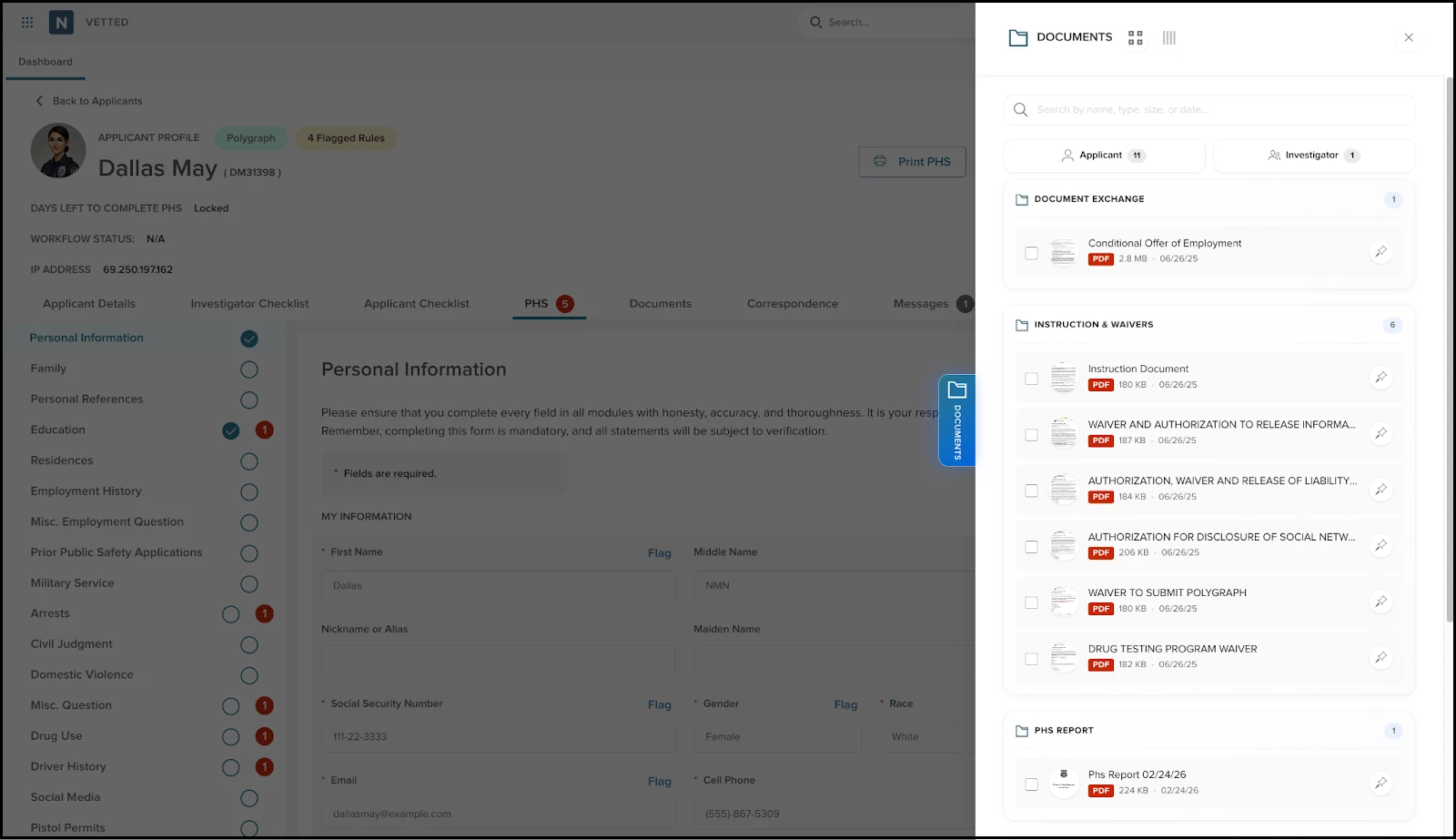
We know that hunting through multiple folders and checklists for a single file can slow down even the best investigator. We built the DocuViewer as a powerful new way to access your data pooling all documents in a single slide-out window.
Don't worry—your documents aren't moving! They are still organized and stored exactly where you left them in the checklist and file repositories. The DocuViewer simply makes it faster than ever to search, view, and compare docs without ever leaving your current page.
How it Works
You can access the DocuViewer by clicking the new Documents tab on the right edge of any applicant file. Once open, you have a suite of tools at your fingertips:
- Smart Search & Filter: Find any doc instantly using the search bar, or use the toggle to filter by Applicant vs. Investigator uploads to cut through the noise.
- View & Verify: Click any document to open our enhanced pop-up. Use the Hide button to toggle documents out of the way while you cross-reference info in the PHS, then pop them back up instantly.
- Side-by-Side Comparison: Need to verify credentials? Select up to 4 documents and click compare to view them side-by-side in a single view.
- Pin for Later: Anchor your most-used docs (like a Birth Certificate or DD-214) to the top of the list for instant retrieval throughout your session.
- Custom Perspectives: Switch between Card View to see thumbnails or a streamlined List View for a more compact workspace.
Value
- Frictionless Navigation: Access every single document in the file without ever leaving the page you are currently working on.
- Consistent Organization: Enjoy a new way to view files while maintaining the peace of mind that your original folders and checklists remain unchanged.
- Enhanced Accuracy: The "Hide" and "Compare" features reduce the mental tax of cross-referencing, making it easier to spot discrepancies.
- Streamlined Auditing: Quickly filter for investigator-uploaded documents to ensure all internal requirements are met.
Audience
- Investigators
- Admins
- Reviewers
- Custom Roles (with access to applicant files)
Examples
- Multi-Doc Verification: An Admin selects an applicant’s Driver's License, Social Security Card, and Passport. Using the Comparison tool, they view all three side by side to ensure the legal name is consistent across all official identity markers.
- The "Hide" Power-Move: While reviewing the Arrests module of the PHS, an investigator opens the DocuViewer to compare the uploaded arrest report with the applicant's arrest report. They use the Hide button to quickly toggle document view on and off to verify specific dates against the PHS fields.
Items Removed because of this enhancement: None
General Changes
This section includes changes to the product's basic design that don’t affect its function, such as the location of common links or menu changes, the addition of tooltips, extra filter and sorting options, or modifications to page titles.
Infrastructure Modernization: Applicant Portal Performance Boost
We have upgraded the applicant-facing portal's underlying framework to the latest modern standards. While you won't see any changes to the PHS layout, this "under-the-hood" update ensures a faster, more responsive experience for candidates. It provides a more stable foundation for future feature releases.
Examples
Applicants will notice smoother transitions and faster load times when navigating complex PHS modules, such as Employment History or Residency.
Enhanced Data Loading for Grids
We’ve refined how data is rendered in applicant-facing lists and tables. This ensures that even for applicants with extensive histories (such as long lists of residences or prior employers), the page remains lightweight and performant.
Examples
An applicant adding their 10th previous residence will experience the same snappy performance as they did when adding their first.
Appendix: Bugs Resolved
Functional
| Scenario When Issue Encountered | Issue Resolved |
| N/A |
508(C) Compliance
| Screen(s) | Count of Bugs Resolved |
| N/A |