



Vetted Release Notes May 26, 2026
Timeline
When will this be released?
May 26, 2026 at 5pm PST
Is there downtime for this release?
No.
Applicant Profile Header – Redesigned 3-Column Grid with Privacy-First Safeguards
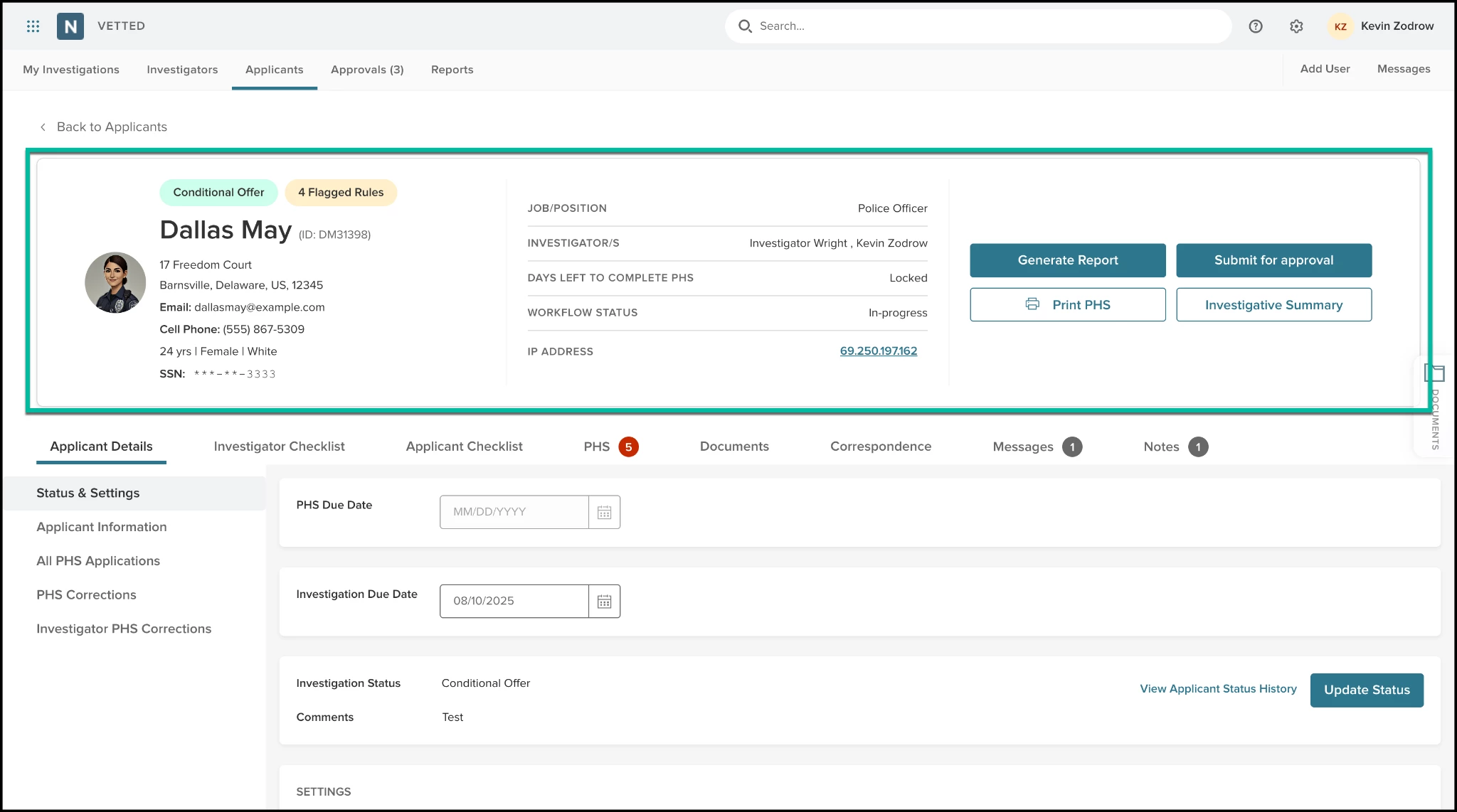
To maximize efficiency and safeguard sensitive candidate data, we have completely overhauled the Applicant Profile Header. This layout replaces the previous layout with an organized, highly scannable 3-column responsive grid. It clusters essential demographics, critical workflow metadata, and high-frequency action buttons into a unified control panel, introducing slick hover interactions that protect Personally Identifiable Information (PII) from "shoulder surfing."
How it Works
When you open any applicant profile, the top banner workspace separates your workflows into three functional zones:
- Left Column: Personal Details & Secure Identifiers
- Displays the applicant's Avatar, status badges (e.g., "PHS Completed"), Full Name in a prominent style, and unique Applicant ID.
- Stacks vital contact and structural details vertically: Address, Cell Phone, Demographics (Age | Sex | Race), and SSN.
- Labels for Cell Phone: and SSN: are explicitly bolded for fast scanning.
- Privacy Hover Reveal: To protect sensitive information in open offices, the candidate's Social Security Number is masked by default (e.g., ***--1234). Hovering your mouse cursor smoothly reveals the full 9-digit number. Similarly, hovering over the applicant's Age (e.g., 41 yrs) reveals their exact Date of Birth in an MM/DD/YYYY format.
- Middle Column: Workflow Information
- Provides quick visibility into key operational milestones. It pairs clear uppercase labels on the left with clean, right-aligned data values:
- JOB/POSITION (e.g., Police Officer)
- DAYS LEFT TO COMPLETE PHS
- WORKFLOW STATUS
- IP ADDRESS
- One-Click IP Geolocation Tracker: Clicking the applicant's listed IP address automatically launches a new secure browser tab executing a Google search for that specific IP's geolocation, letting investigators instantly verify submission integrity.
- Provides quick visibility into key operational milestones. It pairs clear uppercase labels on the left with clean, right-aligned data values:
- Right Column: Primary Actions (CTAs)
- Consolidates high-frequency tasks into four centered, high-visibility action buttons: Generate Report, Submit for approval, Print PHS, and Investigative Summary.
Value
- Eliminates Scrolling Fatigue: Investigators and Reviewers can digest a candidate’s background status, tracking timelines, and demographics the split second the page loads without hunting through sub-tabs.
- Shared Workspace Protection: Automated masking blocks sensitive identity data from casual onlookers or unauthorized foot traffic in your background unit, keeping your agency compliant with data privacy standards.
- Instant Fraud & Integrity Screening: Built-in IP location mapping allows investigators to spot-check submission origins instantly, ensuring the candidate submitted their paperwork from a verifiable location.
- Perfect Mobile Scaling: The responsive layout snaps into a single-column stacked layout on smaller screens or tablets, ensuring fields stay centered and fully readable while processing files in the field.
Audience
- Admins
- Investigators
- Reviewers
Examples
- Scenario 1 (Privacy Control): An investigator is validating an applicant's background profile while a colleague stands next to their desk. Because of the new privacy safeguards, the candidate’s full SSN and birth date remain completely hidden. The investigator hovers over the masked digits to cross-reference them against a physical fingerprint card, verifying the background information cleanly.
- Scenario 2 (Integrity Check): While auditing a Personal History Statement, an investigator notices an unfamiliar IP address under the workflow metadata column. They click the IP address link; Vetted opens a new tab showing a map location for that IP. The investigator confirms it matches the applicant's declared residence city, confirming account security.
Items Removed because of this enhancement: None
Applicant Engagement Notifications
Managing background investigation timelines requires proactive candidate communication. To help agencies keep applicants on track and prevent missed deadlines, we have updated our notification settings to support a secondary automated reminder. Admins can now configure a two-tiered reminder system that dynamically adapts to your agency's timeline and keeps pressure on candidates to finish their Personal History Statements.
How it Works
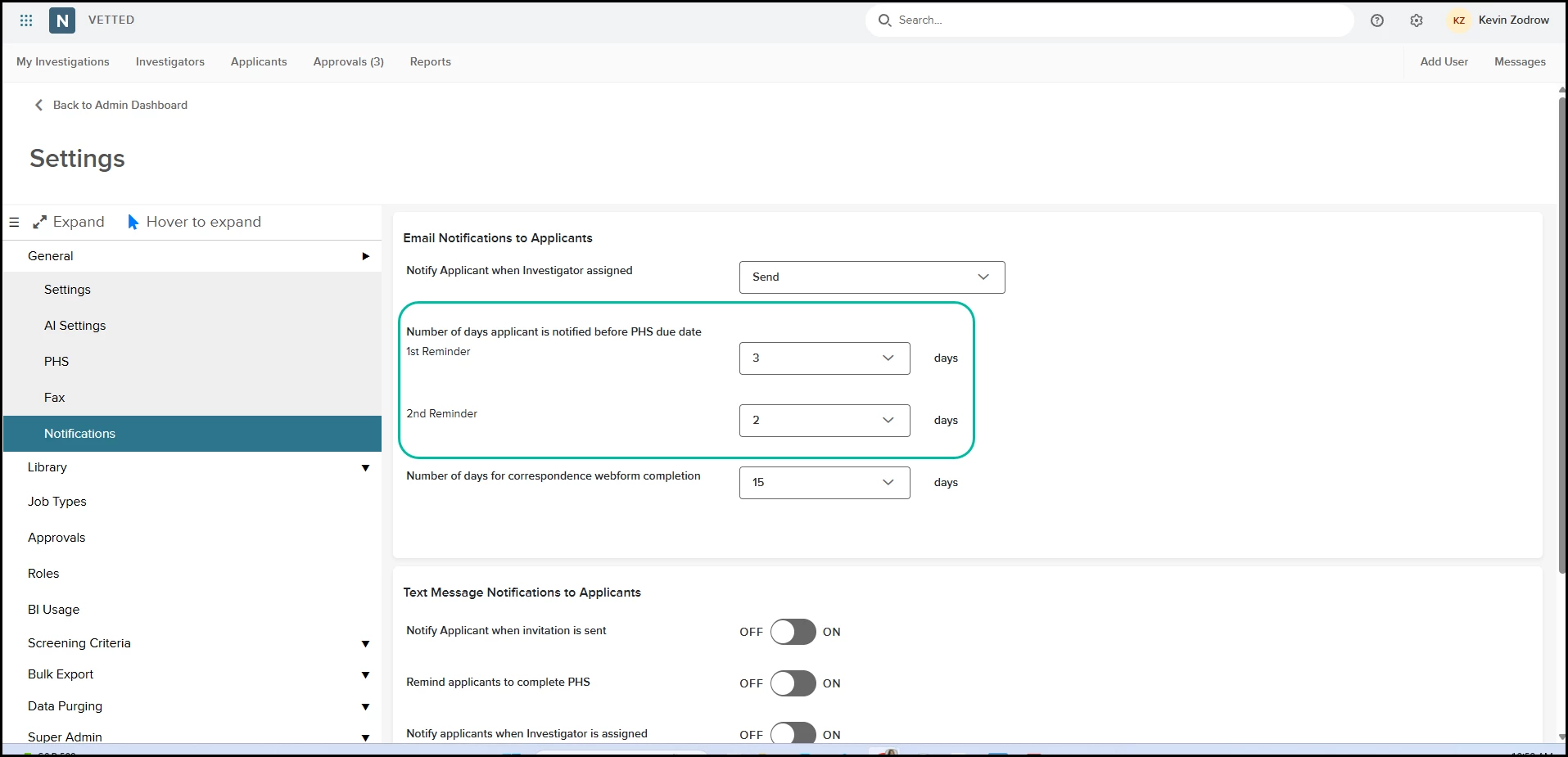
- Navigate to Settings > Notifications tab where you will find a newly organized interface layout:
- Look for the brand-new structural subheading: Number of days applicant is notified before PHS due date.
- The original configuration field underneath this heading has been streamlined and relabeled to 1st Reminder.
- Directly below that field, you will find a new input field labeled 2nd Reminder.
- Built-in system validation rules ensure accurate logic configuration:
- Sequence Lock: The 2nd Reminder field remains locked and can only be set if a value is first saved in the 1st Reminder field.
- Value Logic: The system strictly prevents identical values across both fields. The 2nd Reminder value must be fewer days than the 1st Reminder (e.g., if the first reminder goes out at 7 days, the second can be set to 3 days).
- Both reminders trigger dynamic system emails. Rather than sending static text, Vetted automatically extracts the countdown days, specific job position, and your agency name to tailor the message.
Updated Dynamic Email Format:
- Subject Line: Vetted PHS - [X] days remaining!
- Body: Heads up! You’ve got just [X] days left to complete and submit your Personal History Statement (PHS) for the [Job Position] position with the [Agency Name]! Don’t miss out on this opportunity to serve your community! Log in now: Login [link]
Value
- Reduces Application Drop-off: Introducing a secondary cadence ensures applicants who missed or overlooked the first notification receive a timely "final call" warning.
- Customizable Escalation Windows: Gives your agency granular control over communication urgency, allowing you to space out notifications strategically based on your hiring windows.
- Flawless Personalization: Dynamic field injection guarantees that automated notifications never look robotic, pulling real-time data elements so candidates always know exactly what position and agency they are applying to.
Audience
- Admins
- Applicants
Examples
- Scenario 1: An Admin configures the 1st Reminder for 7 days and the 2nd Reminder for 2 days for an open Dispatcher application. An applicant forgets about their statement over the weekend. At day 7, they receive a dynamic nudge. Busy with their current job, they overlook it. At day 2, the second dynamic alert hits their inbox ("Vetted PHS - 2 days remaining!"), driving them to log in immediately and finish submitting their documents before the link expires.
Items Removed because of this enhancement: None
PHS Completion & Engagement Modals — Gamifying Onboarding and Reducing Drop-off
Completing a public safety Personal History Statement (PHS) is famously grueling, and candidate drop-off is a major obstacle for background investigative units. To maintain applicant momentum and prevent users from walking away mid-process, Vetted now features two sophisticated, responsive system modals: a Section Completion Modal that gamifies progress, and an Exit Intent Modal that leverages psychology to keep candidates in the application pipeline.
How it Works
These behavioral interventions are built directly into the applicant's background workspace. They require zero manual setup by your agency and automatically adapt to real-time candidate data.
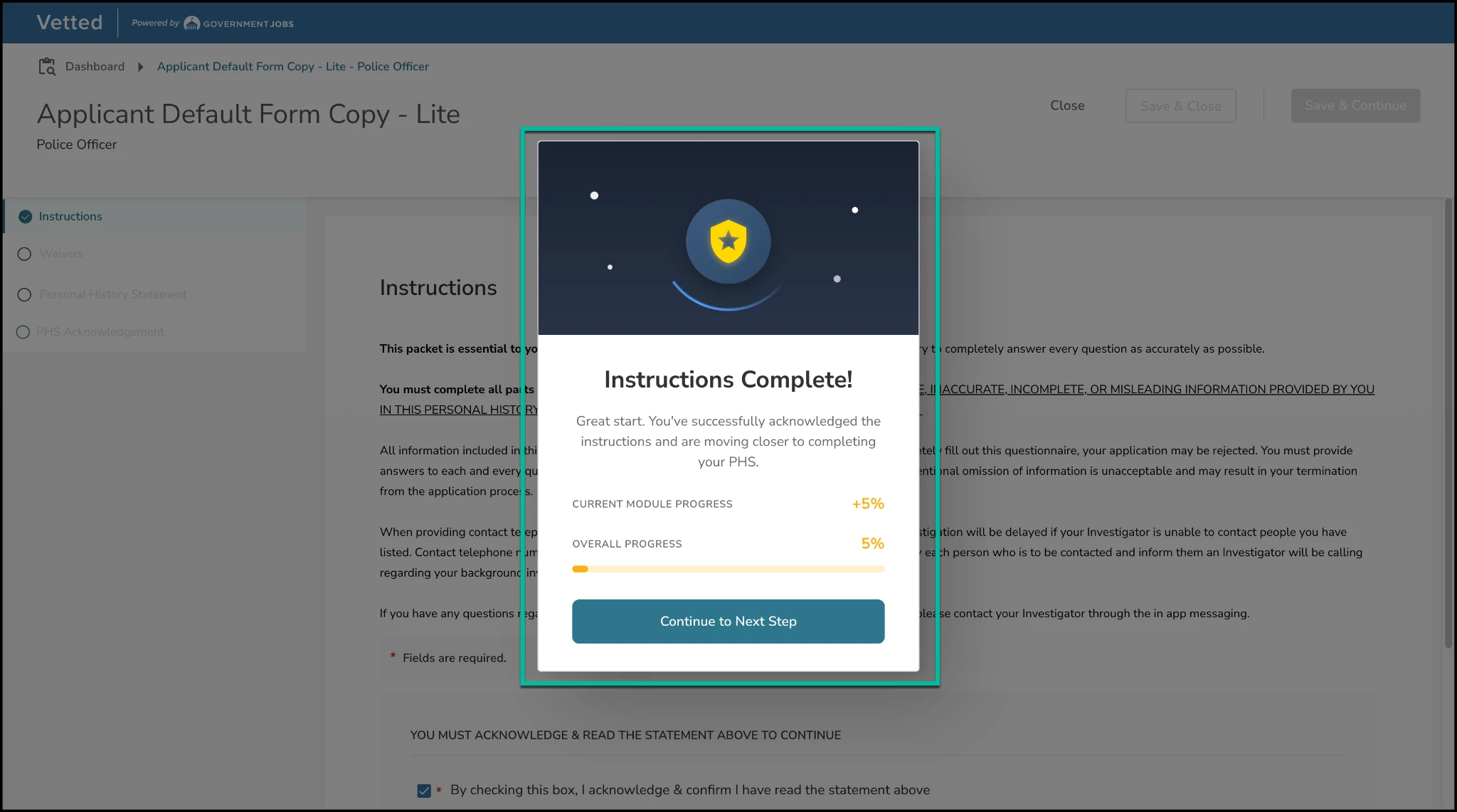
1. Section Completion Modal (The Momentum Builder)
- Where to Find It: This modal triggers automatically the exact moment an applicant completes a milestone within their PHS (e.g., PHS Modules make up 50% of the total weight, and this percentage is split equally among all the modules. For instance, if there are 10 modules, each one is worth 5%.)
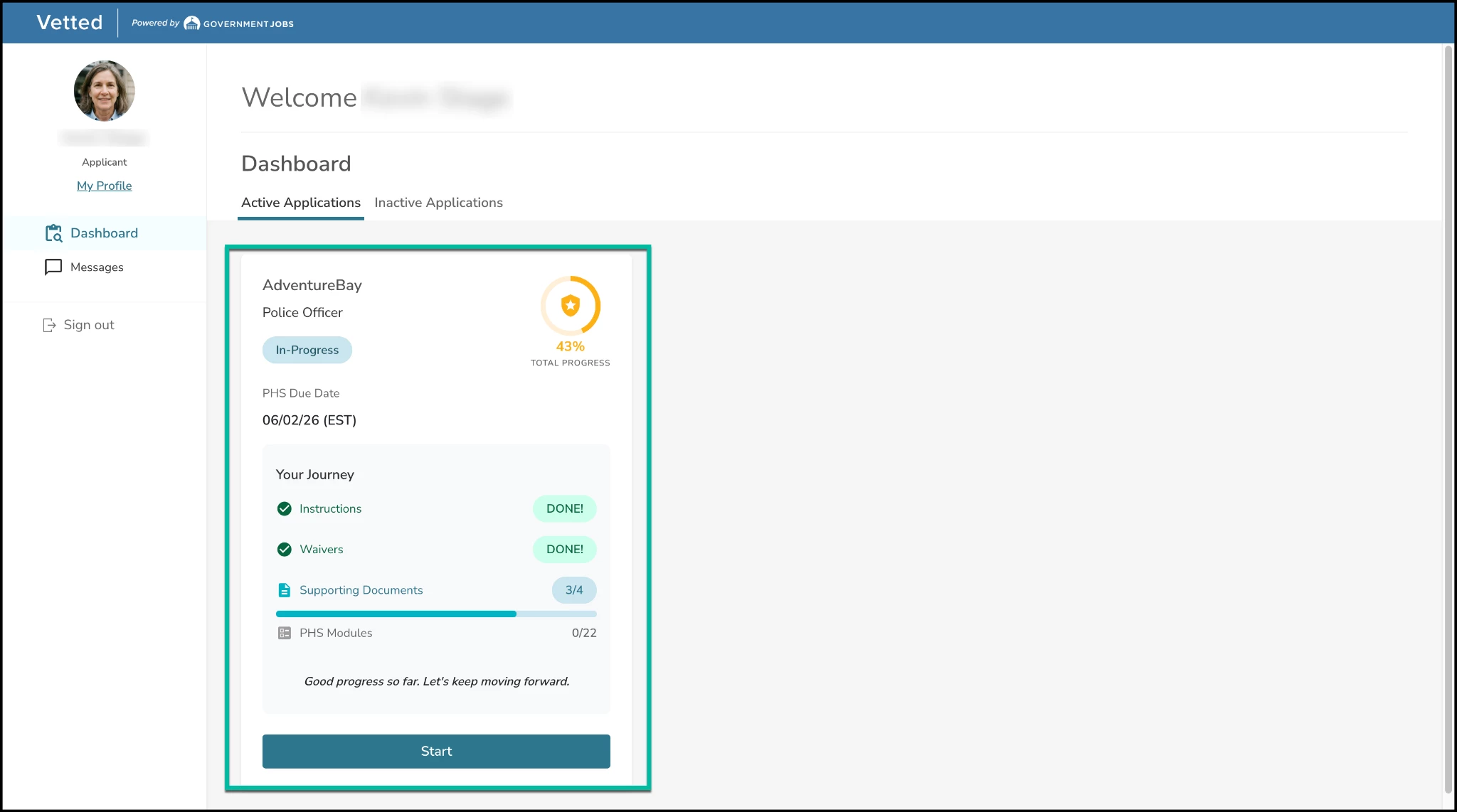
- Rather than a single, ambiguous percentage bar, the system tracks and breaks progress down into four distinct areas:
- Instructions Completed
- Waivers Completed
- Supporting Documents Submitted
- PHS Modules Completed
- Dismissal Constraint: The modal will never auto-dismiss or fade out on its own. This forces an explicit manual interaction, requiring the applicant to click a prominent Continue button to acknowledge their achievement and proceed smoothly to the next onboarding step.
2. Exit Intent / Leave Confirmation Modal (The Loss Aversion Safeguard)
- Where to Find It: This modal intercepts the applicant's workflow whenever they click a Close or Save & Close action from the application layout before their PHS is fully submitted.
- The system calculates and explicitly lists their exact remaining effort (e.g., "You still need 8 more documents and to complete 25 PHS modules").
- Action Buttons: The applicant is presented with a clear choice:
- Primary CTA ("No, keep going!"): Centered and styled for maximum visibility, clicking this instantly kills the modal and returns the applicant right where they left off.
- Secondary Link ("Yes, leave now"): Styled to look less prominent, clicking this safely clears the application timeouts, saves their data, and routes them out to the candidate dashboard.
Value
- Combats Application Drop-off: Explicitly displaying a candidate's progress and showing them exactly what data they are walking away from triggers behavioral "loss aversion"—encouraging them to stay and finish rather than abandoning the form.
- Reinforces Hard Work: Gamifying the administrative burden with micro-celebrations breaks down a massive questionnaire into digestible, rewarding milestones, keeping applicants engaged.
- Robust Mobile Support: Both modals are engineered with viewport-aware width constraints, ensuring that text, progress bars, and animations scale flawlessly without breaking layout grids on smartphones or tablets.
Audience
- Admins
- Applicants
Examples
- Scenario 1 (The Momentum Boost): An applicant finishes entering ten years of residential history and hits save. The system instantly displays the Section Completion Modal. The animated shield expands, and the progress bar climbs dramatically from 45% to 57%, flashing a bold +12%. Feeling a sense of accomplishment, the candidate clicks "Continue" and decides to push through the next module immediately.
- Scenario 2 (Loss Aversion at Play): An applicant gets tired halfway through their background questionnaire and clicks "Save & Close." The Exit Intent Modal catches the action, fracturing the shield icon and rendering a clear warning message: "Hold on! You are 68% complete. You still need 3 more documents and to complete 4 PHS modules." Seeing how close they are to the finish line, the applicant reconsiders, clicks "No, keep going!", and continues filling out their statement.
Items Removed because of this enhancement: None
Email Open Tracking – Real-Time Visibility into Applicant and Reference Engagement
Keeping your background investigations moving forward requires clear insight into candidate and reference activity. To eliminate the guesswork from your outreach, Vetted now includes automated email open tracking for critical system communications. This feature gives your team immediate, verifiable visibility into exactly when applicants and references interact with your emails.
How it Works
Vetted automatically tracks recipient engagement behind the scenes for key outgoing communications, including:
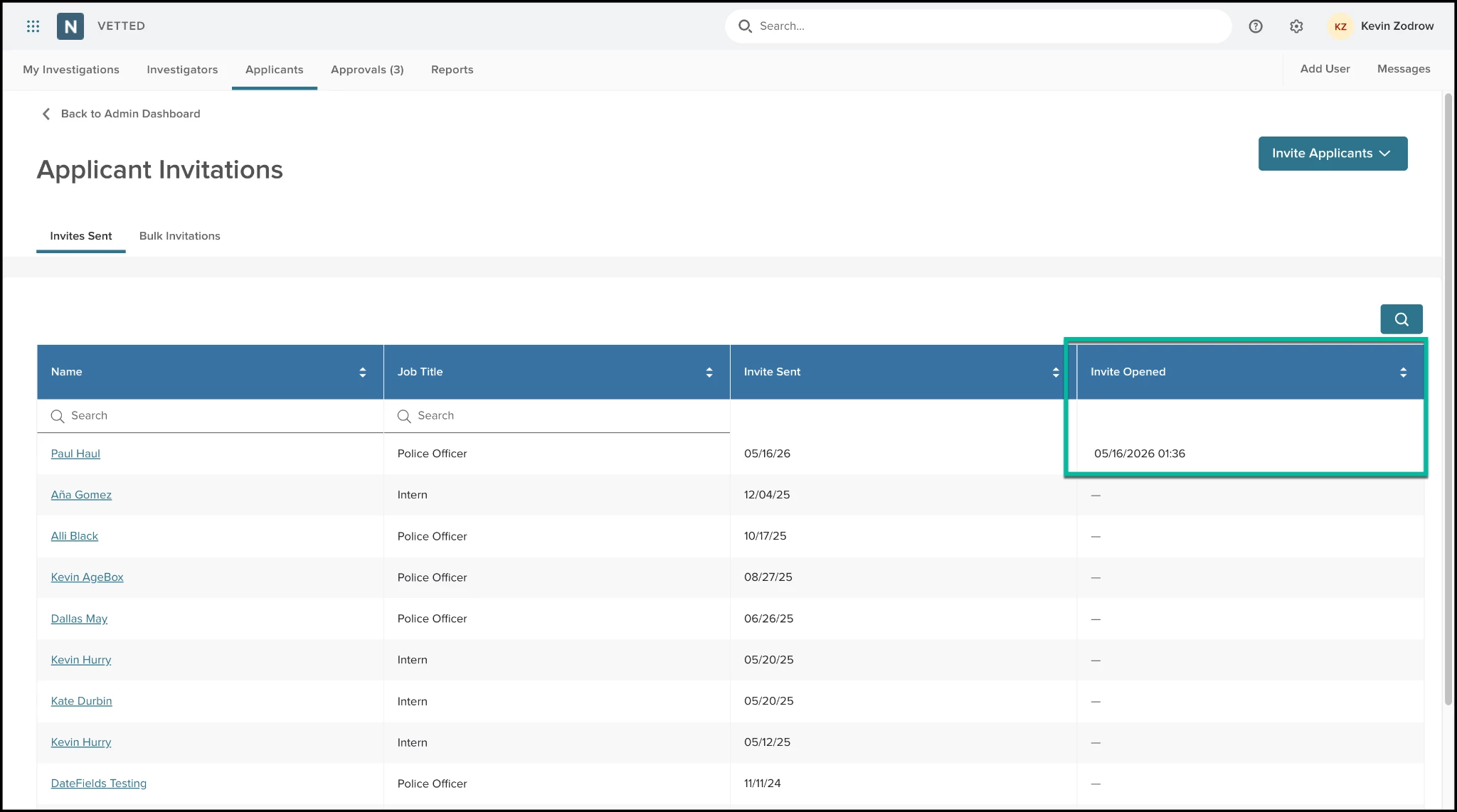
- Invitation emails sent to applicants.
- Correspondence web form emails sent to references and previous employers.
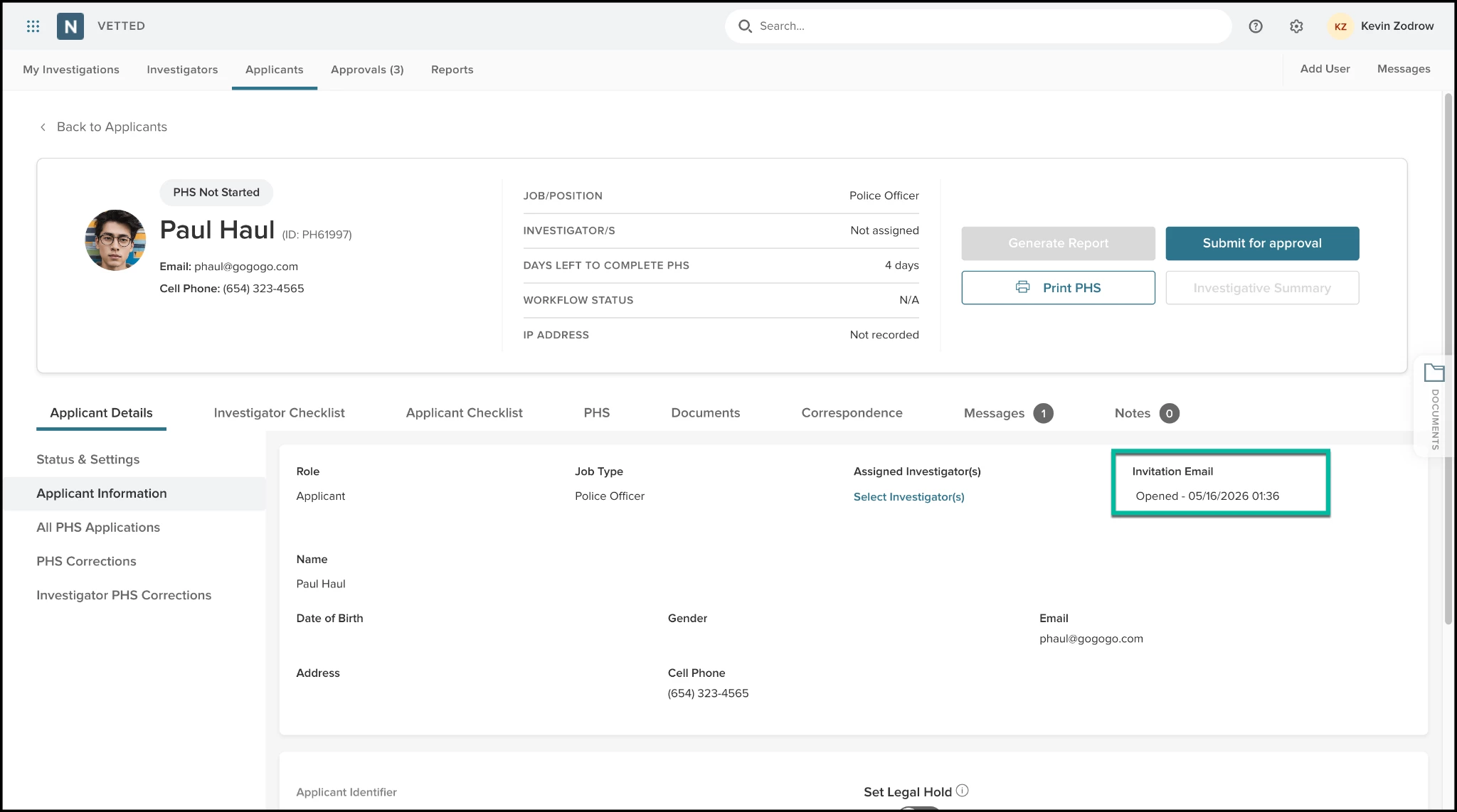
When an applicant or reference opens one of these messages, the system logs the exact date and time of the interaction. This engagement history is displayed directly within the applicant's communication timeline and the correspondence log, allowing your team to instantly see whether a message has been successfully accessed or remains unread.
Value
- Eliminates Uncertain Engagement: Investigators and Admins can now instantly distinguish between a recipient who hasn't seen an email and one who has viewed it but hasn't yet completed their task.
- Optimizes Team Follow-Up: Saves valuable staff hours by preventing premature phone calls or unnecessary manual email resends, allowing your team to prioritize outreach to recipients who genuinely haven't engaged.
- Strengthens Compliance & Audit Trails: Provides an indisputable digital footprint demonstrating that an applicant received their time-bound PHS invitation or that a reference accessed their deadline reminder, mitigating liability during hiring disputes.
- Data-Driven Communication: Helps your agency measure recipient behavior, giving you the insights needed to optimize the timing and wording of your invitation and reminder templates for maximum responsiveness.
Audience
- Admins
- Investigators
- Applicants
- References
Examples
- Scenario 1: An investigator sends a reference questionnaire to an applicant’s former employer but receives no response after three days. Checking Vetted, the investigator sees the email has an "Opened: Yesterday at 9:15 AM" timestamp. Knowing the employer is aware of the request, the investigator decides to wait one more day before calling, saving time and preventing redundant outreach.
- Scenario 2: An Admin reviews a batch of applicant invitations sent out over the weekend. They notice that five candidates haven't even opened their emails yet. Instead of calling them individually, the Admin uses this data to schedule a quick reminder push, identifying early on which candidates might have entered an incorrect email address or have messages stuck in spam filters.
Items Removed because of this enhancement: None
Unassigned Applicant Messaging – Multi-User Distribution Routing
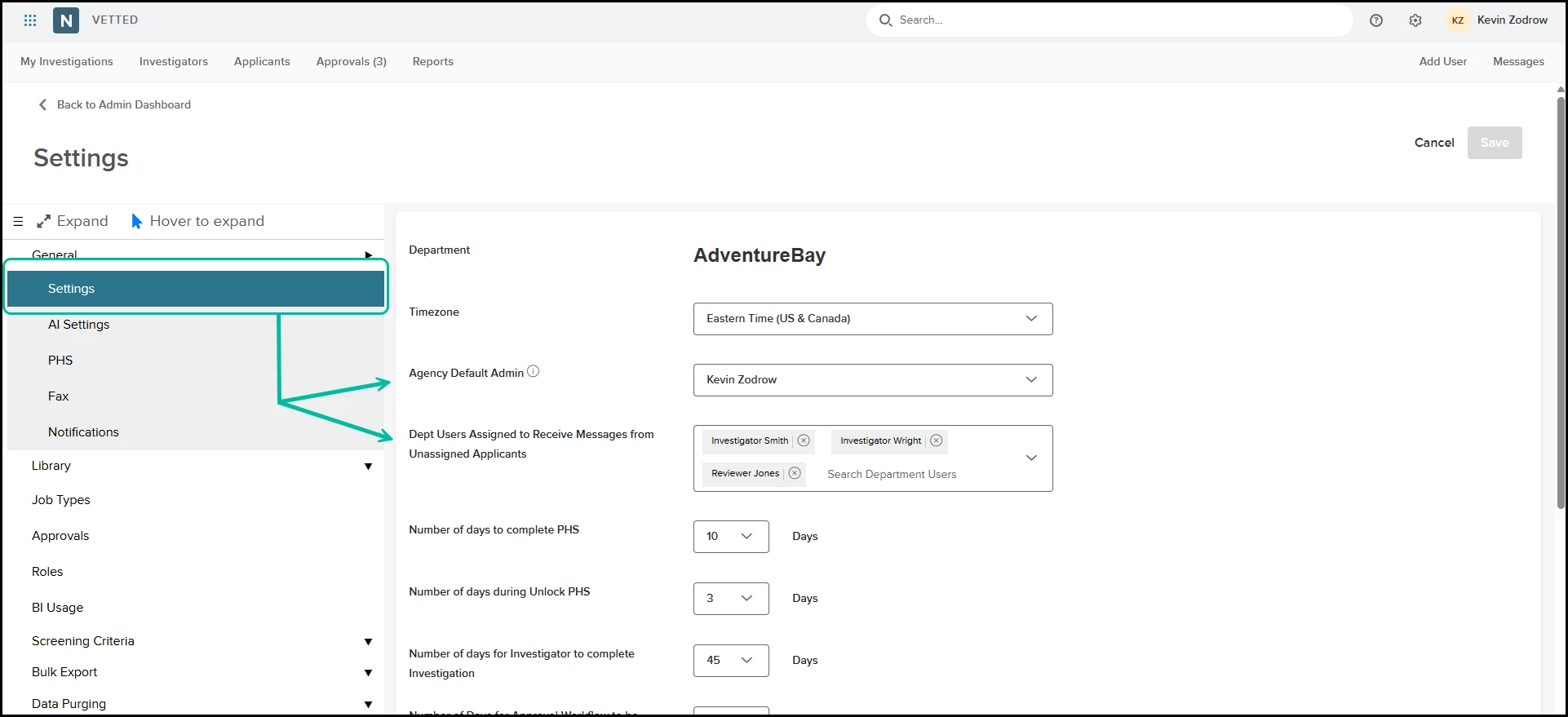
To prevent candidate communications from falling through the cracks, we have overhauled how messages from unassigned applicants are routed. Instead of routing these messages to a single administrator, Admins can now designate multiple active department users to receive notifications and inquiries from applicants who haven't yet been assigned an investigator.
How it Works
- Navigate to Settings where you will find the configuration field has been updated:
- The original field has been relabeled to Agency Default Admin.
- A new informational tooltip has been added next to this field: “Acts as the fallback admin for workflows with inactive users, and receives messages from unassigned applicants.”
- Beneath that field, look for the brand-new multi-select drop-down menu labeled Dept Users Assigned to Receive Messages from Unassigned Applicants.
- Click the drop-down to see a list of all active department users within your system. You can select one, multiple, or all relevant team members who should share the responsibility of monitoring these inbound messages.
- If this new multi-select field is left blank, Vetted will automatically default to routing those messages to the individual selected in the Agency Default Admin field.
Value
- Eliminates Communication Bottlenecks: Spreads the workload across a team rather than overwhelming a single administrator.
- Accelerates Response Times: By notifying multiple team members, unassigned applicants receive answers to their questions faster, keeping them engaged in your hiring pipeline.
- Built-in Redundancy: The fallback mechanism ensures that even if no specific department users are selected, the Agency Default Admin is always there to catch incoming messages.
Audience
- Admins
Examples
- Scenario 1: A large police department wants their entire three-person background intake team to monitor new inquiries. The Admin opens settings and selects all three intake investigators in the new Dept Users Assigned to Receive Messages from Unassigned Applicants multi-select box. When a newly invited applicant sends a message asking about a troubleshooting issue with their PHS, all three team members receive the message simultaneously, allowing whoever is available first to reply.
- Scenario 2: A smaller agency prefers a single point of contact but wants a safety net. The Admin configures the Agency Default Admin field but leaves the new multi-select department user field blank. Messages automatically route to the main Admin, ensuring zero disruption to their existing workflow.
Items Removed because of this enhancement: None
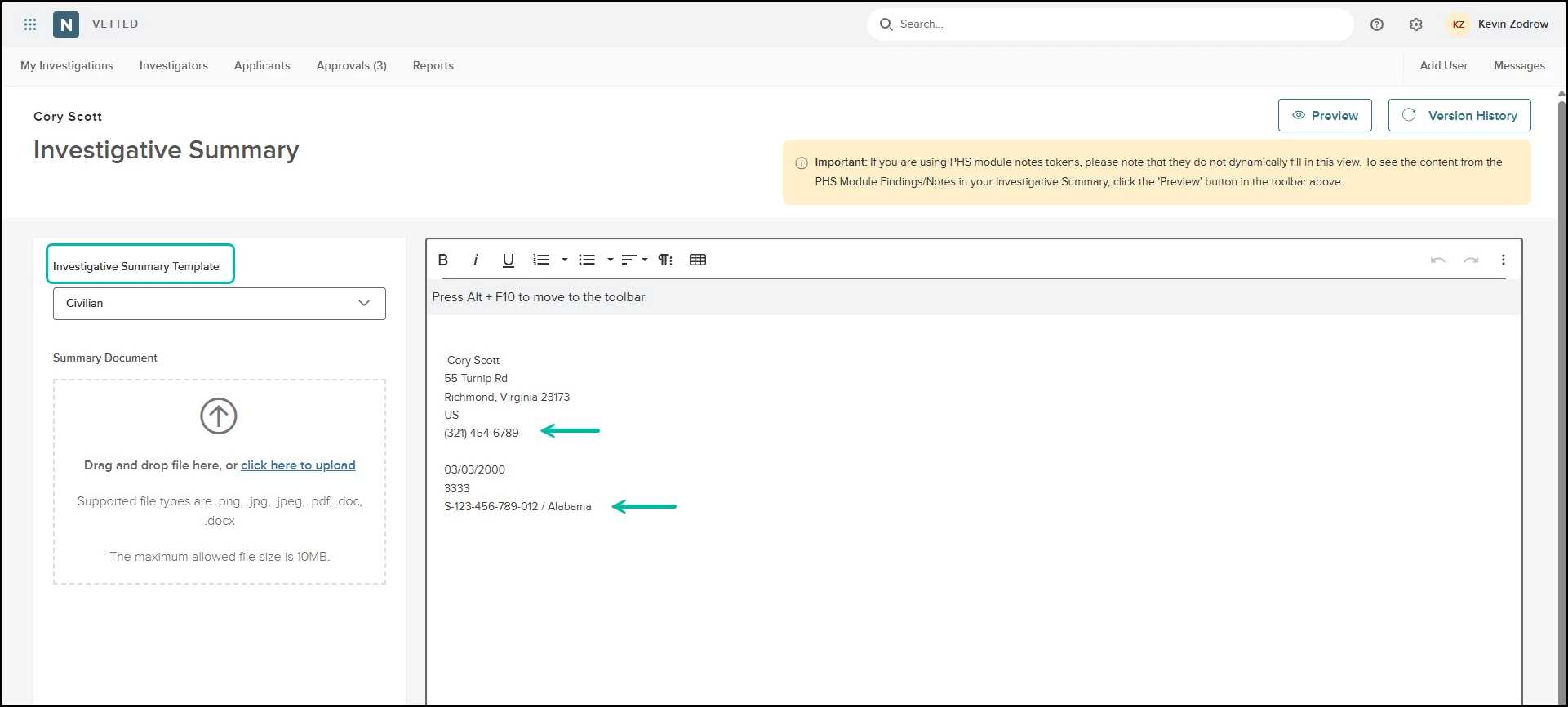
New Applicant Data Tokens – Phone, Driver’s License State and Number
To further automate your documentation and eliminate manual data entry, we have expanded our token library. Admins can now insert dynamic tokens for an applicant’s phone number, driver’s license number, and driver’s license state directly into templates, ensuring accurate, auto-populated data across investigations.
How it Works
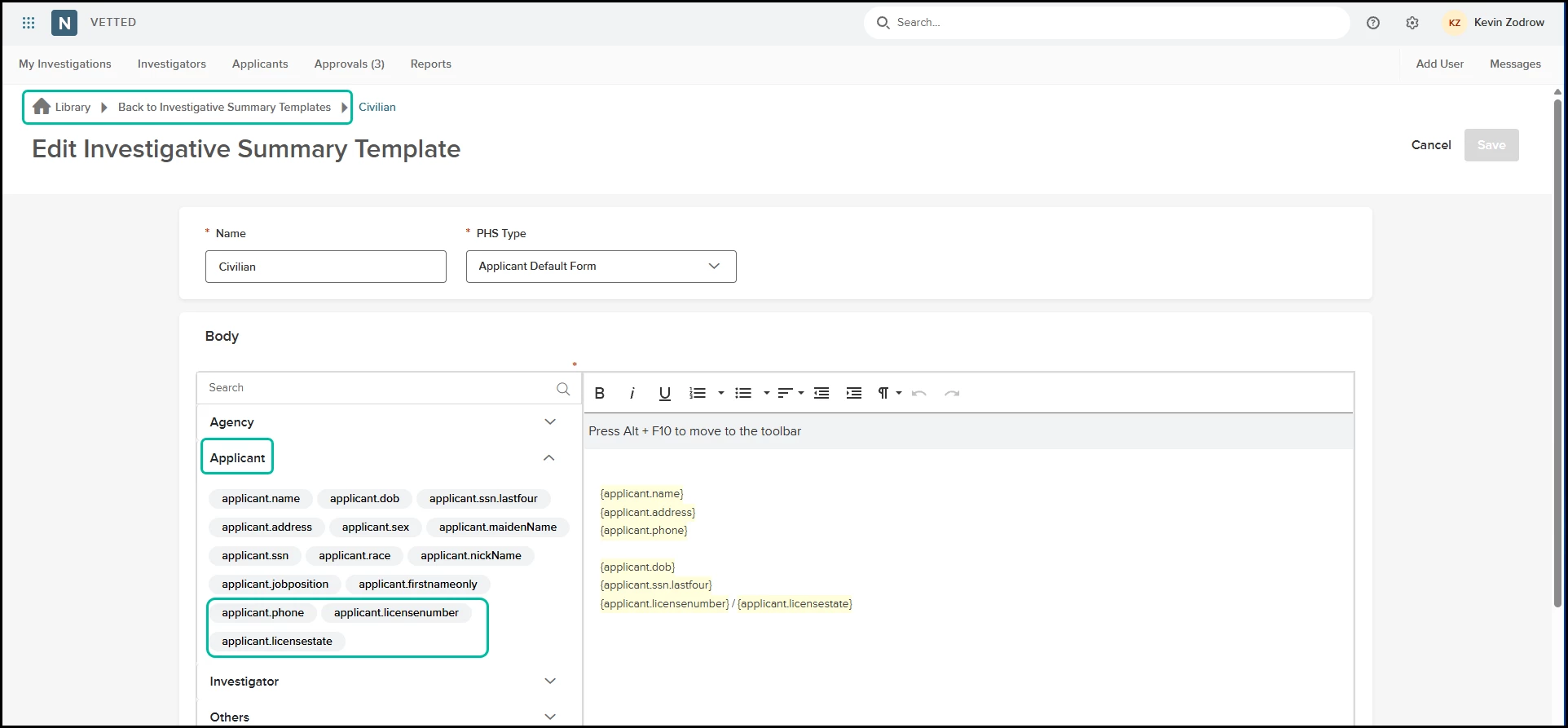
When configuring templates, Admins will find three new high-demand tokens available in the Applicant Token drop-down menu:
- {applicant.phone} – Pulls the applicant's phone number gathered during the initial Onboarding/Registration process.
- {applicant.licensenumber} – Pulls the driver's license number provided by the applicant within their Personal History Statement (PHS).
- {applicant.licensestate} – Pulls the driver's license issuance state provided by the applicant within their PHS.
Token Availability & Placement Matrix:
- Investigator Summary Templates: All three new tokens ({applicant.phone}, {applicant.licensenumber}, and {applicant.licensestate}) are fully supported.
- Correspondence Hub: All three tokens are fully supported and will seamlessly populate across all distribution channels, including web forms, emails, printed letters, and faxes.
- Waivers: Only the {applicant.phone} token is available for use on Waivers. Because driver's license details are collected during the PHS stage (which occurs after initial waiver signing), {applicant.licensenumber} and {applicant.licensestate} are excluded from Waivers to prevent blank data fields.
Note: These new tokens are not available within Standardized Message Responses.
Value
- Eliminates Double Data Entry: Investigators no longer need to copy and paste phone numbers or driver's license details from the PHS into their summaries or reference letters.
- Ensures Compliance and Accuracy: Automatically pulling data straight from the applicant's verified PHS reduces the risk of typos or transcription errors on official agency documents and records requests.
- Streamlines Record Checks: Speeds up the process of sending out local agency records checks by automatically embedding the candidate's driver's license information into outbound correspondence.
Audience
- Admins
- Investigators
Examples
- Scenario 1 (Correspondence): An investigator is preparing an out-of-state DMV records check within the Correspondence Hub. By utilizing the new {applicant.licensenumber} and {applicant.licensestate} tokens in the letter template, Vetted automatically populates the candidate's driving credentials, allowing the investigator to print and mail the request instantly.
- Scenario 2 (Investigator Summary): An Admin configures the master Investigator Summary Template to include a quick-reference contact section at the top. They insert the {applicant.phone} token. When an investigator finishes an investigation and exports the final summary report, the applicant's contact number automatically renders perfectly.
Items Removed because of this enhancement: None
General Changes
Supporting Documents Validation
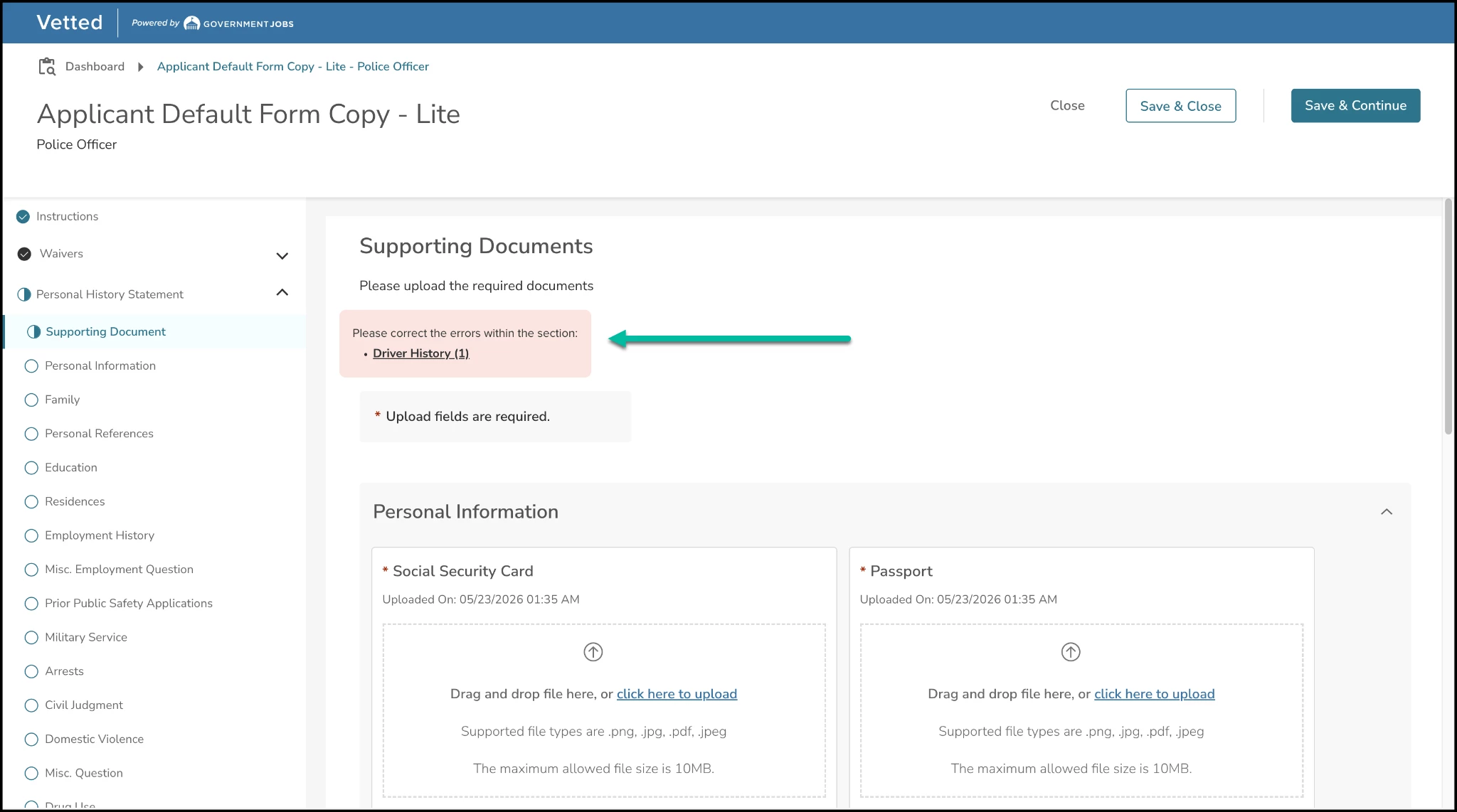
To prevent applicants from moving forward with incomplete files, we have introduced a validation engine to the Supporting Documents phase. This update ensures that candidates cannot bypass mandatory file uploads, eliminating the common issue of applicants submitting their Personal History Statement (PHS) with missing credentials.
Bugs Resolved
Functional
| Scenario When Issue Encountered | Issue Resolved |
|---|---|
| Some of the questions were overlapping with the answer radio button. | The text layout issue was fixed, improving readability. |
508(C) Compliance
| Screen(s) | Count of Bugs Resolved |
|---|---|
| N/A | N/A |