Analytics & Reporting February Release Notes - part III
Timeline
When will this be released?
February 26th 2026
Is there downtime for this release?
No
Related Release Note Links
- Analytics and Reporting Release Notes December 2025
- Analytics and Reporting Release Notes February 2026 - part I
NEOGOV Analytics Dashboards
We are excited to announce the launch of NEOGOV's newest suite of analytics tools: the Core HR and Payroll dashboards. Designed to transform complex data into actionable insights, these dashboards empower HR leaders and administrators to identify operational bottlenecks and ensure financial compliance.
Each dashboard is tailored to optimize specific pillars of your organization's operations:
- Core HR Dashboard - provides a high-level view of personnel action lifecycles and departmental throughput to enhance operational transparency and speed up employee transitions.
- Payroll Dashboard - offers real-time visibility into payroll cycles and gross-to-net summaries, streamlining the auditing process to ensure every batch is accurate and compliant.
Note: These dashboards are currently available to select agencies, with a rollout to all users planned for Q1 2026. For additional information on this and other features of the dashboard, please see the attached release notes: Analytics & Reporting Release Notes, December 2025.
Core HR Dashboard
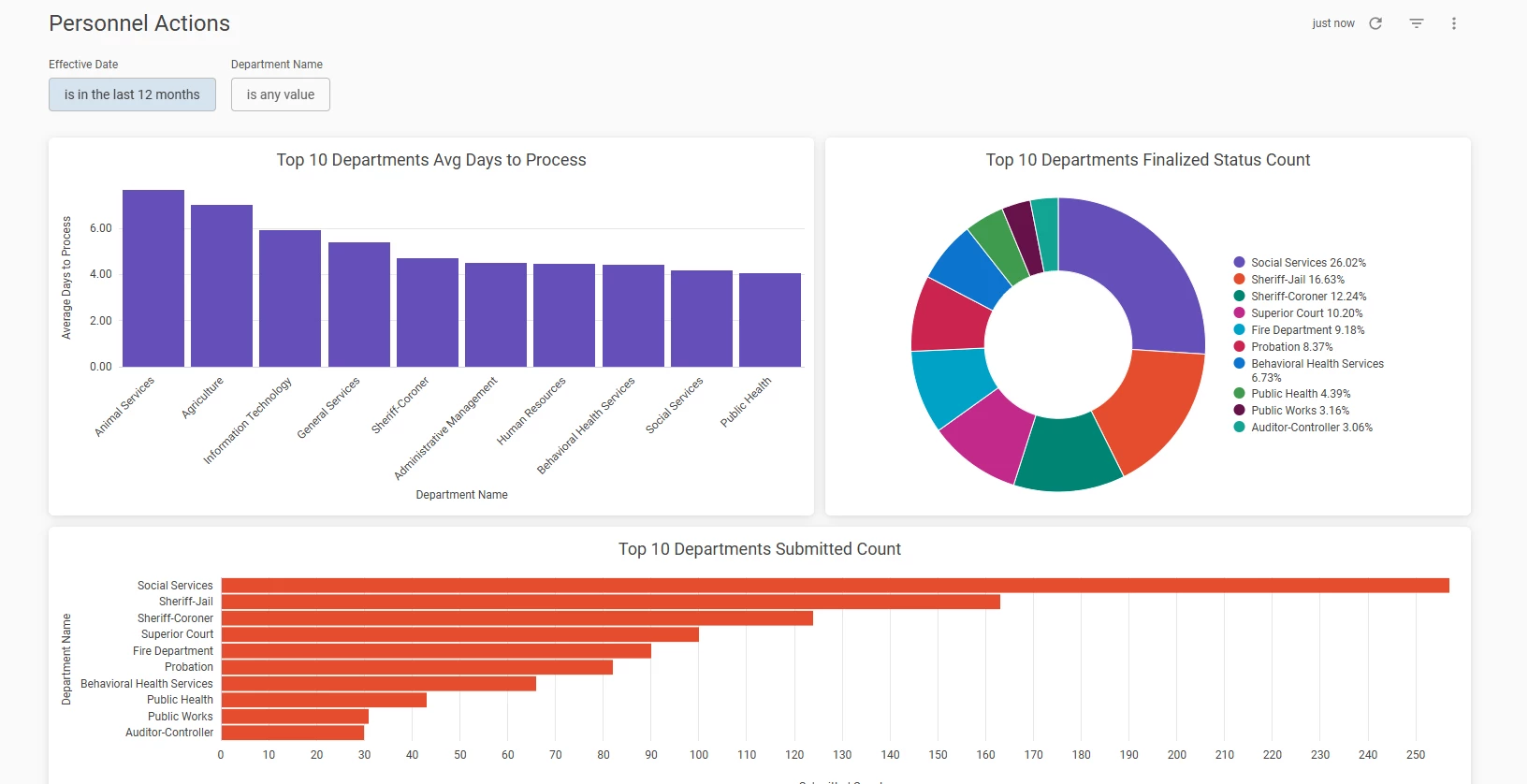
We are pleased to announce the launch of the Core HR dashboard - Personnel Actions. This dashboard is designed to provide HR leaders and administrators with a high-level view of operational efficiency, departmental throughput, and the lifecycle of personnel-related requests. By centralizing data on how personnel actions are processed, this dashboard empowers HR teams to identify bottlenecks, celebrate high-performing departments, and ensure that employee transitions and administrative changes are handled with speed and precision.
Access to the Personnel Actions dashboard requires two conditions:
- The user must have access to the Core HR product because the dashboard aggregates data from it.
- The user must have access to A&R.
Analytics > Core HR
Key Dashboard Features
The Personnel Actions dashboard focuses on three primary dimensions of HR operations: processing speed, finalization volume, and submission trends.
- Avg Days to Process (Top 10 Departments)
This metric tracks the average number of days taken to move a personnel action to the "Processed" status, broken down by department.
Customer value: It allows users to identify which departments have the most efficient approval workflows and which may require additional support or process optimization to reduce administrative lag.
- Finalized Status Count (Top 10 Departments)
This visualization displays a breakdown of actions that have reached a terminal state, specifically those labelled as Processed, Denied, or Withdrawn.
Customer Value: This provides a clear picture of departmental "outcome volume." It helps managers understand not just how much work is being done, but the nature of the outcomes, ensuring transparency in how requests are being resolved.
- Submitted Count (Top 10 Departments)
This bar chart captures the total volume of personnel actions submitted by department, specifically filtering out "Pending" or "In Progress" drafts to focus on active submissions.
Customer Value: This helps HR workload planning by highlighting the departments with the highest administrative demand. By seeing who is submitting the most actions, organizations can better allocate resources to meet departmental needs.
Values & Benefits
- Enhanced operational transparency
No more guessing how long a promotion or transfer takes to process. You now have granular data on the "No. of Days to Complete", allowing for data-driven service level agreements.
- Identification of bottlenecks
By comparing the "Submitted Count" against the "Avg Days to Process", you can quickly see if a department is slow due to high volume or due to inefficient internal approvals.
- Improved employee experience
Faster processing of personnel actions means employees receive their updates, pay changes, and role transitions sooner, leading to higher morale and trust in HR systems.
- Data-driven decision making
With built-in filters for Effective Date and Department Name, HR leaders can perform longitudinal studies to see if process changes implemented six months ago are actually yielding faster results today.
Payroll Dashboard
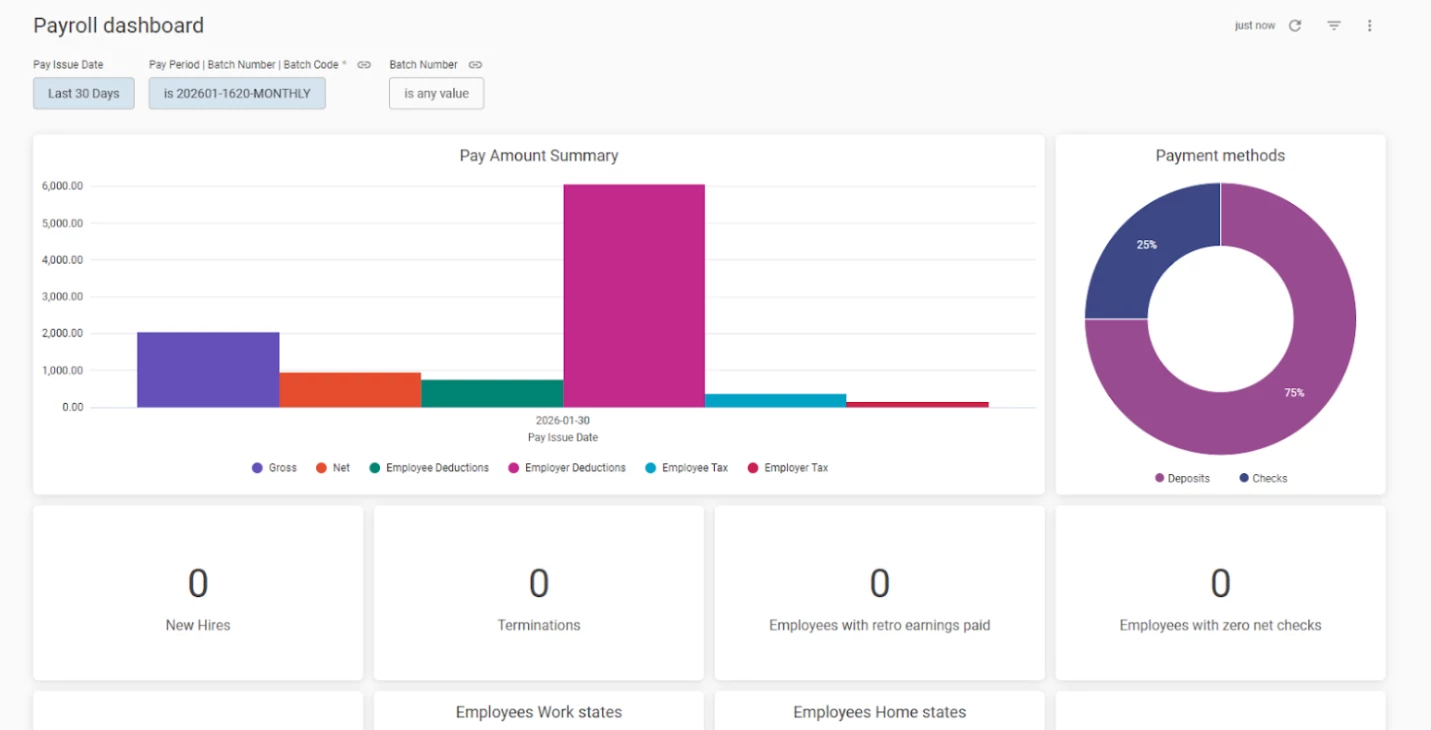
We are thrilled to introduce the Payroll Dashboard, a comprehensive command centre designed to provide payroll administrators and finance teams with real-time visibility into their payroll cycles. This dashboard streamlines the auditing process, ensuring that every batch is accurate, compliant, and processed with full transparency.
By consolidating critical data, from gross-to-net summaries to compliance tracking, this tool allows you to identify discrepancies early and manage the complexities of modern payroll with confidence.
Access to the Payroll dashboard requires two conditions:
- The user must have access to the Payroll product because the dashboard aggregates data from it.
- The user must have access to A&R.
Analytics > Payroll Dashboard
Key Dashboard Features
The Payroll Dashboard features a suite of high-impact tiles, each designed to address specific operational needs:
- Pay Amount Summary
A bar chart displaying Gross Pay, Net Pay, Employee/Employer Deductions, and Employee/Employer Taxes.
Customer Value: Provides an instant audit of payroll liabilities over time, helping users spot unusual spikes in tax or deduction totals before finalizing payments.
- New Hires & Terminations
Two separate tiles that track the count of employees whose hire or termination dates fall within the current pay period.
Customer Value: Synchronize your processing of new joiners and terminated staff with the pay cycle. This prevents overpayments to staff who have left and ensures new joiners receive their first checks on time.
- Zero Net Checks
Identifies employees where the net pay amount is zero or null.
Customer Value: Acts as a critical "red flag" audit. It allows you to investigate if an employee’s earnings were entirely offset by deductions or if there is a configuration error in their pay record.
- Retro Pay
Isolates the count of employees receiving retroactive earnings.
Customer Value: Simplifies the verification of back-pay adjustments, ensuring that manual entries or system-calculated retro amounts are reaching the intended recipients.
- Tax & Compliance Tracking (No Tax Forms / State Address Changes)
Two separate tiles that highlight employees missing tax forms or those who have updated their state residency.
Customer Value: Mitigates compliance risk by pinpointing exactly who needs to provide documentation, preventing incorrect tax withholding and potential regulatory penalties.
- Standard Hours Exceptions
Reports the count of employees whose worked hours exceed their defined standard hours.
Customer Value: Simplifies overtime monitoring and labour cost management by highlighting areas where staffing may need adjustment.
- Payment Methods & Vendor Payments
Two separate tiles - a breakdown of Check vs. Deposit distribution and a count of active vendor disbursements.
Customer Value: Assists with treasury management by forecasting the volume of physical checks to be cut versus electronic funds to be transferred.
Values & Benefits
- Audit efficiency
Instead of manually scanning spreadsheets, use the dashboard to identify outliers in seconds using the Pay Period and Batch Number filters.
- Enhanced compliance
Proactively manage multi-state taxation and missing tax documentation with the Work State and Home State geographic heatmaps.
- Treasury precision
Clear visibility into Net Pay and Vendor Payments allows for more accurate cash flow forecasting.
Dashboard filters
The Payroll dashboard has 3 filters:
- Pay Issue Date - default date is the Last 30 Days
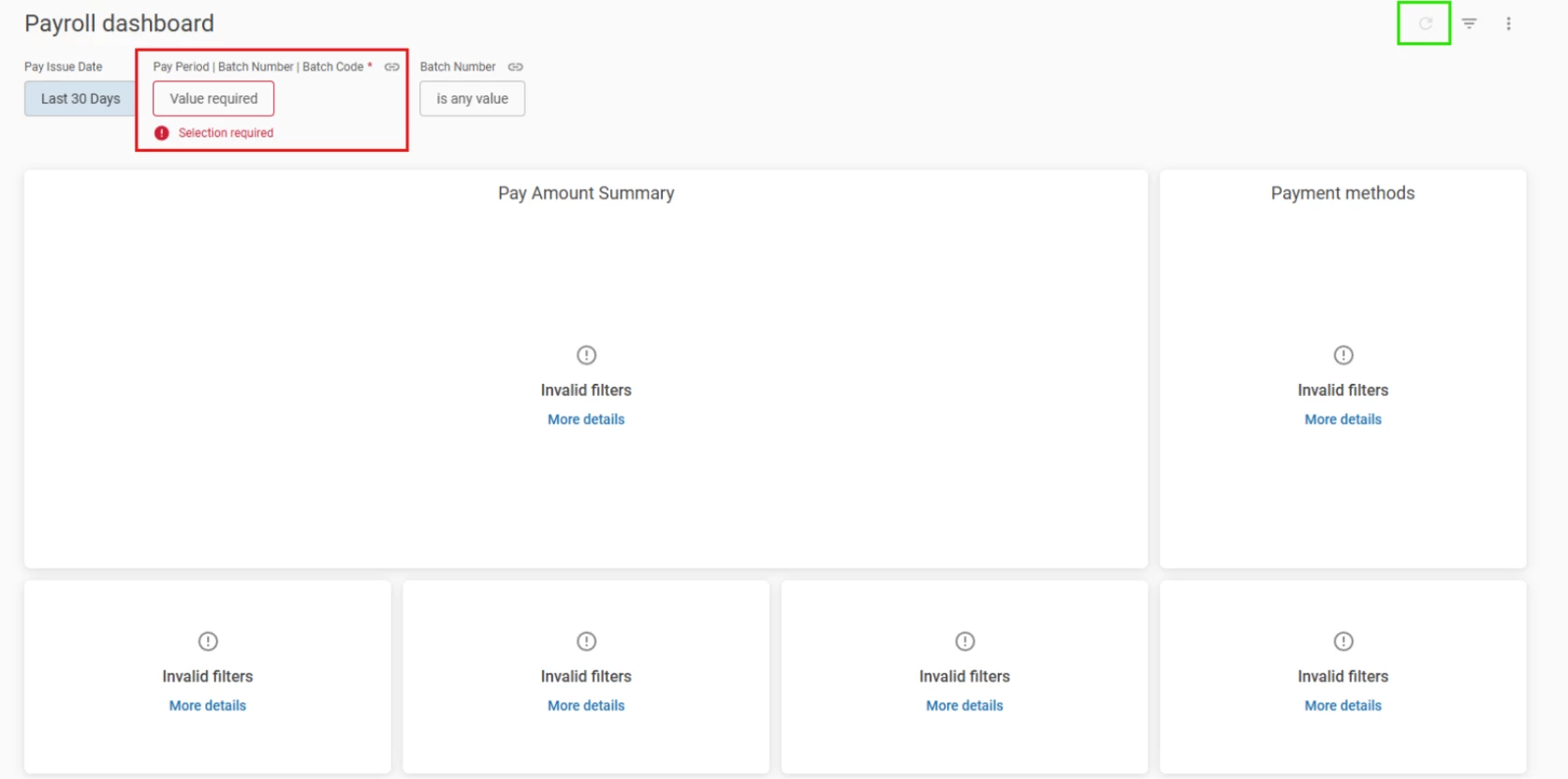
- Pay Period | Batch Number | Batch Code - this required filter uses the Pay Issue Date to combine and limit the data shown by three parameters. Users must select a value for this filter to view any data.
- This filter is limited to selecting a single record and does not support multiple values.
- Batch Number - list of batches based on the selected Pay Issue Date.
Note: Upon navigating to the Payroll dashboard, users will initially see no data displayed because the Pay Period | Batch Number | Batch Code fields are empty. Data will become visible only after the user selects a specific value for these fields and clicks the Refresh button (as shown highlighted in green).