



Learn Spring 2026 Release Notes
Article Links
Timeline
When will this be released?
UAT: Thursday, April 2, 2026, 7 AM EDT
Production: Thursday, April 30, 2026, 7 AM EDT
Is there downtime for this release?
No.
Related Release Note Links
Learn Spring Enhancements Overview
The Spring 2026 release focuses on strengthening compliance, improving administrative visibility, and enhancing reporting capabilities across your training workflows. This update introduces expanded approval levels to better align with complex organizational hierarchies, along with new reporting tools to help proactively identify and close training gaps. Additionally, enhanced report delivery, clearer administrative guidance, and expanded content offerings—including compliance-focused and skills-based courses that give organizations greater flexibility, clarity, and control. Together, these enhancements streamline processes, support regulatory requirements, and empower teams to manage and track employee development more effectively.
Expanded Approval Levels for Course Enrollment & Training Requests
You can now configure up to 10 approval levels for both course enrollment and training requests (previously limited to 3), giving your organization greater flexibility to match complex chains of command. This enhancement ensures that each approval step is clearly assigned and tracked—improving compliance and accountability for all users involved.
Value
Enables organizations to mirror real-world approval hierarchies, supporting compliance and reducing bottlenecks in training workflows.
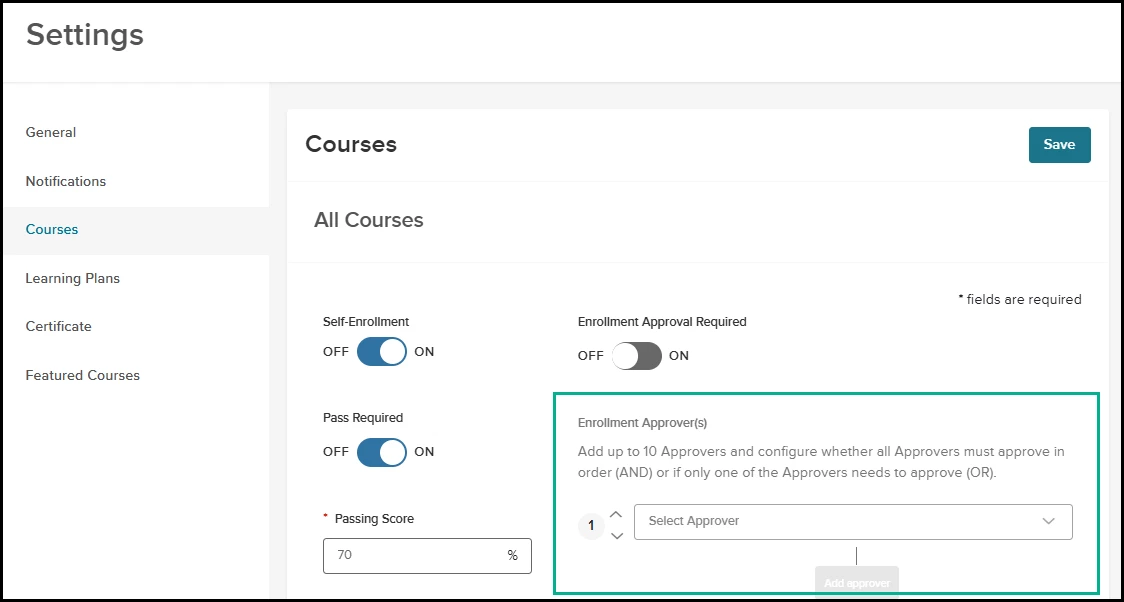
Admin Catalog - Configure Course Enrollment Approvers
Add, remove, or reorder up to 10 approval levels for both course enrollment requests.
- Assign each level to an individual or group as needed.
- Existing approval chains with 1–3 levels remain unchanged unless edited.
- Approvers at each level receive notifications and can approve or reject requests directly from their task list; this remains unchanged.
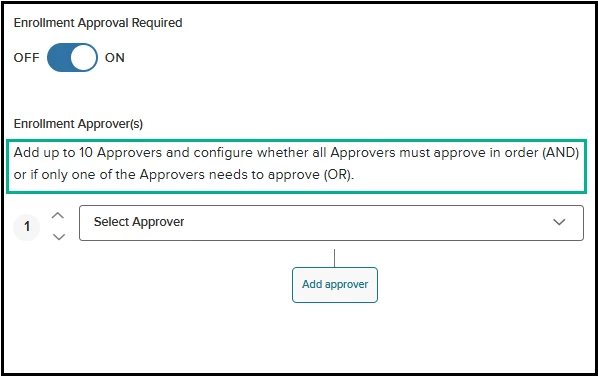
Enrollment Approver(s) setting
Additionally, for newly created courses, the default configuration for Enrollment Approver(s) can be set in General Settings.
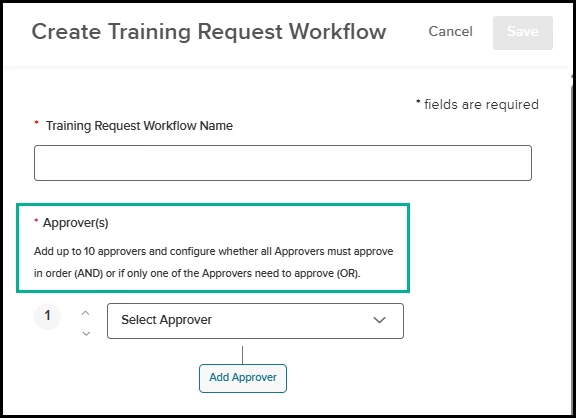
Training Request - Configure Training Request Approvers
Add, remove, or reorder up to 10 approval levels for training requests.
- Assign each level to an individual or group as needed.
- Existing approval chains with 1–3 levels remain unchanged unless edited.
- Approvers at each level receive notifications and can approve or reject requests directly from their task list; this remains unchanged.
Audience
Administrators
Examples
A public safety agency can require approvals from multiple supervisors and department heads before a learner enrolls in a specialized training course or submits a training request.
Updated Approval Workflow Display for Admins & Learners
We’ve enhanced how the approval workflow is displayed to both Administrators and Learners after an approval request is initiated.
Previously, the full approval workflow appeared directly within the page. Now, instead of displaying the entire workflow inline, users will see a “View Approvers” hyperlink on the Course and Training Requests Details pages.
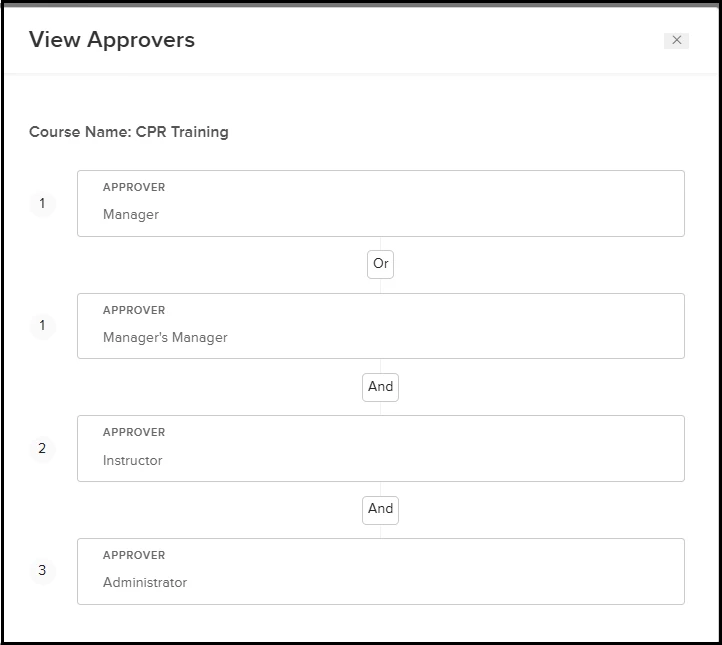
Selecting this link opens a dedicated window that clearly outlines the approval path, including the order of approvers and any “And/Or” conditions.
This update delivers a cleaner, more streamlined experience while maintaining full visibility into the approval process when needed.
Before: View Course Enrollment Request Approvers
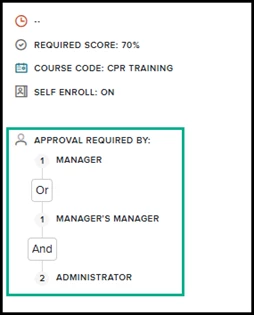
Now: View Course Enrollment Request Approvers
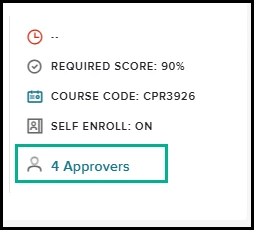
Before: View Training Request Request Approvers
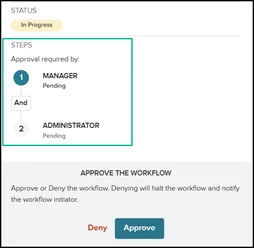
Now: View Training Request Request Approvers
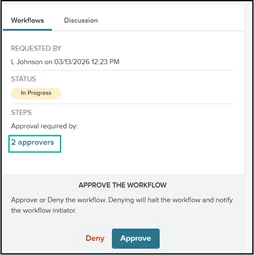
Upon selecting Approvers, View Approvers displays, allowing you to view configured course enrollment approvers.
Email Attachment Subscription for Learn Reports
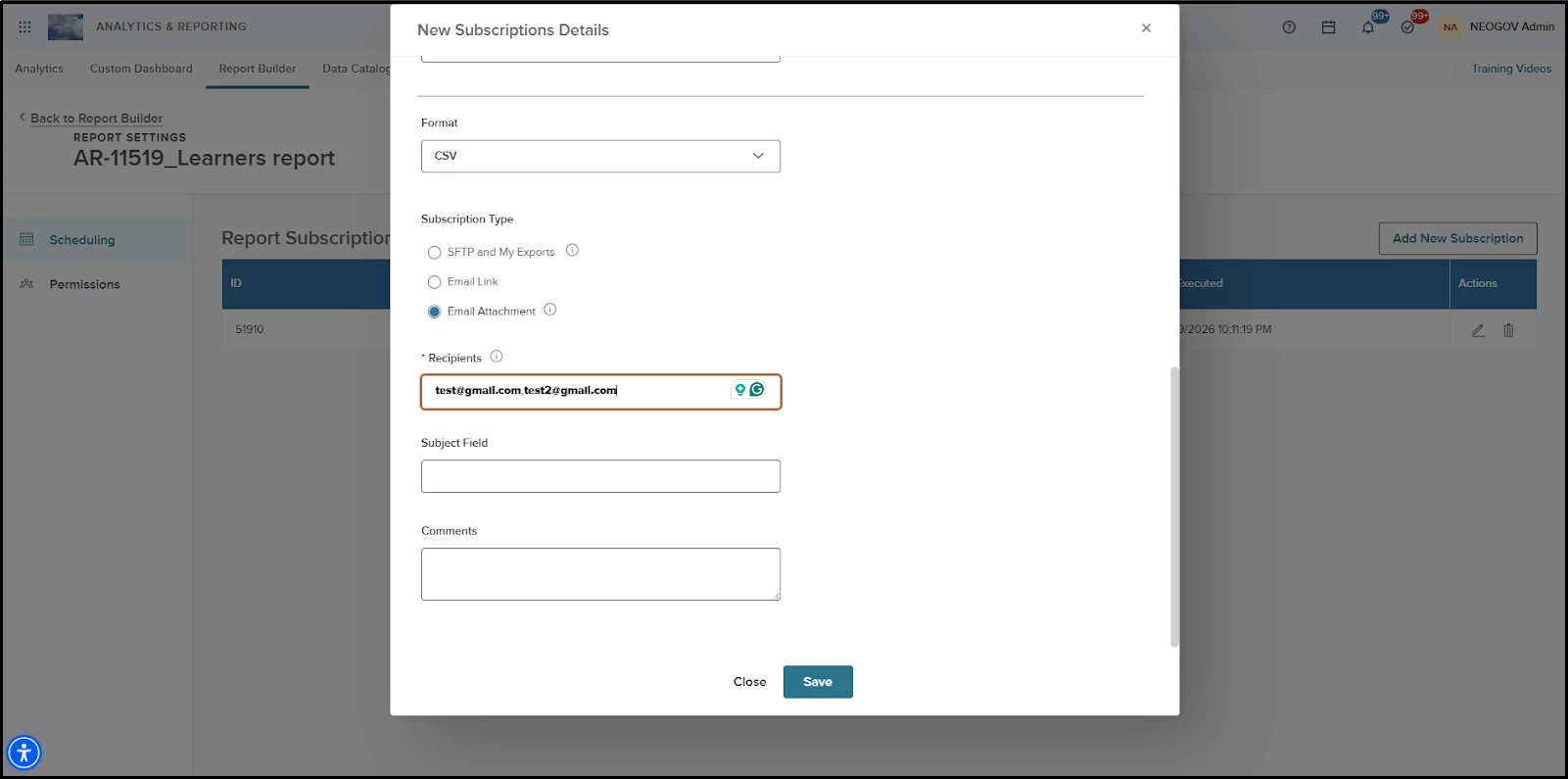
As part of this release, users can create subscriptions to Learn reports and have them delivered as email attachments to any valid email address. This includes shared inboxes and external recipients outside your system.
This enhancement adds an Email Attachment subscription type for Learn reports.
Security Note: Safeguards are in place to protect Personally Identifiable Information (PII). If a report contains sensitive data, the option to send it as an email attachment will be disabled, or a clear message will be displayed.
How does it work?
- Select Report Builder and select/create a Learn report.
- Select Settings> Scheduling and create a new subscription.
- Select Email Attachment as the subscription type.
- Enter recipient email addresses (comma-separated). The recipient limit is 50.
- Save the subscription.
Constraints
Learn reports can contain Personally Identifiable Information(PII), which can affect the ability to create a subscription as an email attachment type:
- If the report contains PII fields: Address 1, Address 2, First Name, Last Name, Email Address, or Employee Number, the Email Attachment option is disabled.
- If the report contains consent PII fields: Employer Id, User ID, or Username, a disclaimer appears and user confirmation is required before saving the subscription.
- If a report is edited to add PII fields after a subscription is created, saving is blocked, and a validation message explains the issue.
The table below outlines the restrictions on using PII fields when setting up email subscriptions for reports.
| Report Fields Present | Email Attachment | Action Required |
|---|---|---|
| Address 1, Address 2, First Name, Last Name, Email Address, Employee Number | Disabled | No |
| Employer Id, User ID, Username (no other PII fields) | Enabled | Disclaimer and user confirmation required |
| Both the PII and Consent PII fields | Disabled | No |
Value
Secure report delivery is now automated to any inbox, enhancing workflow flexibility while maintaining the protection of sensitive data.
Audience
HR Admins by default
Example
An HR Admin needs to regularly share training compliance reports with department leaders and external auditors who do not have access to the system. Instead of manually exporting and emailing reports each week, the admin creates a subscription using the new Email Attachment option. The report is automatically delivered as an attachment to a shared leadership inbox and an external auditor’s email on a scheduled basis.
New Report: Unenrolled Learners (via Report Builder)
Quickly identify users who have not enrolled in required courses, helping you close training gaps and ensure compliance. The new Unenrolled Learners Report is available in Report Builder under Analytics & Reporting, allowing administrators to view both enrolled and unenrolled users for selected courses.
Value
Enables proactive tracking of training compliance by surfacing users who have not enrolled in required courses.
How it works
- Access the report via Analytics & Reporting > Report Builder > Create Report and choose Unenrolled Learners Report as the type.
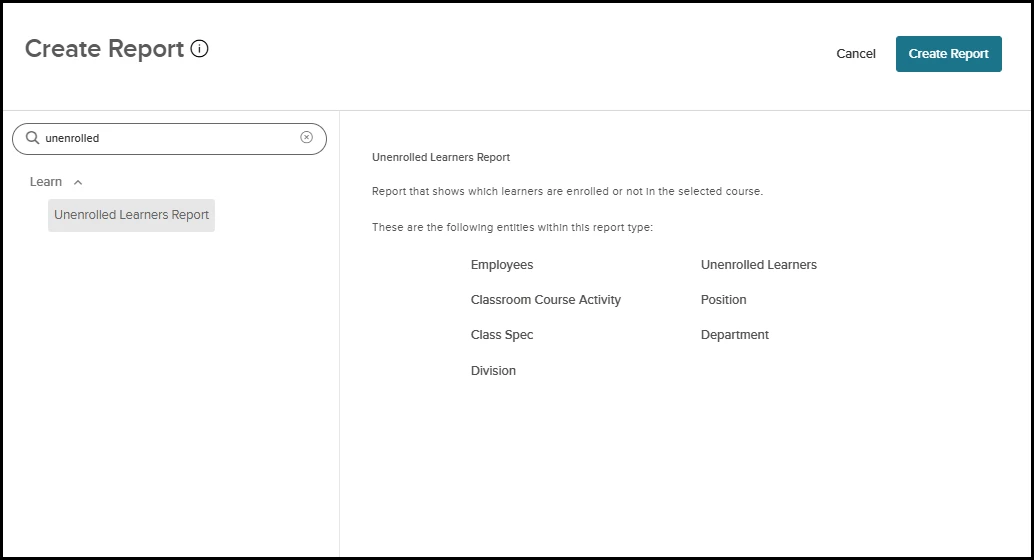
Select Unenrolled Learners Report > Create Report
- The report requires you to select at least one course using the Course Code filter (this filter is mandatory and cannot be removed).
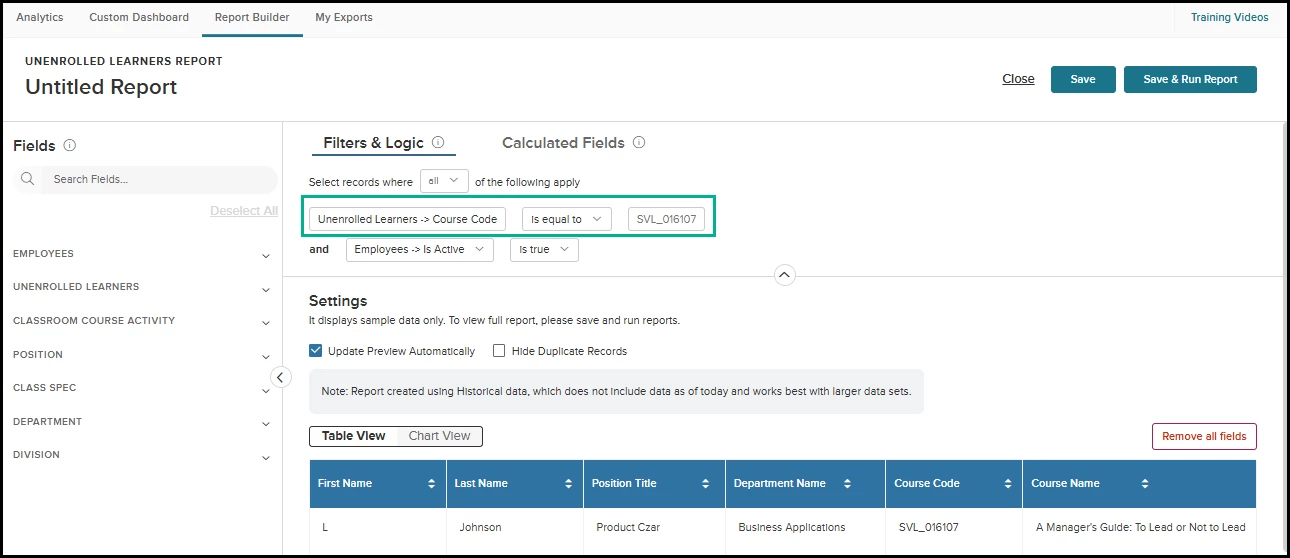
Select Unenrolled Learners Report > Create Report
- Both enrolled and not enrolled learners are displayed for the selected course(s).
- Additional filters (user, organizational, or course attributes) can be applied to refine results. Save & Run Report to view results.
- To improve reporting accuracy, the Unenrolled Learners Report uses the Course Code as the primary field for record generation. For learners who are not actively enrolled in a course, related fields such as Course Name, Status, and Enrollment Date will display as blank. Additionally, please note that this report reflects data from the previous day and is not generated in real time.
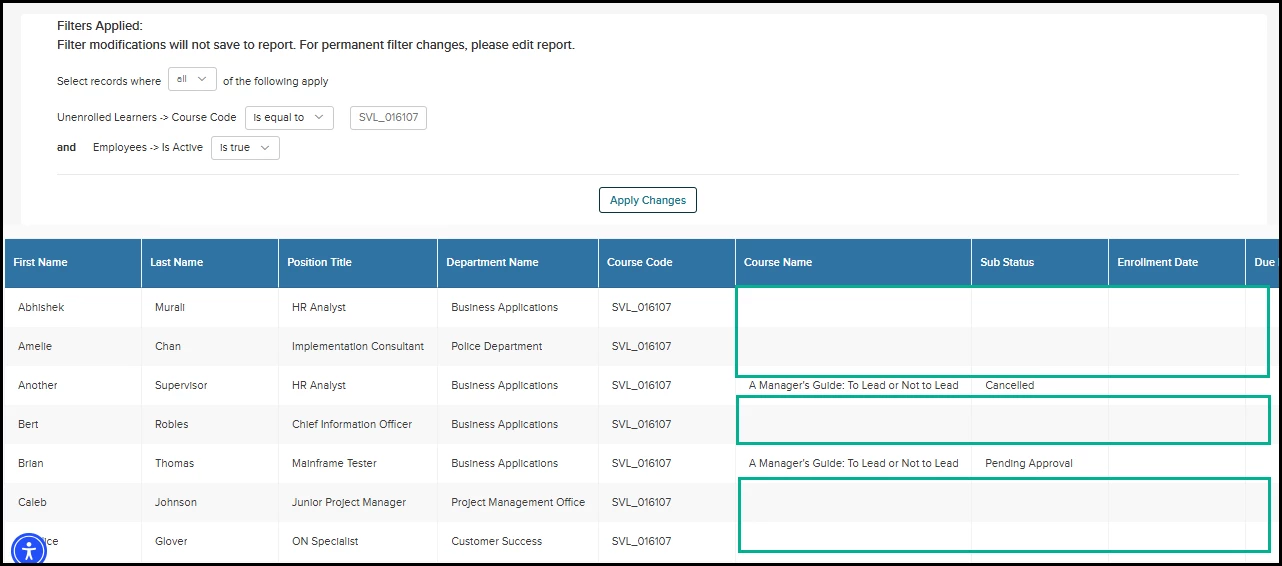
Select Unenrolled Learners Report > Search for Course Code > Save & Run Report
Important Notes:
- Only HR Admins have access by default; other roles require customer support to enable access to Report Builder.
- External Learners are not included in this report at this time.
Audience
HR Admins by default
Examples
An HR Admin can generate a report to find employees who have not enrolled in mandatory safety training, making it easy to follow up and ensure completion.
Manager Change Update: New Action Guidance Message
Stay informed about how manager changes impact tasks across products with the new Manager Change Confirmation dialog. When you update a user’s manager, a dialog summarizes how tasks are reassigned in Learn, Perform, eForms, and Onboard—helping you understand downstream effects and maintain process clarity.
Value
Gives administrators immediate clarity on how manager changes affect tasks across products, reducing confusion and supporting smoother transitions.
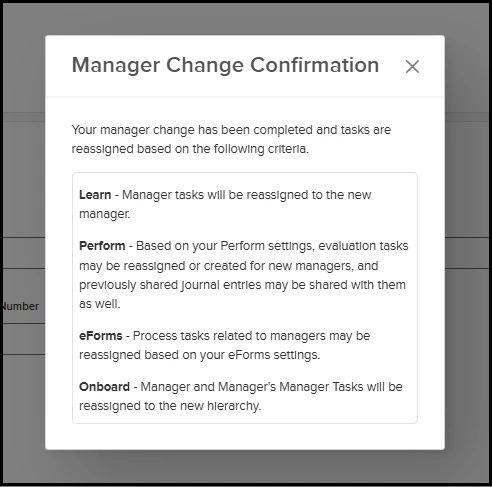
Change Direct Manager > Click Save
The dialog is informational only—manager changes are already saved before it appears. No data is stored or tracked from the dialog.
Audience
Administrators
Examples
After saving a manager change for an employee, you see a dialog explaining which tasks are reassigned to the new manager in each product area.
Content Updates & Announcements
The Learn Content Team will release several much-needed courses this quarter, including three new Fiscal and Financial Training courses designed to meet California’s SB 827 requirements. This release will also include courses on 508 compliance, PC desktop skills, and AI tools.
The following courses will be released in UAT environments on Thu, Apr 2, and PROD environments on Thu, Apr 30.
Employment Liability
- Financial Reporting & Transparency (SB 827) HW87
- Capital Financing (SB 827) HW85
- Ethical Stewardship & Long-Term Obligations (SB 827) HW83
Business Skills
- Sharing Calendars and Email in Outlook (2025) BI61
- Microsoft Forms Essentials (2025) BI62
- Mastering Outlook 365 - Beginner (2025) BI63
- Mastering Outlook 365 – Basics (2025) BI64
- Mastering Outlook 365 – Intermediate (2025) BI65
- ChatGPT Essentials Part 1 BI66
- ChatGPT Essentials Part 2 BI67
- Mastering Excel 365 - Expert (2025) BI68
- Mastering Outlook 365 – Advanced (2025) BI69
- Mastering PowerPoint 365 – Expert (2025) BI70
- Mastering PowerPoint 365 - Beginner (2025) BI71
- Intro to Copilot for Microsoft 365 BI72
- Section 508 Compliance: Enhancing Accessibility and Elevating Engagement SVL_1021530
- Section 508 Compliance: Introduction and Key Concepts SVL_1020800
Appendix: Bugs Resolved
No additional bug fixes outside of the maintenance releases. Please refer to the maintenance release notes for details.