



Insight Summer 2026 Release Notes
Article Links
Timeline
When will this be released?
UAT Preview Window: July 2, 2026, 4 AM PDT
Production Availability: July 30, 2026, 4 AM PDT
Is there downtime for this release?
No.
Related Release Notes Links
AI Writing Assistant Across Insight Workflows
The NEOGOV AI Writing Assistant is now available to Insight customers across multiple recruiting workflows, helping recruiters and administrators draft, refine, and polish content directly where they work. Users can access writing support in the job posting add/edit form, disposition and rating comment boxes, and e-Reference template creation.
This release gives teams a consistent writing assistant experience across high-use areas of the recruiting process, making it easier to improve clarity, tone, spelling, and professionalism without leaving Insight. Please note that the AI Writing Assistant support for hiring department users in the rating comments area is planned to be available soon in the future.
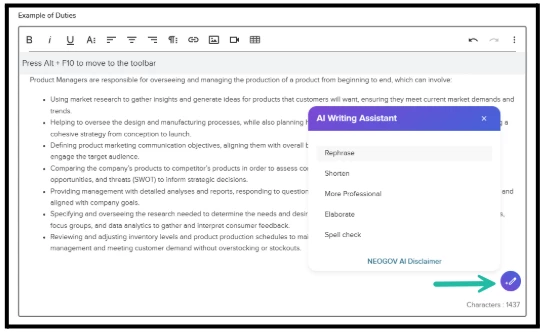
Where the AI Writing Assistant Is Available
- Job Posting Add/Edit Form
- Candidate Disposition and Rating Comments
- e-Reference Template Creation
How It Works
The AI Writing Assistant includes five refinement options:
- Rephrase
- Shorten
- More Professional
- Elaborate
- Spell Check
These options help users quickly adjust content while keeping the original meaning and context. The assistant preserves formatting by default, and can refine selected text or the full content when no specific text is selected.
Admin Controls and Availability
The AI Writing Assistant across Insight is controlled by Insight AI settings and feature controls under agency preferences.
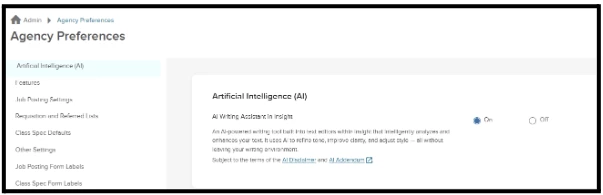
This AI capability is OFF by default. Admins can opt in when ready, so that it's available for all users across the organization within Insight.
AI Writing Assistant UAT Preview
The AI Writing Assistant will be available in UAT only starting Wednesday, July 8, for preview and testing. Users can use this time to review the experience across supported Insight areas before general availability.
Value for Employers
This launch helps agencies produce clearer, more polished recruiting content with less manual effort. By making the AI Writing Assistant available across multiple Insight workflows, agencies can save time, reduce proofreading effort, and support a more consistent experience for applicants, hiring teams, and references. Clearer candidate comments can also improve recordkeeping and provide more useful documentation for future review, audits, or legal proceedings.
This is just the beginning. We’re investing in AI-powered enhancements across Insight and Unified Recruiting to improve usability, efficiency, and support better and smarter hiring outcomes. More exciting AI capabilities are on the way. Stay tuned!
Preview Application Attachments Without Auto-download
Recruiters and hiring department users can now preview supported candidate and recruiting attachments directly in the browser without downloading them first. Attachment file names will open a document preview, while a separate download action remains available for users who need to save the file.
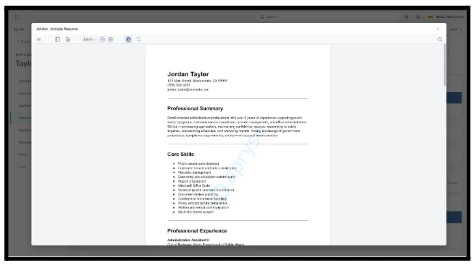
Available Preview Areas
Attachment preview is now available from:
- Application Attachments view within Insight and Unified Recruiting
- Master Profile Attachments view within Insight
- Requisition attachments within Insight
- Hire attachments within Unified Recruiting
- Offer attachments within Unified Recruiting
Audience
Insight recruiters and the hiring department users
Value for Employers
This update makes it faster and easier for hiring teams to review resumes, certifications, requisition documents, hire documents, offer attachments, and other related files without leaving their workflow or downloading each file locally. By reducing unnecessary file handling and keeping users in context, agencies can improve review efficiency, support better decision-making, and help limit local storage of sensitive candidate and hiring information.
Preferred First Name Support for Applicants
Job seekers can now enter an optional Preferred First Name when applying through GovernmentJobs, SchoolJobs and your career portal. When a preferred name is provided, Insight, OHC, and Unified recruiting will display that preferred name throughout the recruiting experience instead of the applicant’s existing legal first name. If no preferred name is provided, the applicant’s existing legal first name will continue to display as it does today.
By applying preferred names consistently across recruiting, agencies can reinforce a more inclusive and welcoming hiring process.
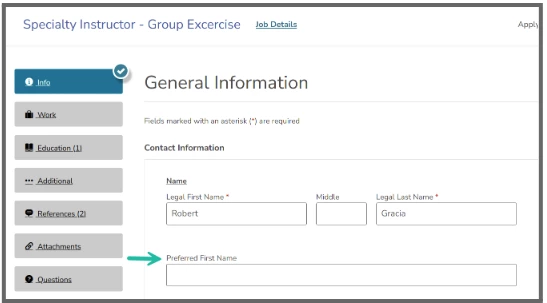
How It Works
The Preferred First Name field will be available by default on the job seeker-facing application forms for all agencies and will remain optional for applicants. When a job seeker submits an application, the preferred name will be stored with the master profile data of the candidate.
Where Preferred Name Will Display
Across Insight, OHC, and Unified recruiting workflows, the applicant’s first name will display using this logic:
Preferred First Name, if available
Legal First Name, if Preferred First Name is not available
This display logic is intended to reduce discrepancies across recruiting screens, so recruiters and hiring departments see the same first name throughout the process. Uploaded documents, such as resume files or cover letters, will not be renamed or updated as part of this change.
Master Profile Access and Updates
Preferred First Name can be viewed and edited from the Master Profile Add/Edit experience by users with the confidential access.
Candidate Notices
Existing notice templates will automatically address candidates by their Preferred First Name when available. If a candidate has not provided a preferred name, notices will continue to use their legal first name. No template updates are required for this change.
eOffer Letters
Existing eOffer templates will automatically address candidates by their Preferred First Name when available. If a candidate has not provided a preferred name, the template will continue to use their legal first name.
No template updates are required unless an agency specifically wants eOffers to address candidates by legal first name only.
For agencies that need to use legal first name, a new eOffer merge field called Legal First Name is available. Replace the existing First Name field with Legal First Name on the eOffer template to ensure the candidate is addressed by their legal first name, even when a preferred name exists.
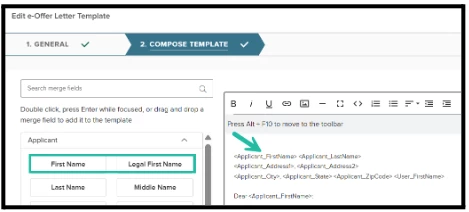
This approach allows most agencies to continue using preferred name on eOffers, while still giving agencies flexibility when legal first name is required.
When a new hire or a prehire is created from Insight, both the legal first name and preferred first name will be sent across to Onboard and HRIS, helping downstream systems receive the appropriate name values in the employee record.
Value for Employers
This update helps agencies support a more inclusive and respectful candidate experience by addressing job seekers by the name they choose to use. It also helps protect job seeker identity by keeping preferred name and legal name separate, so legal name can be reserved for compliance-sensitive processes while preferred name is used in day-to-day recruiting interactions.
Display of Calculated Work Experience on Application View for Recruiters
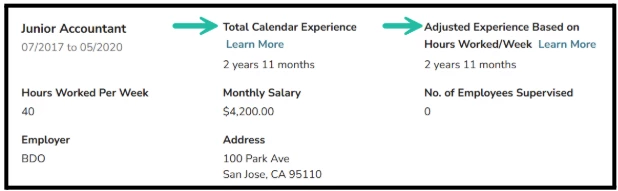
Insight now displays Calendar Experience and Adjusted Experience Based on Hours Worked/Week for each work experience role on the application view within Insight. Calendar Experience shows the full duration of a role based on the start and end dates provided, while Adjusted Experience estimates full-time-equivalent experience based on the candidate’s reported hours worked per week.
Recruiters will also see a Learn More link next to each experience field with a brief explanation of how the value is calculated. If the information needed to calculate experience is missing or invalid, the system will display Unknown instead of requiring recruiters to interpret incomplete data.
Audience
Insight recruiters reviewing applications
Value for Employers
This update helps recruiters more quickly understand a candidate’s work history without manually calculating dates or estimating part-time experience. By showing both overall role duration and adjusted experience based on hours worked per week, agencies gain a more consistent and realistic view of candidate experience during application review.
This display is currently available to recruiters in Insight, with support for hiring department users planned for a future release.
Insight Legacy Report Builder Sunset Notice
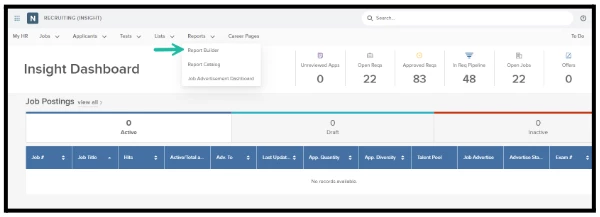
The legacy Report Builder within Insight will be sunset with the Fall 2026 major release in October. After this release, Insight users will no longer be able to access the legacy Report Builder or view reports created there.
Existing report subscriptions created in the legacy Report Builder will continue to run for a limited time after the Fall 2026 release. These subscriptions will also be discontinued at a later date, and NEOGOV will provide advance notice before subscription delivery is turned off.
Action Required
Most organizations have already moved their reports to the Analytics and Reporting module. Agencies that have not yet moved their legacy reports should recreate needed reports in Analytics and Reporting before the legacy Report Builder is fully retired.
Value for Employers
Sunsetting the legacy Report Builder allows NEOGOV to focus continued investment on the newer Analytics and Reporting experience, giving agencies a more modern and scalable reporting solution for their long-term needs.
Salary Study Portal Sunset Notice
As we continue to invest in new technologies and strategic initiatives, we occasionally phase out features that no longer align with our long-term product direction. As part of this effort, the Salary Study portal (https://salarystudy.neogov.com/) will be sunset and will no longer be available after July 1, 2026.
This transition allows NEOGOV to focus its investment on modern solutions that better support evolving agency needs. Going forward, we will continue exploring how we can provide similar salary study capabilities in a more powerful, flexible, and forward-looking way.
Early Access Features
We are excited to offer multiple features in an early access release. Early access means you will receive the features in UAT and Production before the general release to all customers.
To sign-up for early access features (you can select which ones you want), please complete this Early Access Feature Enrollment Form.
For detailed information about each early access feature, please see Early Access notes.
Hiring Team Roles and Permissions
Do you use hiring teams to conduct applicant reviews or interviews? Then try out these two new roles with configurable permissions, Hiring Team Lead and Hiring Team Member! With these roles, the hiring team members get access to candidates as soon as they are referred.
E-Offer Versioning
Introducing the new and improved e-offer experience: HR Liaisons and Hiring Managers will now be able to send multiple offers (e.g. conditional and final, or updated versions of the same offer) to candidates which will be tracked as versions in the Offer Details page in Unified.
Multiple Pass/Fail Ratings (Unified Recruiting Hire Workflow)
Rating tasks on review, interview, and exam steps will now support multiple raters giving pass/fail scores to an individual candidate. These scores do not aggregate into an overall pass/fail status. Instead, the Hiring Team Lead, Hiring Manager, or HR Liaison enters a Combined Overall Rating as the candidate's final assessment.
Auto-Advance from Referred List
When candidates are referred to Hiring Managers, the new auto-advance setting on the referred step in the hire workflow will automatically advance candidates to the next (non-offer) step without HR Liaison or Hiring Manager intervention.
Editing Departments and Divisions on Requisitions
When requisitions have been submitted, Insight users will now be able to edit and update the department/division field when they are in the statuses In Progress, Approved, or Open.
Appendix: Bugs Resolved
Please refer to the maintenance release notes for details about all the bugs resolved in this quarter:
Note: The Unified Recruiting - Cleaner Task Lists for Active Recruiting Work feature is delayed; its release date has yet to be determined. A notification will be shared when a release date is confirmed.