



Learn: Fall 2026 Release Notes
Timeline
When will this be released?
UAT Availability Schedule:
| Feature | UAT Availability Date |
| Register Learners via Associations for Learning Plans | Thursday, October 1, 2026 |
| Select Third-Party Online Courses in Learning Plans | Thursday, October 1, 2026 |
| New Fields in Course Activity and Learning Plan Activity Reports | Friday, October 9, 2026 |
| AI-Powered NEOGOV Course Recommendations | Not available in UAT, Training, or for Canadian agencies |
Production: Thursday, October 29, 2026, 7 AM EDT
Is there downtime for this release?
No
Release Notes Success Community Article
Related Release Note Links
Learn Fall Enhancements Overview
This fall, Learn introduces new capabilities designed to simplify training administration, create more flexible learning experiences, and deliver deeper insights. Highlights include automated Learning Plan registration based on employee associations, the ability to include third-party online courses in Learning Plans, and AI-powered course recommendations that help administrators discover relevant NEOGOV and NEOED content based on trends across similar organizations.
We’re also expanding Report Builder with additional course, learning plans, and employee data—including keywords, security profiles, and instructor status—to help organizations create more detailed reports and make informed training decisions.
Learning Plan Enhancements
Learning Plans are becoming more flexible and easier to manage. Administrators can automatically register employees in Learning Plans based on associations such as department, position, division, or organization-wide criteria. They can also include third-party online courses in Learning Plans, making it easier to create comprehensive learning paths that combine internal and external training content.
Register Learners via Associations for Learning Plans
Ensure employees are enrolled in required training automatically by linking Learning Plans to specific employee groups, departments, or roles. This update eliminates manual enrollment tasks, guaranteeing that new and existing staff receive necessary training as soon as they meet the defined criteria.
Example
An administrator sets a "Safety Essentials" Learning Plan to auto-register all "Non-Managers," ensuring every individual contributor is enrolled without manual oversight.
What’s New:
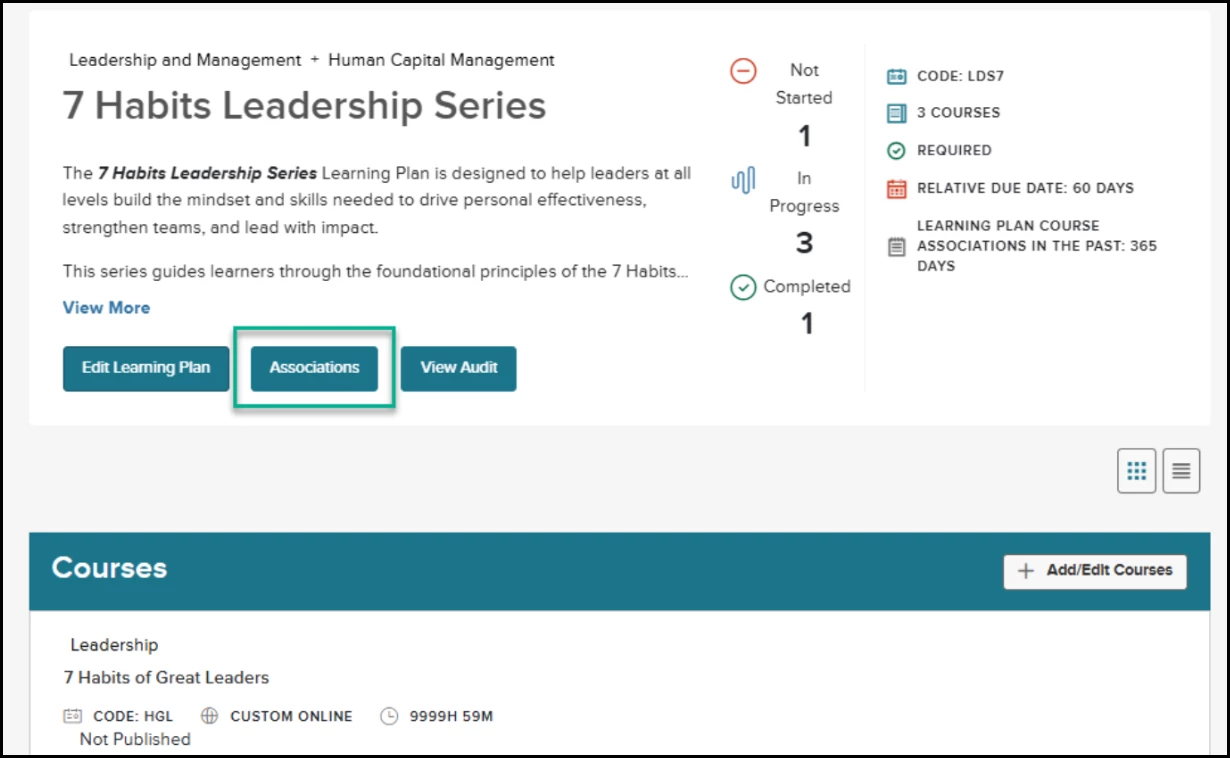
- Navigate to Learning Plan Details and select the Associations button, located to the left of View Audit.
- Select from any of the below association types:
- All Employees
- Managers
- Non-Manager (NEW)
- Assign training to all active employees who do not have direct reports
- Departments
- Positions
- Divisions
- Class Specs
- Employee Groups (NEW)
- Assign training to custom groups of employees created by your organization.
- Enable the Auto Registration toggle at the top of the Associations page to activate background enrollment job.
- When enabled, the background enrollment job runs daily for both Learning Plan registrations and Course enrollments at 5:00 a.m. Pacific Time.
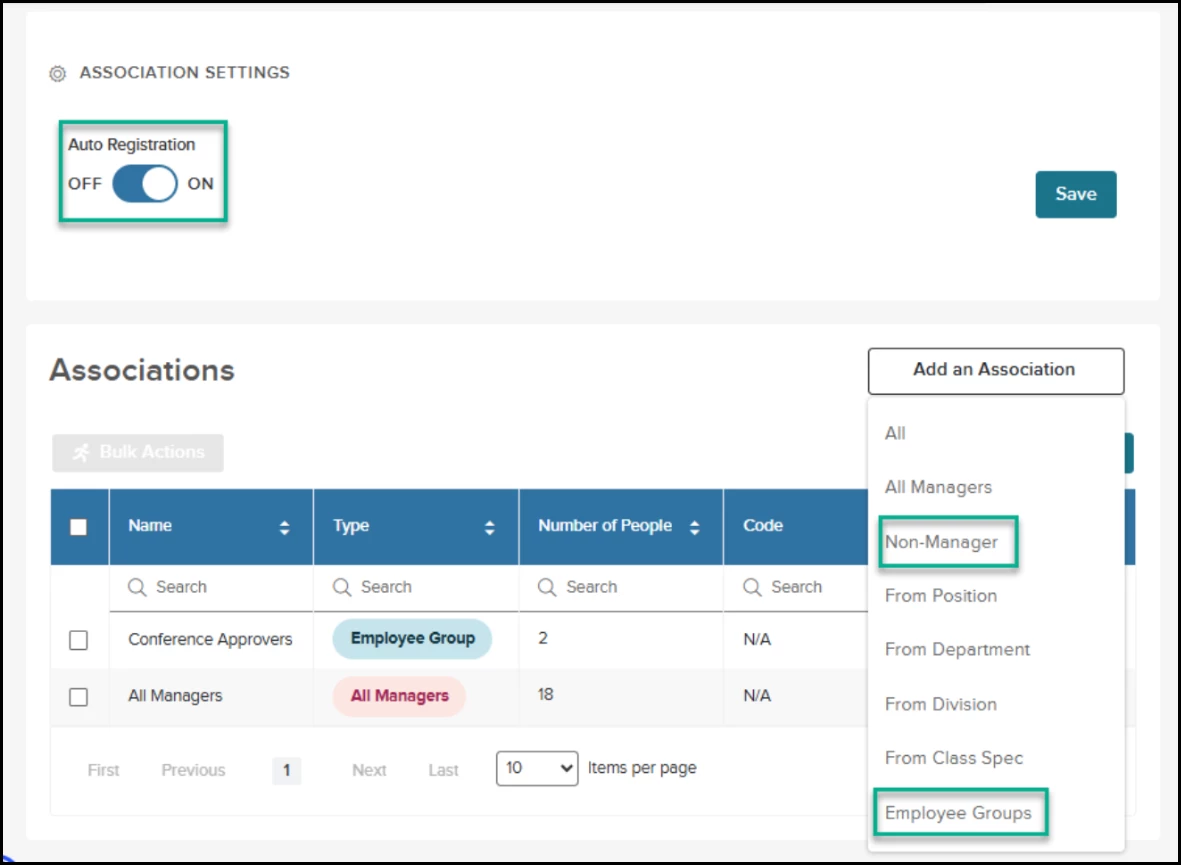
Navigation: Learning Plan menu > Select a Learning Plan > Click Associations
- Use the Bulk Actions button above the grid to select and delete multiple associations simultaneously.
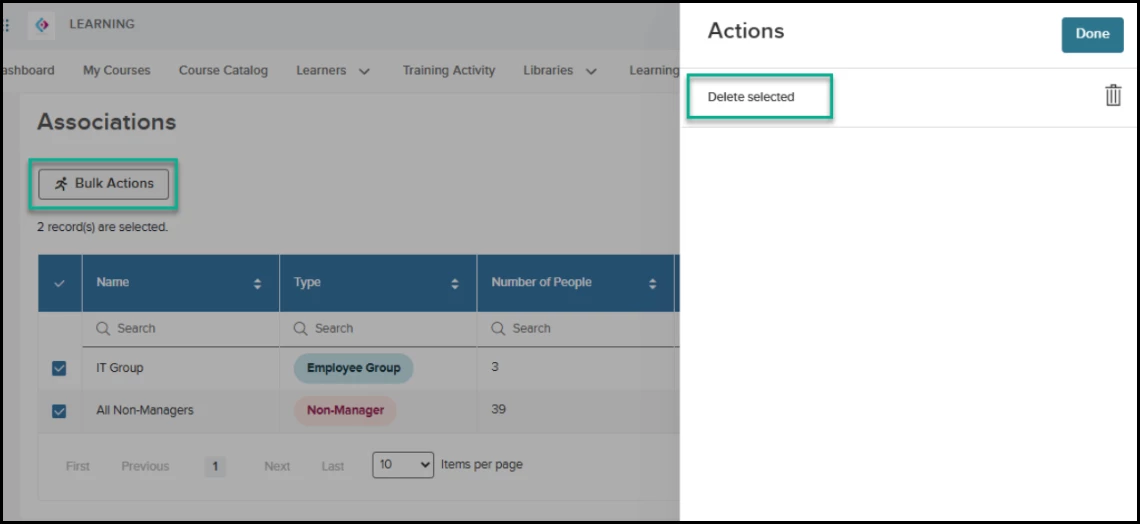
Navigation: Learning Plan menu > Select a Learning Plan > Click Associations > Select one or more Associations > Bulk Actions
- Click the Number of People hyperlink in the grid to view a detailed list of eligible users, including their Employee Number and Department.
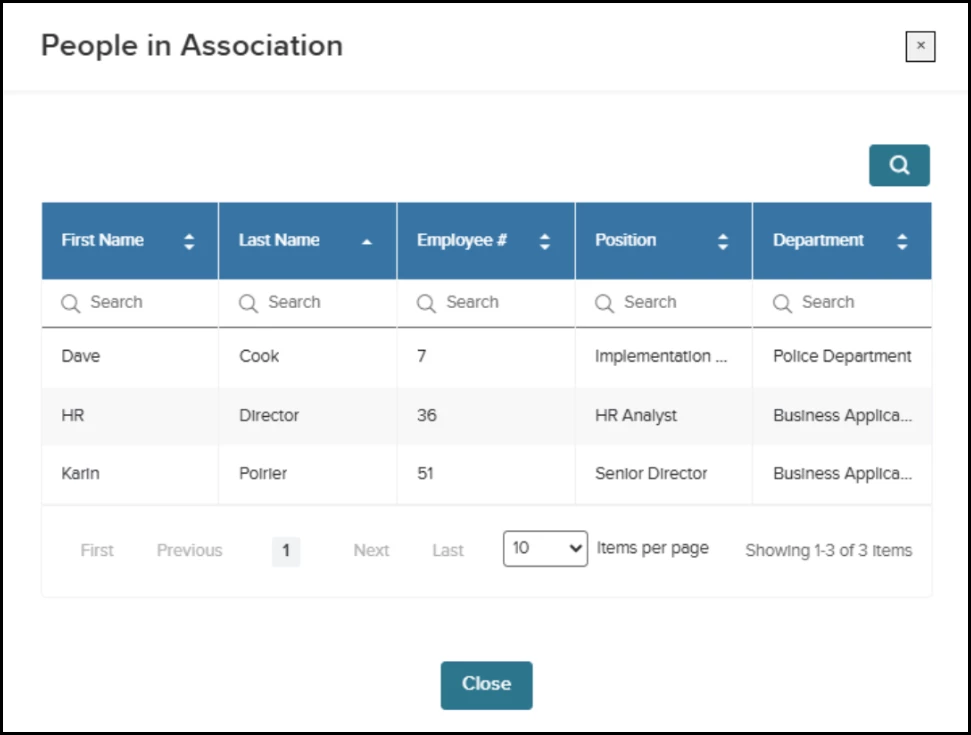
Navigation: Learning Plan menu > Select a Learning Plan > Click Associations > Click the Number of People hyperlink
As an added benefit, the Course Associations experience has also been enhanced. The Auto Enroll toggle now appears at the top of the Associations page for greater visibility, alongside options to bulk delete associations and view additional user attributes. New Non-Manager and Employee Group criteria are also available for association-based assignments and recurring course enrollment.
These updates provide a more consistent experience across association features. Configuring recurring enrollment for Learning Plans remains under consideration for the Learn roadmap.
Value
Reduces administrative burden and ensures compliance by automating the enrollment lifecycle based on real-time employee data.
Audience
Administrators
Select Third-Party Online Courses in Learning Plans
Streamline your training curriculum by including external content alongside internal courses, ensuring users are automatically enrolled in all required materials. This update allows you to add Third Party Online (TPO) courses to Learning Plans, providing a more comprehensive and automated onboarding or development experience.
Example
A Learning Administrator adds a LinkedIn Learning course to the "New Manager" Learning Plan, and all registered managers are instantly enrolled in that course.
What’s New:
- Select Third Party Online from the Delivery Method filter in the Add Courses to Learning Plan modal to find external content.
- Add any published TPO course to a Learning Plan; it will appear in the Courses section alongside Classroom and Online types.
- Register a user for a Learning Plan to trigger automatic enrollment in all included TPO courses. The system shall validate that the TPO course is published and available at the time of Learning Plan registration.
- Launch TPO courses directly from the Learning Plan Details page or find them in the My Courses list.
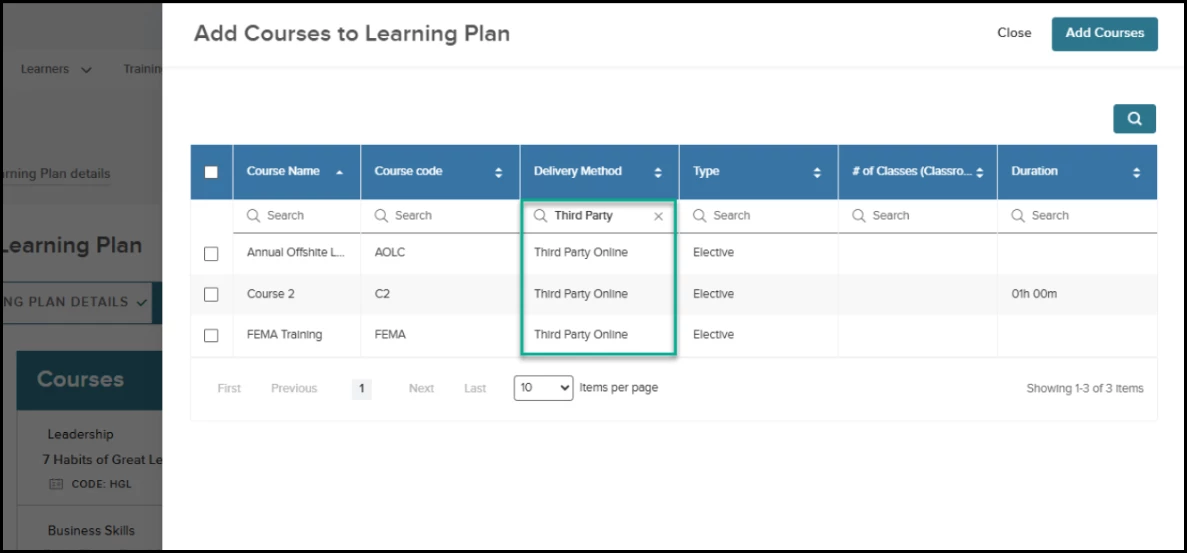
Navigation: Learning Plan menu > Select a Learning Plan > Add/Edit Courses > Search for Third Party Online Courses to add to a Learning Plan
- Manual tracking of course completion is still required by an administrator.
Important Risk Pool Agency Notes: To maintain data integrity across organizations, Learning Plans containing TPO courses cannot be assigned to child agencies. If you are working within a Risk Pool, the Assign to Agencies button will be disabled for any plan that includes Third Party Online courses.
Additionally, for plans that have already been pushed to child agencies, TPO courses are automatically excluded from the selection list to prevent unsupported syncing.
Value
Automates external course enrollment and prevents unsupported cross-agency syncing, reducing manual administrative tasks and compliance risks.
Audience
Administrators
Learning Plan Course Limit
Manage course limits effectively; the system now enforces a maximum of 100 courses per Learning Plan to maintain optimal performance.
Existing Learning Plans that exceed the 100-course limit are grandfathered in, but you must reduce the count to 100 or fewer before adding new courses or saving further edits.
Best practice: Create focused Learning Plans aligned with a specific topic, category, role, skill, or development goal. Instead of including a large number of courses in one plan, divide the content into smaller, targeted learning experiences. This makes each plan easier to manage and helps learners clearly understand its purpose and expectations.
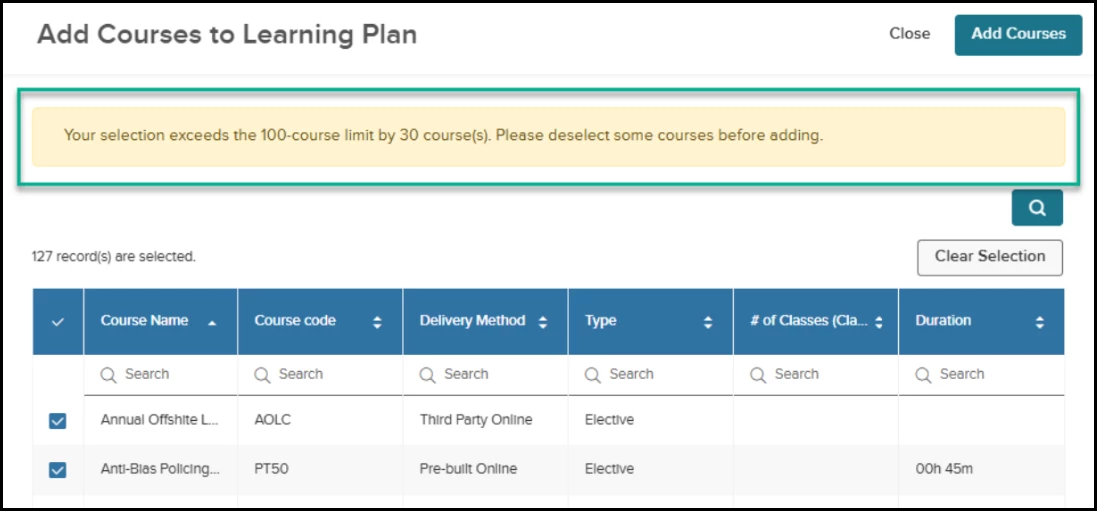
Navigation: Learning Plan menu > Select a Learning Plan > Add/Edit Courses
AI-Powered NEOGOV/NEOED Course Catalog Recommendations
Reduce the manual effort of researching industry training trends with targeted, AI-generated course suggestions. This update introduces an AI agent that analyzes your agency's catalog and compares it with peer organizations to recommend high-impact courses for import.
Important Note: The AI-powered NEOGOV Course Catalog features are currently unavailable in UAT, Training environments, and for Canadian agencies. This feature is available only in the Production environment at this time.
Examples
- An HR Administrator at a mid-size city government sees a recommendation for a "Cybersecurity Awareness" course because it is currently trending among other similar-sized municipalities.
- An HR Administrator for a California-based agency receives a recommendation for a "State-Mandated Harassment Prevention" course because the AI identifies it as a high-priority requirement for their specific state and peer group.
How it Works
- Enable AI NEOGOV Course Catalog Recommendations in the AI Administration Setting page (requires agreement to AI Terms).
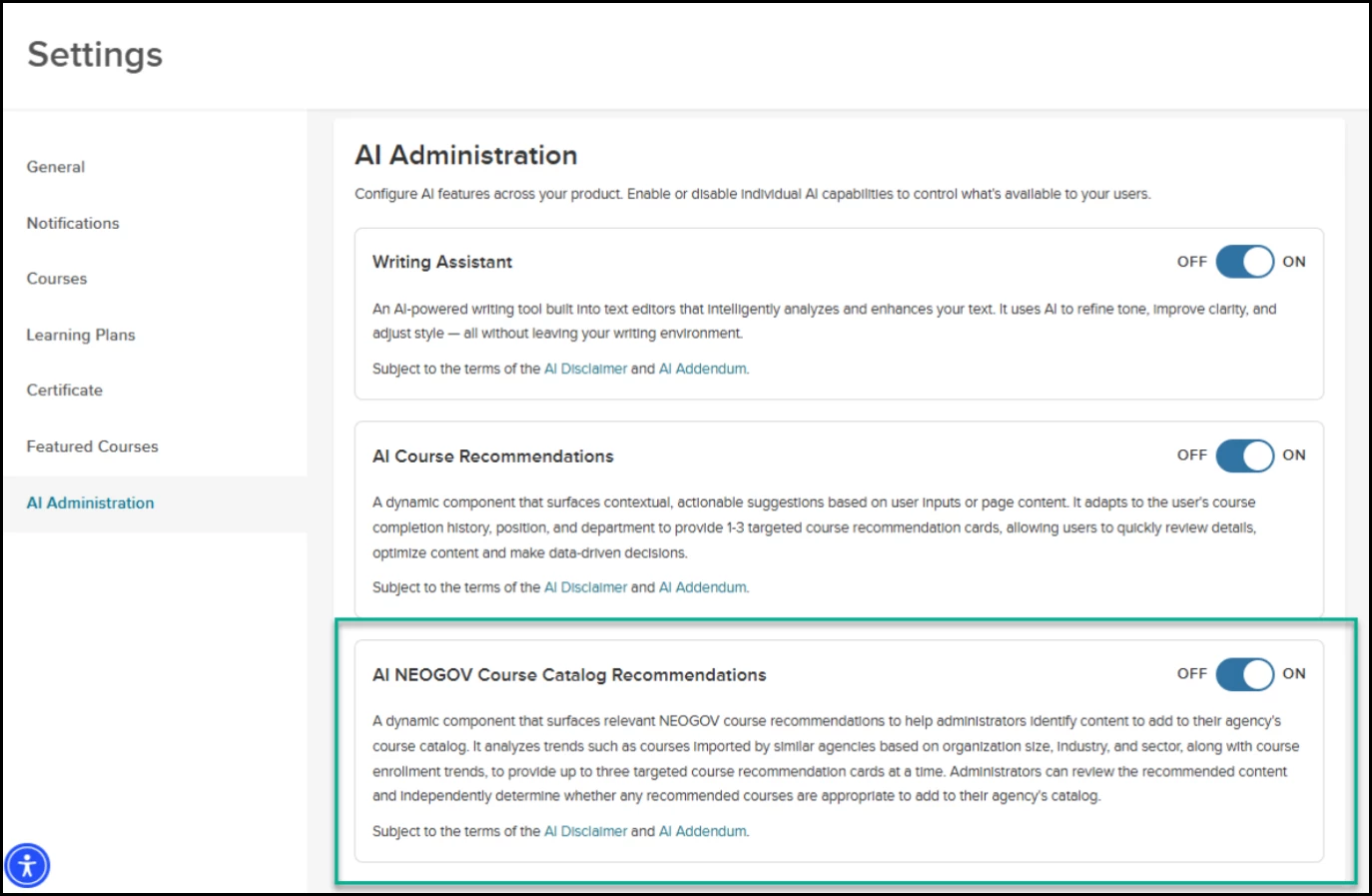
- Navigate to the NEOGOV Course Catalog import page and select View Recommendations to see up to three targeted course cards.
- Review the Why these courses are recommended section to see specific rationales, such as peer benchmarks, enrollment trends, or content relevant to your organization’s state.
- Select Import on an individual course card or use Import all to add all recommended courses to your catalog at once.
- Use the Hide recommendations chevron to collapse the section and save screen space when needed.
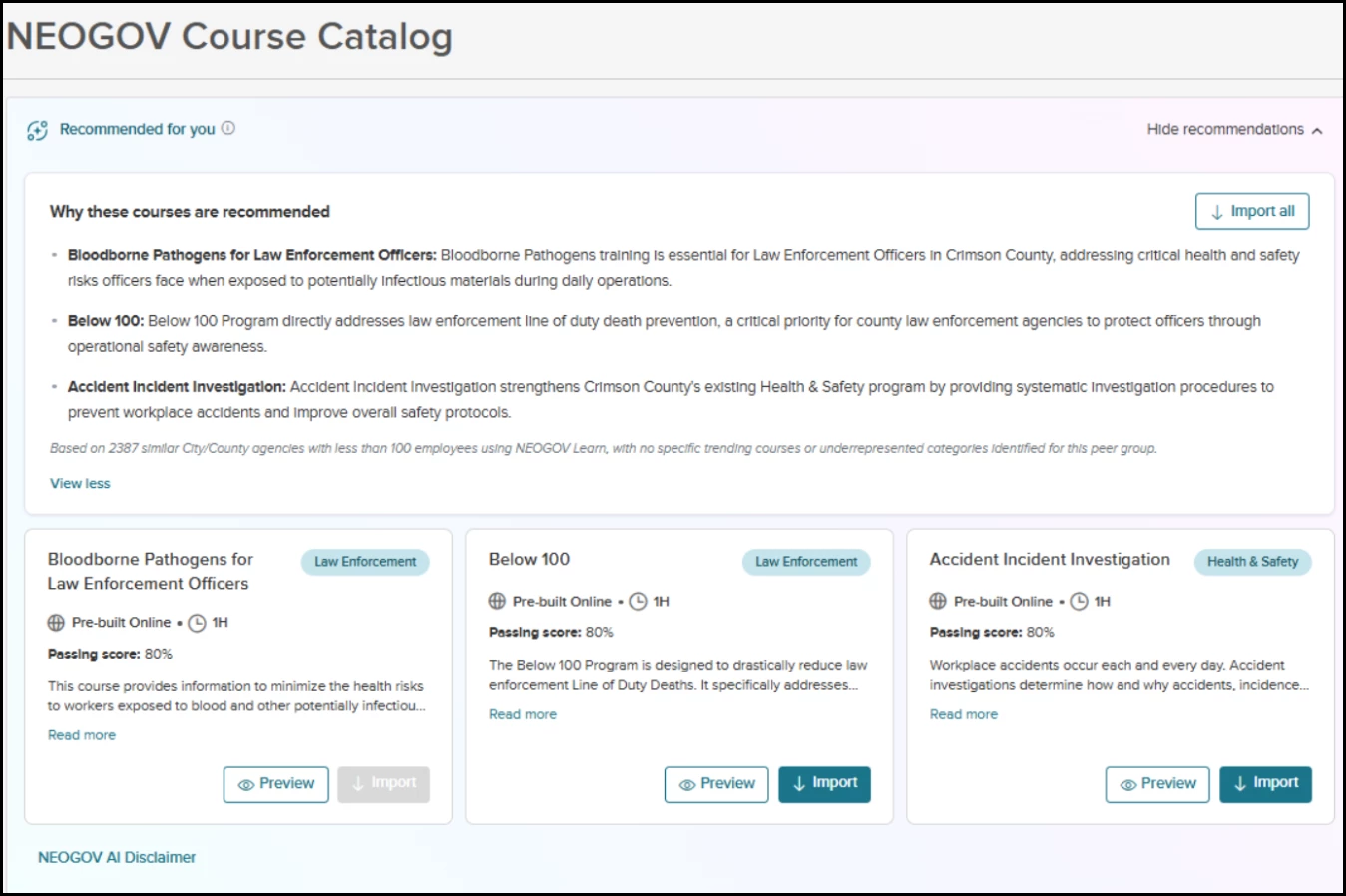
Navigation: Course Management > NEOGOV Course Catalog or NEOED Course Catalog
Value
Streamlines catalog management by surfacing relevant, trending content based on peer data, ensuring your training curriculum remains competitive and up to date.
Audience
Administrators
New Fields in Course Activity and Learning Plan Activity Reports
Gain deeper insights into your training data by including organizational metadata directly in your custom reports. This update introduces new fields to the Report Builder, allowing you to categorize and analyze activities using keywords and specific employee attributes.
Example
An Administrator generates a Course Activity report and filters by the "Safety" keyword to identify all employees who have completed compliance-related training.
What’s New:
- Select the new Keywords field when creating or editing Course Activity or Learning Plan Activity reports to see a comma-separated list of associated tags and competencies.
- Include the Is Instructor and Security Profile fields in reports featuring the Employee Entity to track specialized user roles and access levels.
Value
Improves data categorization and filtering capabilities, enabling more precise analysis of training impact and user roles across the organization.
Audience
Administrators
Content Updates & Announcements
The following courses will be available in UAT beginning Oct 1, 2026 and in all Production environments on Oct 29, 2026.
Employment Liability
- Mandated Reporter: Context, Equity, and Trauma-Informed Reporting (HW93)
Higher Education
- Anti-Hazing for Faculty & Staff (HE66)
Health & Safety
- Risk Management (full 60 min course) (SK58)
- Employee Safety Refresher (SK60)
- New Employee Safety Orientation (NE61) - Note: This course will be receiving an accessibility update. All learners currently in progress should be instructed to complete this course prior to the delivery dates.
Business Skills
- Reviewing for Accuracy (BX76)
- Leading Former Peers (BX78)
Diversity, Equity & Inclusion
- ADA and 508 Compliance for Digital Content Creators (DE18)
Appendix: Bugs Resolved
No additional bug fixes outside of the maintenance releases. Please refer to the maintenance release notes for details.