

Author Upgrade to Version 3.0.14 by March 19

  • February 18, 2025
  • 30 replies
  • 2810 views

TheStephErb
NEOGOV Employee
Forum|alt.badge.img

Great news!!! This new Author update has squashed many of the bugs that have been so troublesome. Be sure to upgrade to 3.0.14 by March 19
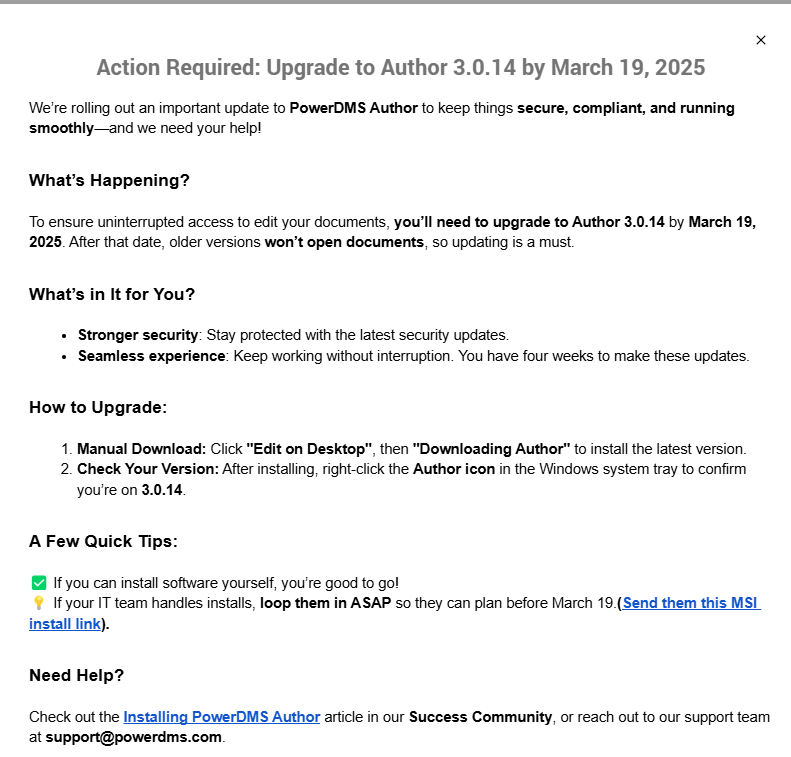


Installing PowerDMS Author Article in success community


If AFTER updating you continue to have problems with Author please submit them to support@powerdms.com or call 800-749-5104
30 replies

BernieB
Civic Explorer (Level III)
Forum|alt.badge.img+1
  • Civic Explorer (Level III)
  • February 18, 2025

After the initial message appeared on the screen, I was unable to go back into the message (never appeared again) to copy the link “Send them this MSI install link” to forward to our IT Team; can someone provide that please?

Thank you.


abradford
NEOGOV Employee
Forum|alt.badge.img+1
  • NEOGOV Employee
  • February 18, 2025

@BernieB ~ LINK FOR MSI INSTALL


BernieB
Civic Explorer (Level III)
Forum|alt.badge.img+1
  • Civic Explorer (Level III)
  • February 18, 2025

Thank you!


Forum|alt.badge.img
  • New Member (Level I)
  • February 20, 2025

I recently updated the author, but any edits to documents are not being saved.  As a result, I need to save the document to my computer and manually upload it as new document under (add new file).  Is this an issue for any other members.


TheStephErb
NEOGOV Employee
Forum|alt.badge.img
  • Author
  • NEOGOV Employee
  • February 20, 2025

I recently updated the author, but any edits to documents are not being saved.  As a result, I need to save the document to my computer and manually upload it as new document under (add new file).  Is this an issue for any other members.

is this occurring after upgrading to version 3.0.14? 


If you already updated to 3.0.14 then please submit problems to support@powerdms.com or call 800-749-5104


  • New Member (Level I)
  • February 27, 2025

After upgrading Author to 3.0.14, when I make edits to a document on my computer via MS Word, it no longer shows changes to the document such as a strikethrough on words that I delete or hit backspace on.


TheStephErb
NEOGOV Employee
Forum|alt.badge.img
  • Author
  • NEOGOV Employee
  • February 27, 2025

After upgrading Author to 3.0.14, when I make edits to a document on my computer via MS Word, it no longer shows changes to the document such as a strikethrough on words that I delete or hit backspace on.

please make sure to submit a ticket to support@powerdms.com or call 800-749-5104


Forum|alt.badge.img
  • New Member (Level I)
  • February 27, 2025

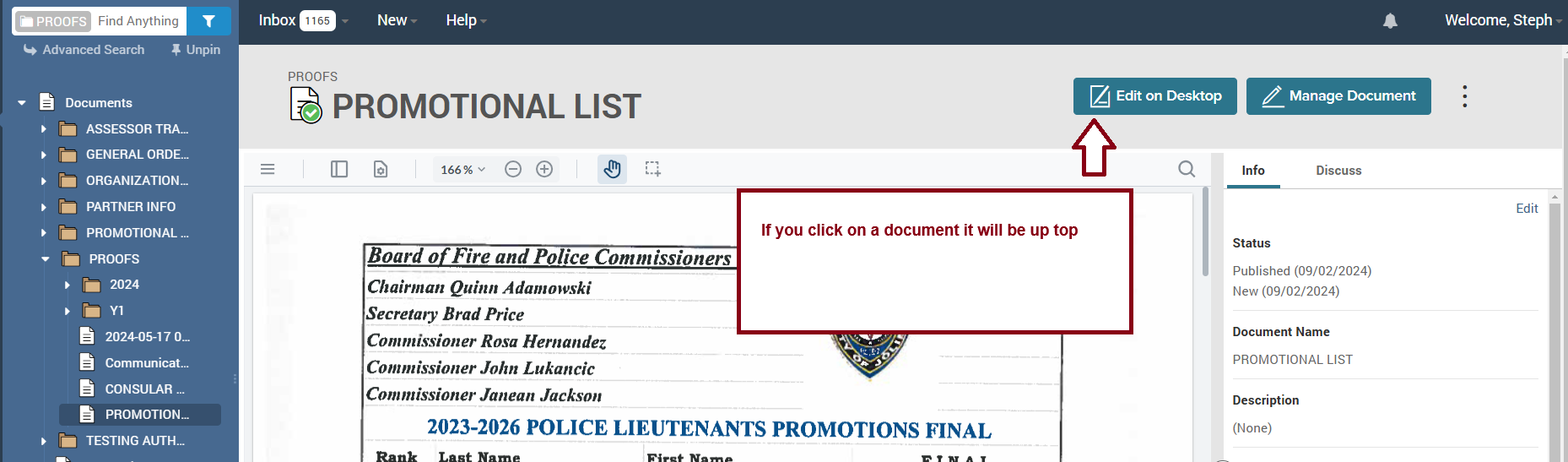
Where do I find  “ Edit on Desktop” ?  I am currently on version 3.0.8


TheStephErb
NEOGOV Employee
Forum|alt.badge.img
  • Author
  • NEOGOV Employee
  • February 27, 2025

Where do I find  “ Edit on Desktop” ?  I am currently on version 3.0.8

please see below, if you have further questions please let me know. 


  • New Member (Level I)
  • February 28, 2025

Do we have to uninstall the older version of Author before upgrading to the new Author 3.0.14?


TheStephErb
NEOGOV Employee
Forum|alt.badge.img
  • Author
  • NEOGOV Employee
  • February 28, 2025

Do we have to uninstall the older version of Author before upgrading to the new Author 3.0.14?

If you are on a Mac then yes otherwise no


  • New Member (Level I)
  • February 28, 2025

How do I verify the version of Power DMS Author I am using?


TheStephErb
NEOGOV Employee
Forum|alt.badge.img
  • Author
  • NEOGOV Employee
  • February 28, 2025

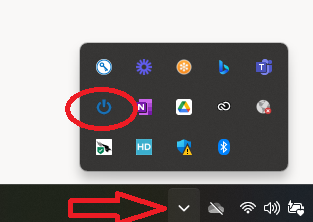
How do I verify the version of Power DMS Author I am using?

first click on the downward arrow on your taskbar, then right click on the blue author logo, it will tell you at the top of the pop up then. 


Forum|alt.badge.img
  • New Member (Level I)
  • March 3, 2025

I recently updated the author, but any edits to documents are not being saved.  As a result, I need to save the document to my computer and manually upload it as new document under (add new file).  Is this an issue for any other members.

A lot of users are complaining about this at my agency as well.  I don’t know if it’s a PDS bug or user error.


TheStephErb
NEOGOV Employee
Forum|alt.badge.img
  • Author
  • NEOGOV Employee
  • March 3, 2025

I recently updated the author, but any edits to documents are not being saved.  As a result, I need to save the document to my computer and manually upload it as new document under (add new file).  Is this an issue for any other members.

A lot of users are complaining about this at my agency as well.  I don’t know if it’s a PDS bug or user error.

@Kimora.P  please confirm those users are on 3.0.14 if they are then please submit a ticket to support and then send me the ticket number 


Forum|alt.badge.img
  • New Member (Level I)
  • March 4, 2025

I have installed the new version of Author, when I click “edit on desktop”, I enter my log in information, but Word does not open and nothing else happens. 


TheStephErb
NEOGOV Employee
Forum|alt.badge.img
  • Author
  • NEOGOV Employee
  • March 4, 2025

I have installed the new version of Author, when I click “edit on desktop”, I enter my log in information, but Word does not open and nothing else happens. 

@Amanda.V14 please confirm you are on 3.0.14 if you are then please submit a ticket to support and then send me the ticket number support@powerdms.com 


Forum|alt.badge.img
  • New Member (Level I)
  • March 4, 2025

I am on 3.0.14 and submitted a ticket yesterday with no response.


TheStephErb
NEOGOV Employee
Forum|alt.badge.img
  • Author
  • NEOGOV Employee
  • March 4, 2025

I am on 3.0.14 and submitted a ticket yesterday with no response.

@Amanda.V14  can you please provide me the ticket number via private message or your full name and agency info? Thank you. 


  • New Member (Level I)
  • March 11, 2025

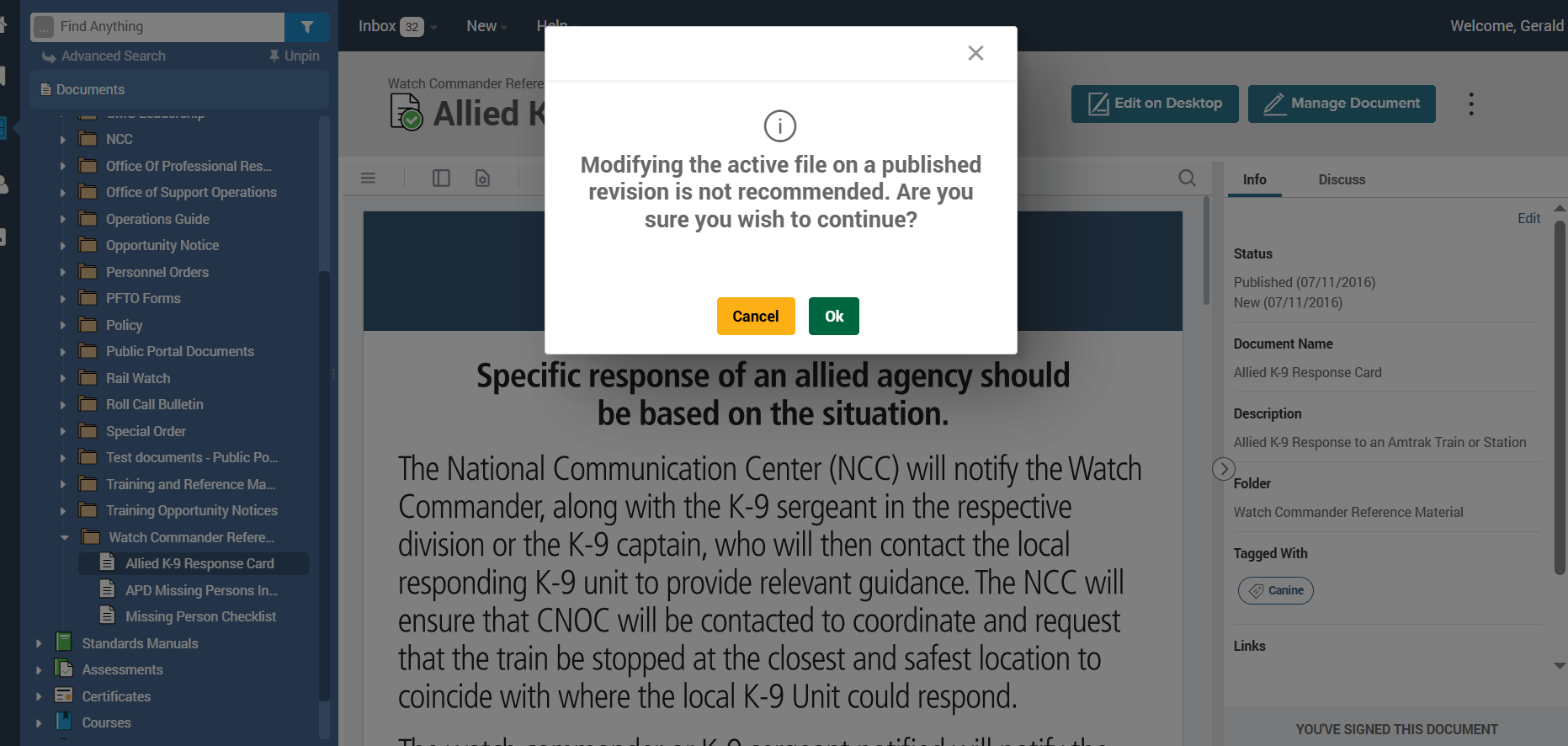
I am getting this message when I attempt to upgrade. Should I click okay? Are we to click on any file in documents?  


abradford
NEOGOV Employee
Forum|alt.badge.img+1
  • NEOGOV Employee
  • March 11, 2025

@GERALD.G12 That message populates when you are attempting to edit a document prior to it being placed into a draft state. That is not associated/affiliated with the Author update.


  • New Member (Level I)
  • March 11, 2025

Should I click “ok”?


TheStephErb
NEOGOV Employee
Forum|alt.badge.img
  • Author
  • NEOGOV Employee
  • March 11, 2025

Should I click “ok”?

No, click cancel then go to manage document click duplicate drafts to create a draft of the document since best practice is to not make changes of published documents, click on save and create new draft document then click edit on desktop


abradford
NEOGOV Employee
Forum|alt.badge.img+1
  • NEOGOV Employee
  • March 11, 2025

Hi ​@GERALD.G12 ~ Editing a document while in a published state goes against Best Practice for document management.

By chance are you a new administrator for your organization? If so, I would suggest using our course offerings within PowerDMS University so that you can obtain a great foundation on how to manage your content effectively.  Below is a quick help article the provides information on your learning options within PowerDMS University if it helps. 


If you need further assistance regarding your training options, please reach out to trainingteam@powerdms.com and we’ll be happy to help!


  • New Member (Level I)
  • March 13, 2025

How can I confirm the correct version on a mac? I downloaded author and it is in my tray but there is no option for version confirmation.


Please disregard: I figured it out. For anyone else on a mac, look at the download file and it will have the version on there.