



Workflow Flexibility Release is now Generally Available in Power Policy
Workflow Flexibility Enhancement
We are pleased to introduce a series of enhancements to the Workflow process that significantly increase flexibility and adaptability. These improvements empower Master Admins, Workflow Initiators, and Workflow Participants to manage in-progress Workflows more effectively, without needing to restart or interrupt ongoing processes.
Advance to Next Step without Completing Current Step
Master Admins and Workflow Initiators can now move an in-progress Workflow from its current step to the next step, even if the current step is incomplete.
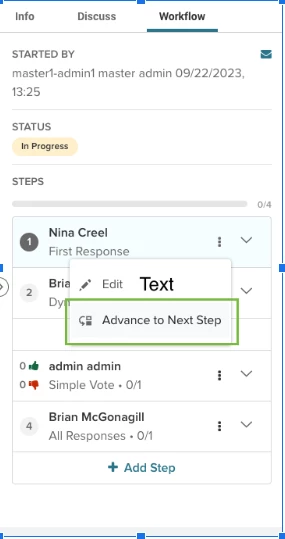
Allows skipping or bypassing steps that are unnecessary or blocking progress, streamlining the Workflow when exceptions arise
Return a Workflow to a Previous Step
Master Admins and Workflow Initiators can revert a Workflow to an earlier step at any point in the process.
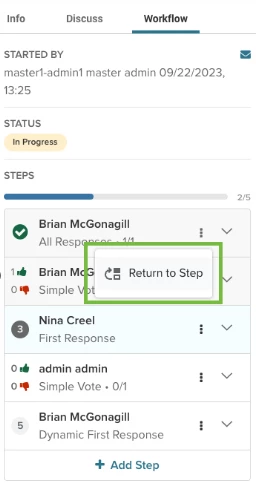
Enables teams to revisit and correct earlier decisions or tasks, rather than starting the entire Workflow from scratch
Add Steps to an Active Workflow
Master Admins and Workflow Initiators can insert new steps into a Workflow that is already underway.
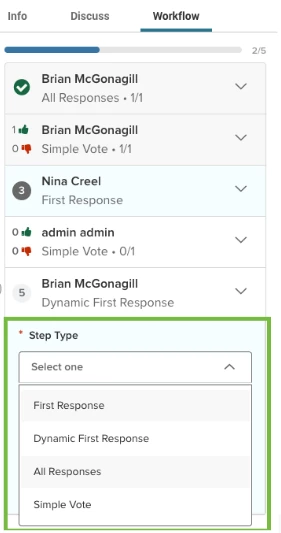
Improves agility and responsiveness to new requirements or changing project parameters. Users can adapt a Workflow on the fly without halting ongoing work
Delete Steps from an Active Workflow
Master Admins and Workflow Initiators can remove existing steps in a Workflow that is currently in progress.
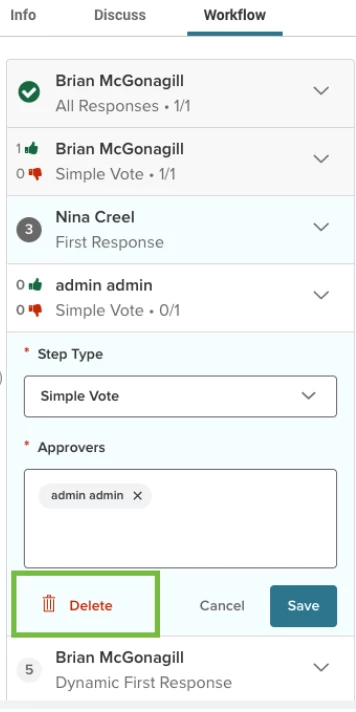
Helps eliminate redundant or outdated steps, ensuring the Workflow remains efficient and aligned with evolving goals or constraints.
NOTE: When using an existing template to start a workflow, any of the modifications to the workflow using the new options above, will not change the underlying template. Your templates will remain as they are unless you change them intentionally through the template editor.